AWS has been venturing away from traditional ACLs for S3 access control for several years now, steering customers toward Bucket Policy as the primary access-control mechanism, and toward Bucket Owner Enforced as the default ownership model. OneFS embraces that shift in the 9.16 release, supporting Bucket Policy, the AWS-standard JSON allow/deny document, and Object Ownership Policy, which decides who actually owns a file once it lands in a bucket. Together alter not just what admins can configure, but how multi-user S3 buckets on PowerScale should be designed in the first place.
Before this release, OneFS S3 primarily offered the Object Writer ownership model, where whoever uploads a file owns it, and access from there is governed by ACLs. That model can become cumbersome once an administrator tries to lock down who can create buckets in a shared, multi-user environment. Historically, any user holding S3 credentials could create a bucket, so securing that meant either leaving the parent directory wide open at 777, or building a group specifically scoped to the users allowed to create buckets, and then reusing that same group to gate who could write to the buckets once created.
In contrast, with Bucket Owner Enforced in OneFS 9.16, the parent directory is set to 700, the ownership policy is flipped, and every object written to that bucket is owned by the bucket owner, with no bucket ACL consulted at all. Access control moves entirely into Bucket Policy and object ACLs, which is precisely mimicking the standardized AWS model. For an S3-only, multi-user deployment, this is the recommended mode, and it is now available as a direct configuration option rather than something administrators had to engineer around.
OneFS 9.16 mirrors AWS’s three ownership modes exactly: ‘Object Writer’ remains the default and the unchanged legacy behavior, ‘Bucket Owner Enforced’ ignores the bucket ACL entirely and makes every object belong to the bucket owner, and ‘Bucket Owner Preferred’ occupies the middle ground, generally assigning ownership to the bucket owner while still consulting the bucket ACL and allowing per-request headers to shift that behavior.
| Mode | Files owned by | Bucket ACL | Recommended for |
| Object Writer (default) | Uploader | Active | Multi-user, multi-protocol; legacy compatibility |
| Bucket Owner Enforced | Bucket owner | Ignored | S3-only, multi-user |
| Bucket Owner Preferred | Per-request (header) | Active | Hybrid; advanced |
Ownership Policy is a per-zone S3 setting, visible alongside the other S3 zone settings, and it defaults to ‘ObjectWriter’ on both new installations and upgrades, so existing clusters see no behavior change until an administrator explicitly opts in:
# isi s3 settings zone view

Root Path: /ifs

Base Domain:

Object ACL Policy: replace

Ownership Policy: ObjectWriter

Requester Full Control: Yes

# isi s3 settings zone modify --ownership-policy=BucketOwnerEnforced --zone=System
Upon upgrade to OneFS 9.16, Ownership Policy remains at ObjectWriter and no bucket or zone policies are added, preserving existing behavior. Additionally, neither Ownership Policy nor Bucket Policy can be modified until the upgrade is fully committed.
The selected mode has a significant bearing for multi-protocol workflows.
| Deployment Pattern | Mode | Rationale |
| S3-only, multi-tenant, fine-grained policies | Bucket Owner Enforced | A single owner means policies are the only access decision; no ACL surprises. |
| S3 + NFS, multi-user read/write on the same files | Object Writer | Preserves per-user ownership; NFS sees the writer as the file owner. |
| S3 + NFS, single NFS admin, S3 multi-user | Bucket Owner Enforced + RequesterFullControl | Bucket owner controls files for the NFS view; the ACE preserves per-user S3 access. |
| S3 write, NFS read-only | Bucket Owner Enforced + inherited read ACE | Single ownership for compliance; readers are gated by an ACE on the parent directory. |
| Hybrid with policy-driven access | Bucket Owner Preferred + RequesterFullControl | Preserves AWS-like semantics under BOFC headers, falling back when policy grants override the ACL view. |
If S3 is writing and NFS is only ever reading, Bucket Owner Enforced plus a new setting called RequesterFullControl works well: Once enabled, the original S3 uploader still gets a full-control ACE on every file it creates, so NFS clients keep working even though the bucket owner technically owns everything now.
Conversely, with NFS writing and S3 reading, the default ‘Object Writer’ mode remains the only viable option. If ‘Bucket Owner Enforced’ were selected instead, files written by an NFS user could carry restrictive mode bits that the bucket-owner identity S3 would be forced to use but could not actually read.
For mixed read/write traffic across both file and object protocols, ‘Bucket Owner Preferred’ combined with ‘RequesterFullControl’ is the best bet, and it includes two OneFS-specific refinements on top of AWS’s version: A BOFC-decidable flag that determines which security context a given operation should run under, and the automatic ‘RequesterFullControl’ ACE itself, both of which help guard multi-protocol access from quietly failing.
‘RequesterFullControl’ can be set at three different scopes depending on how broadly it needs to apply: As a zone-wide default with ‘isi s3 settings zone modify –requester-full-control=true’, as a per-bucket override at CreateBucket time via the ‘x-isi-requester-full-control: true’ header, or per object using the ‘s3:x-amz-grant-full-control’ header on ‘PutObject’, ‘PutObjectAcl’, or ‘CompleteMultipartUpload’.
Switching an existing bucket’s ownership mode does not retroactively change permissions on files already written there. Before changing the setting, cluster admins should inventory current file owners, either change ownership (re-‘chown’) to the intended bucket owner or pre-populate inherited ACEs, and drain in-flight multipart uploads first, since AbortMultipartUpload and CompleteMultipartUpload can fail if the identity context changes mid-flight.
Bucket Policy and its companion, Zone Policy, provide two different scopes of control. Bucket Policy is a JSON allow/deny document attached to one specific bucket, configurable through S3 itself via ‘PutBucketPolicy’, ‘GetBucketPolicy’, and ‘DeleteBucketPolicy’, or through the CLI and platform API.
The ‘DeleteBucketPolicy’ API request parameter is:
| Request parameters/body | Supported | Description |
| Bucket | Yes | Required: Yes The name of the bucket whose policy is to be deleted. |
Similarly, the ‘GetBucketPolicy’ API request parameter:
| Request parameters/body | Supported | Description |
| Bucket | Yes | Required: Yes The name of the bucket whose policy is to be retrieved. |
And the ‘PutBucketPolicy’ API request parameters include:
| Request parameters/body | Supported | Description |
| Bucket | Yes | Required: Yes The name of the bucket to which the policy applies. |
| Policy | Yes | Required: Yes A JSON document, passed as the request body, consisting of a Version field and one or more Statement entries. Each statement specifies an Effect (Allow or Deny), a Principal (or NotPrincipal), an Action (or NotAction), a Resource (or NotResource), and optionally one or more Condition blocks. See “OneFS S3 Zone Policy and Bucket Policy” for details on policy document structure. |
A bucket’s owner can always perform ‘PutBucketPolicy’, ‘GetBucketPolicy’, and ‘DeleteBucketPolicy’ against their own bucket, even if the bucket policy currently in effect would otherwise deny the action. This override applies only to a denial originating from the Bucket Policy itself; it does not apply if the applicable Zone Policy denies the request, since Zone Policy is evaluated first and its denial is unconditional
‘GetBucketPolicy’ returns a ‘404 Not Found’ HTTP response if the bucket has no policy configured. ‘DeleteBucketPolicy’ only ever removes the Bucket Policy itself, having no effect on that bucket’s Zone Policy, its Object Ownership setting, or its ACL, all of which keep governing access exactly as they did before the policy existed. Zone Policy is the cluster-wide, account-level equivalent, closer in spirit to an AWS IAM policy than to a bucket policy, and it is the only place administrators can govern operations that have no bucket to attach a policy to yet, ‘CreateBucket’ being the obvious example. Because the S3 protocol itself has no concept of a OneFS access zone, Zone Policy can only be set through the CLI or platform API, never through the S3 REST API.
The two layers are evaluated in a fixed order, and respecting this matters for policy design.
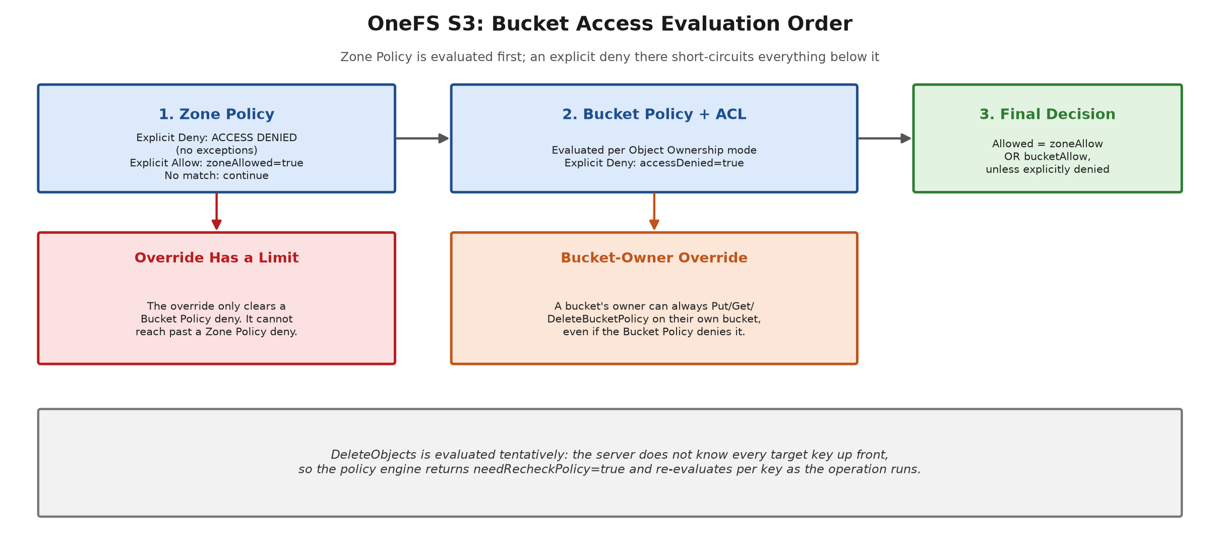
Zone Policy is checked first, and an explicit deny here is final. Conversely, an explicit allow sets a flag and evaluation continues. Likewise, no match at all also just continues. Next the Bucket Policy and bucket ACL are evaluated, with the exact logic depending on which ownership mode is in play. It’s worth noting that a bucket’s own owner can always ‘PutBucketPolicy’, ‘GetBucketPolicy’, or ‘DeleteBucketPolicy’ on their own bucket, even if the current Bucket Policy would otherwise deny it. This prevents a cluster admin from accidentally locking themselves out of their own bucket’s policy. That override has a hard boundary, though, since it only ever clears a Bucket Policy deny. If Zone Policy denied the request, the override never even gets a chance to run, because Zone Policy denial short-circuits everything below it. Another proclivity is that ‘DeleteObjects’ is a batch call where the server does not necessarily know every target key at the time it checks policy, so that check comes back marked ‘needRecheckPolicy’, and the actual decision gets re-evaluated key by key as the delete runs.
A Bucket Policy is essentially a JSON file with a version string and one or more statements. Each of these statement carries an optional ‘Sid’ (Statement ID), a required ‘Effect’ of ‘Allow’ or ‘Deny’, a required ‘Principal’, a required ‘Action’, a required ‘Resource’, and an optional ‘Condition’ block.
| Attribute | Description | Status |
| Sid | Optional Statement ID, that’s a human-readable identifier that can be assigned to individual permission blocks within the bucket policy. | Optional |
| Effect | Allow or deny, determining whether the specified actions in a statement are explicitly permitted or prohibited. | Required |
| Principal | The identity (or identities) the statement applies to — the user, group, role, or account the permission block grants or denies access to. Can be specified as NotPrincipal to apply the statement to all principals except those listed. | Required |
| Action | The S3 operation or operations affected by the statement (e.g., s3:GetObject, s3:PutObject). Wildcards are supported (e.g., s3:Get*, s3:*). Can be specified as NotAction to apply the statement to all actions except those listed. | Required |
| Resource | The bucket or object ARN (Amazon Resource Name) that the statement applies to, identifying the specific resource(s) the permission block governs. Can be specified as NotResource to apply the statement to all resources except those listed. | Required |
| Condition | One or more conditional operators and keys that further scope when the statement applies (e.g., restricting access by source IP, requiring HTTPS, or matching a specific request parameter). | Optiona |
‘Principal’, ‘Action’, and ‘Resource’ also all have inverse forms, ‘NotPrincipal’, ‘NotAction’, and ‘NotResource’, which should be used with caution. A ‘NotPrincipal’ statement naming two accounts today will silently expand its exclusion list if the platform later adds new kinds of principals, without the policy itself being touched. On the pros side, its able to lock out everyone except a single break-glass account. For cons, if pairing ‘NotResource’ with ‘DeleteObjects’, this per-key re-evaluation can produce unexpected denies. The safer approach is almost always to pair a ‘NotResource-style’ exclusion with an explicit, positive Allow covering exactly the keys the operation is meant to touch.
Condition blocks are where a lot of the real security value lives, and two keys are worth building into a default policy template from day one: aws:SecureTransport to deny plaintext HTTP outright, and s3:TlsVersion to deny anything below TLS 1.2. For example:
{

"Version": "2026-10-17",

"Statement": [{

"Sid": "ZoneDenyInsecureTransport",

"Effect": "Deny",

"Principal": "*",

"Action": "s3:*",

"Resource": "*",

"Condition": {

"Bool": { "aws:SecureTransport": "false" },

"NumericLessThan": { "s3:TlsVersion": "1.2" }

}

}]

}
S3 bucket policy variables provide a useful efficiency mechanism. Specifically, ‘${aws:username}’ expands inside resource patterns and condition values, allowing a shared bucket to be scoped into per-user home directories with just two statements (instead of one per user), letting each person list and read/write only their own shared/${aws:username}/* prefix. One field-naming caveat to be aware of on PowerScale is that, in a principal or resource ARN, the Account ID field is not an AWS account. Instead, it is the OneFS access zone the policy applies to, and should be empty, an asterisk, or the exact, case-sensitive zone name.
Evaluating a full JSON policy document on every single S3 request would be slow enough to notice, so OneFS 9.16 adds an in-memory Policy Decision Cache specifically to avoid repeating that work for steady-state traffic, delivering up to a 13x speedup on complex policies that lean on group principals. A few operations still require some genuinely lazy evaluation, wildcard matching has to be expanded before a full match can be done, but the cache absorbs the bulk of the repeated cost.
For day-to-day hygiene, every Bucket Policy statement’s Sid should be populated so access decisions are traceable in the S3 access log. Bare ‘s3:*’ actions on ‘Allow’ statements should be avoided, and any ‘principal’ intended for exclusion should be explicitly denied rather than relying on the absence of an ‘Allow’. Additionally, policies themselves ideally belong in version control, and should be thoroughly tested before implementing in production. Caution and vigilance should be exercised, since a policy mistake on a shared bucket can go undetected until an audit demands evidence of who could access what.
Ownership Policy defaults to ‘ObjectWriter’ for both new PowerScale installations and legacy cluster upgrades. As such, Object Ownership settings for any existing buckets are automatically preserved during upgrade to OneFS 9.16, and cannot be modified until the non-disruptive upgrade has been committed.
Switching a bucket from ‘ObjectWriter’ to ‘BucketOwnerEnforced’ or ‘BucketOwnerPreferred’ does not retroactively change the ownership of files already written to the bucket. Before switching, inventory the bucket’s existing files and either re-‘chown’ them to the bucket owner or pre-populate inherited ACEs granting the bucket owner access. In-flight multipart uploads should be allowed to complete or be aborted before switching modes, since ‘AbortMultipartUpload’ and ‘CompleteMultipartUpload’ may fail if the operation’s identity context changes mid-upload.