ObjectScale 4.4 and X7700 Platform

Hot off the press comes ObjectScale version 4.4 – a significant release of Dell’s enterprise-grade object storage platform and a key component of the Dell AI Data Platform. ObjectScale 4.4 builds on the foundation laid by earlier releases, delivering broad improvements across performance, security, observability, networking, and licensing that are engineered to meet the evolving demands of AI-driven and cloud-native workloads. Version 4.4 also arrives alongside the new Dell ObjectScale X7700, the ultra-dense HDD storage engine of the Dell AI Data Platform, whose launch highlights are summarized later in this article.

This release is available as a software upgrade for existing ObjectScale environments. The core new customer-facing features and capabilities introduced in ObjectScale 4.4 include:

Performance and Storage Efficiency

ObjectScale 4.4 compacts data indices to improve garbage collection (GC) throughput, enabling faster reclamation of deleted capacity and reducing the operational overhead associated with large-scale object churn. This release also extends support for large object storage workloads, broadening the platform’s applicability for AI training datasets, media archives, and other use cases characterized by very large individual objects.

Targeted performance tuning for Big AI workloads includes shared memory (SHM) refactoring to reduce contention and improve throughput under heavy parallel data access patterns typical of model training and inference pipelines. These optimizations are designed to complement ObjectScale’s role in the Dell AI Data Platform, ensuring that storage I/O does not become a bottleneck for GPU-intensive workloads.

S3 object listing operations now benefit from prefetching, reducing latency when enumerating large buckets. This improvement is particularly impactful for AI data pipelines and analytics workflows that iterate over millions of objects as part of data ingestion or cataloging processes.

Metadata journal garbage collection is now enabled by default in ObjectScale 4.4, improving storage efficiency and reducing administrative overhead by ensuring that metadata journal data is reclaimed automatically without manual intervention. Retention policies have also been optimized to reduce configuration complexity and improve long-term cluster hygiene in geo-replicated environments.

Capacity metrics reporting has been enhanced for greater accuracy, particularly for chunked and geo-replicated data where previous releases could undercount or misrepresent consumed capacity in the dashboard. A related fix corrects inaccurate UI report data for geo-replication configurations, giving administrators a more reliable view of storage utilization across multi-site deployments.

Networking and Connectivity

ObjectScale 4.4 includes S3 over RDMA, using the RoCE v2 (RDMA over Converged Ethernet version 2) protocol, and delivering significantly lower latency and higher throughput for object I/O compared to standard TCP-based S3. This capability is targeted at performance-intensive workloads such as AI/ML training, high-performance analytics, and large-scale data ingest where network latency is a bottleneck.

Enabling S3 on RDMA requires a compatible lossless Ethernet fabric configured with Priority Flow Control (PFC), Explicit Congestion Notification (ECN), and appropriate QoS settings. Note that this feature is disabled by default and must be enabled by engineering on a case-by-case basis while NVIDIA driver certification is completed.

ObjectScale 4.4 introduces load balancer support for Sonic switches, enabling improved traffic distribution across network paths in software-defined and open-networking deployments. This enhancement provides greater flexibility in network architecture design and supports higher aggregate throughput for environments using Sonic-based switching fabrics.

The connectivity framework introduces two new automated behaviors in 4.4: a daily cluster topology transmission to the Dell connectivity portal in AST format, and an hourly heartbeat and connection test. These additions improve proactive monitoring visibility and support faster issue detection and resolution by Dell support teams. The product type on the connectivity portal for key and PIN generation remains “Elastic Cloud Storage Gateway.”

ObjectScale software-defined deployments now support single NIC configurations, including both single-port and dual-port single NIC topologies. This reduces the hardware footprint and simplifies cabling for software-defined environments. Note that this capability is Request for Price Quotation (RPQ)-only for the 4.4 release and must be scoped and approved by the product group prior to deployment.

Security and Platform Hardening

ObjectScale 4.4 introduces a new platform hardening capability that substantially reduces the OS-level attack surface by transitioning the deny list for Object Storage services (OBS) to an allow-list model. When enabled, the escalation tool requires a password configured by the administrator via the UI; the platform internally combines this password with the node service tag using PBKDF2 key derivation, which is entirely transparent to the end user.

Platform hardening is disabled by default in ObjectScale 4.4 for both fresh installs and upgrades, and must be explicitly enabled via the UI or API with an escalation password. It is important to note that this feature is distinct from STIG hardening, which is not included in the 4.4 release.

Root CA rotation for ECS service-level communications is now fully automated in ObjectScale 4.4, eliminating the need for manual tracking and intervention before certificate expiry. In prior releases, administrators were responsible for proactively monitoring and rotating the root CA before it expired. This automation removes a significant operational risk and reduces the burden on storage administrators managing large or distributed ObjectScale environments.

Two combined security capabilities address elevated container privilege mode exposure within the ObjectScale container runtime. These changes reduce the risk associated with privileged containers by enforcing stricter privilege boundaries, contributing to a more secure and defensible platform posture.

The UI’s backend-for-frontend (BFF) layer has been upgraded and rewritten to address security vulnerabilities in the prior implementation. This update modernizes the communication layer between the management UI and backend services, incorporating current security best practices and reducing the exploitable surface area of the management interface.

Observability and Operations

The ObjectScale management UI has received a comprehensive visual refresh in version 4.4, delivering a modernized design and improved user experience across dashboards, configuration workflows, and status views. The updated interface aligns with current Dell design standards and aims to reduce the time administrators spend navigating the management plane.

ObjectScale 4.4 empowers administrators to self-execute pre-upgrade health checks without engaging Dell Professional Services. Using a service orchestrator container (Stargate) available exclusively from 4.4 onwards, customers can trigger health checks via REST API calls before scheduling a maintenance window. The checks validate all current pre-upgrade conditions, including firmware versions and system readiness, helping to surface potential issues early and reduce maintenance window duration.

Documentation for this feature will be included in the ObjectScale Admin Guide. The capability is available only on clusters running ObjectScale 4.4 or later.

ObjectScale 4.4 introduces native Kafka-based event notification support, enabling external systems to consume ObjectScale events – such as object creation, deletion, or policy changes – via Kafka topics. This complements existing webhook-based notifications and is particularly valuable for organizations that have standardized on Kafka as their event streaming backbone for data pipelines and event-driven applications.

An S3 request throttler is introduced in ObjectScale 4.4 as an initial MVP capability, allowing administrators to apply rate limits to S3 operations to prevent any single tenant, application, or workload from exhausting cluster resources. This provides a foundational quality-of-service control mechanism that will be expanded in future releases.

ObjectScale 4.4 delivers S3 Tables at general availability, providing native Apache Iceberg support directly within the platform. Analytics and AI workloads can query and operate on tabular data in place, eliminating the need to move or copy data into a separate analytics engine. A complementary S3 Tables reporting capability surfaces structured visibility into S3 table utilization and access patterns within the ObjectScale management layer, with richer analytics to follow in subsequent releases.

The hashing algorithm underlying ObjectScale’s metering subsystem has been redesigned to improve accuracy and performance of usage data collection. This change ensures that consumption reporting is more precise and scales more efficiently as cluster size and object count grow, which is increasingly important in multi-tenant and pay-per-use licensing scenarios.

Licensing

Dynamic licensing in ObjectScale 4.4 adds Multi-License Aggregation Group (Multi-LAG) support, allowing administrators to manage and aggregate multiple license groups through a unified workflow. Accompanying UI enhancements provide clearer visibility into LAG composition and licensing status, reducing administrative complexity for large or multi-tenant deployments.

ObjectScale 4.4 extends dynamic licensing to better support Transformational License Agreement (TLA) customers. TLA customers – typically software-defined deployments – select a TLA checkbox during SCG configuration, which triggers a dedicated dynamic licensing registration workflow. Without this selection, the system would attempt standard registration, which requires hardware device service tags (DSTs) not present in software-defined environments.

The SCG configuration UI and documentation have been reviewed and updated to consistently use the correct term “Transformational License Agreement” throughout, resolving prior inconsistencies between screens.

For environments where ObjectScale cannot maintain continuous connectivity to the Dell licensing portal, offline compliance reporting provides a mechanism for periodic compliance validation and evidence generation. This is particularly relevant for air-gapped or intermittently connected deployments that must still satisfy licensing obligations.

Hardware Platform Additions

ObjectScale 4.4 qualifies two new drive configurations, expanding the storage density options available to customers:

  • 61 TB Self-Encrypting Drive (SED) on XF960: Qualifies the 61 TB SED for the XF960 all-flash appliance, delivering higher all-flash storage density while maintaining full data-at-rest encryption and security. No user behavior changes are required.
  • 122 TB and 245 TB Drive Support (software-defined): Qualifies high-density 122 TB and 245 TB drives for ObjectScale software-defined deployments, enabling greater storage efficiency with fewer servers and a lower datacenter footprint. No user behavior changes are required.

ObjectScale 4.4 also introduces software delivery support for the X7700 platform (single chassis, 102 drives). Dual chassis qualification is in progress and will be released in a subsequent update. For ObjectScale software-defined deployments on the 7725XD platform, single NIC support (RPQ) is now available as described above.

ObjectScale X7700 Platform

ObjectScale 4.4 launches alongside the new Dell ObjectScale X7700, the ultra-dense HDD object storage engine and dense bulk tier of the Dell AI Data Platform.

Built on a disaggregated 1U compute and 4U storage design, the X7700 pairs the 4.4 software capabilities described above with a significant step up in density, performance, and economics. Highlights include:

  • Up to 45% more HDD capacity in the same footprint, allowing environments to scale without consuming additional data center floor space.
  • Up to 3x faster object read and write performance compared to ECS EX5000 running 4.3, with a single-node X7700 delivering performance equivalent to a previous-generation dual-node EX5000 for most use cases.
  • 100GbE front-end networking, delivering up to 4x faster throughput than the prior generation and shrinking backup and restore windows.
  • Structured data queried in place with production-ready S3 Tables and Apache Iceberg, up to 4.5x faster with no data movement, complemented by up to 3x faster S3 listing versus 4.3.
  • Seamless ECS and ObjectScale intermix: X7700 nodes can be added to existing live clusters after the appropriate software upgrade, protecting prior infrastructure investment.
  • Up to 80% lower total cost of ownership compared with leading public clouds in active-storage scenarios, per Omdia economic validation sponsored by Dell Technologies.

In summary, ObjectScale 4.4 represents a substantial advancement across the dimensions of the platform – from AI workload performance and RDMA networking to automated security hardening, self-service operations, and flexible licensing. Whether deploying on the latest X7700 hardware, extending into software-defined configurations, or upgrading an existing ECS or ObjectScale environment, this release equips organizations with the tools needed to manage growing data volumes with greater efficiency, security, and confidence.

OneFS pNFS Configuration and Management

As we saw in the previous article in this series, with OneFS 9.15, any node in a PowerScale cluster can now act as the OneFS metadata server (MDS), or serve data connections (DS). This separation of the metadata path from the data path allows file I/O traffic to be distributed across multiple nodes in the cluster, thereby maximizing available bandwidth and parallelism.

In this article, we turn our attention to the enablement, configuration, and management of pNFS.

When a pNFS‑capable client mounts an NFS export on a pNFS‑enabled OneFS cluster, each node functions as both a Metadata Server and a Data Server, with the Metadata Server role being implicitly assigned to the node the client initially contacts during the mount.

Data I/O operations are performed using NFSv3, as permitted by the pNFS Flexible File Layout specification, while NFSv4.1 or NFSv4.2 is used exclusively for layout management and metadata operations. Layouts are granted on a per‑file basis, with the client requesting a layout upon file open that specifies the appropriate data server or servers for that file. Different files may be assigned to different nodes, and traffic distribution behavior is influenced by server‑side alignment settings. The set of data server addresses provided to the client is determined by the SmartConnect pool associated with the mount IP address.

In order for pNFS to activated, a cluster must be running OneFS 9.15, with NFSv4.1 or NFSv4.2 enabled for metadata operations and NFSv3 enabled for data operations. The SmartConnect pool must also use static IP allocation.

Attribute Details
OneFS version OneFS 9.15 to provide pNFS support.
NFS protocol versions NFSv4.1 or NFSv4.2 must be enabled (for the metadata path). NFSv3 must also be enabled (for the data path).
SmartConnect pool type The SmartConnect network pool hosting pNFS must use Static IP allocation.
Client OS Linux with kernel pNFS Flexible File Layout support (available in mainline Linux kernels 5.14+).
Client mount options The client must mount the cluster export using NFSv4.1 (-o vers=4.1) or NFSv4.2 (-o vers=4.2). Transport protocol may be RDMA (proto=rdma) or TCP (proto=tcp). UDP is unsupported.

On the client side, systems must be running Linux kernels that support the pNFS Flexible File Layout, which is available in mainline kernels version 5.14 and later. Additionally, mounts must explicitly specify NFSv4.1 or NFSv4.2 using either TCP or RDMA transport, as UDP is not supported.

With OneFS 9.15, pNFS configuration can be performed via the OneFS CLI or platform API (pAPI), but the WebUI does not currently have an equivalent. Under the hood, the configuration is managed by the  ‘isi_gconfig’ registry keys under the NFS driver path. Client remounts are strongly recommended when enabling or disabling pNFS, as clients cache file attributes that determine layout eligibility, so may otherwise retain stale information. Activation requires unmounting NFS clients, enabling the pNFS feature from the OneFS CLI, and restarting the NFS service, with a corresponding process to disable the feature.

Several configuration parameters control pNFS behavior, including a master enablement flag for advertising Metadata Server and Data Server capabilities, alignment settings that determine how file data is distributed across nodes, options for mapping network interfaces to pNFS devices, and internal settings governing layout tracking scalability. In particular, the stripe alignment configuration has a substantial impact on I/O distribution patterns and must be carefully considered when tuning performance, as different alignment values favor different workload characteristics.

Facet Details
Layout Layouts are per-file. Each time a client opens a file, it requests a layout that tells it which data server to use. Different files may be assigned to different nodes. How the client spreads its traffic also depends on the server settings around alignment.
Network SmartConnect determines the pool. The set of data server addresses returned to the client comes from the SmartConnect pool that the client’s mount IP belongs to.
Node roles Every node in the cluster acts as both a Metadata Server and a Data Server. The ‘MDS’ role simply means the node the client happened to connect to for that mount.
Protocol version Data I/O uses NFSv3. The pNFS Flexible File Layout standard allows data servers to speak NFSv3, which is well-supported and performant. The client uses NFSv4.1 only for metadata and layout management.

Every node in the cluster functions as both a Metadata Server (MDS) and a Data Server (DS), with the MDS role simply representing the node to which the client initially connects during the mount operation. Data I/O operations are performed using NFSv3, as permitted by the pNFS Flexible File Layout specification, while NFSv4.1 is used exclusively by the client for metadata handling and layout management. Layouts are granted on a per‑file basis, such that each time a file is opened, the client requests a layout identifying the appropriate data server, allowing different files to be serviced by different nodes, with overall traffic distribution further influenced by server‑side alignment configurations. The set of data server addresses provided to the client is determined by SmartConnect, with the addresses drawn from the SmartConnect pool associated with the client’s mount IP.

When it comes to enabling pNFS, ensure that the following prerequisites are met:

OneFS version OneFS 9.15 or later.
NFS protocol versions NFSv4.1 or NFSv4.2 must be enabled for the metadata path. Additionally, NFSv3 must also be enabled for the data path.
SmartConnect pool type The pool must use static IP allocation. Dynamic IP pools are not currently supported for pNFS because device addresses must remain stable.
Client OS Linux with kernel pNFS Flexible File Layout support (available in mainline Linux kernels 5.14+).
Client mount options The client must mount using either NFSv4.1 (-o vers=4.1) or NFSv4.2 (-o vers=4.2). Transport protocol may be RDMA (proto=rdma) or TCP (proto=tcp). UDP is unsupported.

OneFS pNFS support can be enabled via the CLI as follows:

  1. First, verify that the desired SmartConnect network pool is configured for static IPs:
# isi network pools list
  1. Next, check that NFSv3 and NFSv4.1 and/or NFSv4.2 are enabled:
# isi nfs settings global view
  1. When both the above prerequisites are confirmed, activate pNFS as follows:
# isi nfs settings global modify --pnfs-enabled 1
  1. Once done, the cluster’s NFS exports can then be mounted from a Linux client running kernel 5.14+. For example:
# mount -t nfs4 -o vers=4.1 <pool-ip>:/ifs/data /mnt/pnfs
  1. From the NFS client, after performing some I/O, the ‘mountstats’ file contents or CLI command can be used to verify pNFS is active. For example:
# grep -A 20 "pnfs" /proc/self/mountstats

Or:

# mountstats --nfs /mnt/pnfs

Specifically, the presence of non-zero ‘pNFS_read’ and ‘pNFS_write’ counters in the output confirms that the Linux client is using pNFS.

Optionally, as a second part to step 3 above, NIC-level device granularity configuration can also be applied. For example:

# isi_gconfig registry.Services.lwio.Parameters.Drivers.nfs.NFSV4LayoutDeviceUseNICAsUniqueDevice=1

Followed by an NFS service restart:

# isi services nfs disable && isi services nfs enable

Additionally, if pNFS does need to be disabled for any reason, first unmount any NFS clients, then run the following CLI command:

# isi nfs settings global modify --pnfs-enabled=true

The OneFS pNFS implementation (and the pNFS spec in general) does not require any changes to applications, as it is negotiated transparently between the NFS client and server. This allows applications to continue reading and writing files normally while the client kernel automatically manages layout negotiation and communication with data servers.

If a data server node becomes unavailable while a client holds a layout, the client may encounter I/O errors on the NFSv3 data path to that node. However, most Linux NFS clients will fall back to performing I/O through the metadata server (MDS) until the data server becomes available again, at which point they can re-request a layout, with the exact behavior varying by client kernel version and implementation.

OneFS pNFS is supported with both NFSv4.1 and NFSv4.2 and can coexist with non-pNFS clients on the same export, since pNFS is negotiated individually during session setup and clients that do not support it will continue using traditional NFS I/O paths while still accessing the same files.

Additionally, pNFS can work with RDMA when the server advertises both TCP and RDMA data server addresses and the environment includes RDMA-capable interfaces, enabling compatible clients to use RDMA for the data path.

Finally, pNFS requires NFSv3 to be enabled because the Flexible File Layout specification allows data servers to be accessed via NFSv3. The data path between clients and data server nodes uses NFSv3 for simplicity and compatibility, while the metadata operations, including layout management and file open or close operations, must use NFSv4.1 or NFSv4.2.

OneFS and Parallel NFS – pNFS

If you’ve ever witnessed a high-core-count compute node saturate a single NFS mount point while the rest of a PowerScale cluster still has plenty of resources to spare, you’ve experienced the fundamental limitation that Parallel NFS (pNFS) was designed to eliminate. Traditional NFS, whether NFSv3 or NFSv4.1 in conventional mode, binds all client I/O to the single node behind the mount IP. The cluster may have dozens of nodes, petabytes of aggregate flash bandwidth, and a 400GbE back-end fabric, but from the perspective of that NFS client, it’s talking to one node. With OneFS 9.15, PowerScale introduces native pNFS support, allowing a single NFS client to read and write data directly and concurrently across multiple nodes in a SmartConnect pool — turning the entire cluster into a parallel data path rather than routing everything through a single server. This article covers what pNFS is, how the metadata-server and data-server roles work in a OneFS environment, the prerequisites you need to meet before enabling it, and the CLI steps to activate and configure pNFS on your cluster.

The pNFS protocol is an extension of NFSv4.1, designed to significantly improve throughput for NFS workloads by enabling clients to perform data reads and writes directly and concurrently to multiple nodes across a cluster or distributed storage system, rather than routing all I/O through a single, node-bound NFS server.

In a traditional NFS deployment, a client mounts a share and directs all read and write operations to the single node associated with the mount IP address, which inherently limits performance and creates a bottleneck regardless of overall cluster size or capability.

All I/O for this mount is between the client and node over NFSv3 or NFSv4.1, while the remainder of the cluster’s nodes sit idle for this client.

In contrast, when pNFS is enabled, the client continues to communicate with a single node on the cluster for metadata operations such as file open, close, rename, and attribute queries, but is explicitly informed which other nodes to send the actual file data to.

With OneFS 9.15, any node in a PowerScale cluster can now act as the OneFS metadata server (MDS), or serve data connections (DS). This separation of the metadata path from the data path allows file I/O traffic to be distributed across multiple nodes in the cluster, thereby maximizing available bandwidth and parallelism.

In a pNFS-enabled PowerScale cluster, the client always talks to the MDS over NFSv4.1 or NFSv2 for namespace, attributes, and locking, and it talks directly to data servers for the actual I/O.

  1. When a pNFS client opens a file, it sends an NFSv4.1 ‘OPEN’ and ‘GETATTR’ to the MDS, which returns a filehandle and any required state.
  2. The client then issues a ‘LAYOUTGET’ to the MDS, which responds with a layout describing exactly which Data Servers (DSs) hold which byte ranges or stripes of the file, often using a ‘files’ layout with per-node NFS file-handles or device IDs. The client may also send a ‘GETDEVICEINFO’ request, to which the MDS responds.
  3. For reads, once the client has this layout, it bypasses the MDS and issues NFS ‘READ’ RPCs directly to the Data Servers corresponding to the required byte ranges. The DSs return data straight to the client, while the MDS is only involved again if there is a layout error or a recall, in which case the client may perform ‘LAYOUTCOMMIT’, ‘LAYOUTRETURN’, and a fresh ‘LAYOUTGET’ to resynchronize.

For writes, the client similarly acquires a read-write layout via ‘LAYOUTGET’ from the MDS, then sends NFS ‘WRITE’ (and, if needed, ‘COMMIT’) operations directly to the DSs based on the stripe mapping in the layout.

  1. After the Data Servers have durably stored the data, the pNFS client uses ‘LAYOUTCOMMIT’ to inform the MDS about changes such as the updated file size and modification time.
  2. Finally, the client passes a ‘LAYOUTRETURN’ when it is finished with the layout.

Throughout this process, all metadata operations, including directory lookups, creates, deletes, renames, attribute changes, and locks, are handled solely by the MDS using standard NFSv4.1 operations (i.e. LOOKUP, CREATE, REMOVE, RENAME, GETATTR, SETATTR, LOCK, and LOCKU, etc). In contrast, the Data Servers never see namespace, simply serving or accepting data for extents identified by the layout. The net effect is that metadata and control traffic (opens, layouts, locks) flow between the client and the MDS, while bulk data reads and writes flow directly between the client and multiple DS nodes in parallel, allowing the data path to scale with the number of storage nodes rather than being bottlenecked by a single NFS server.

The primary benefits of pNFS include increased single‑client throughput by eliminating the single‑node bottleneck and distributing I/O across all nodes within a SmartConnect pool, as well as improved aggregate cluster throughput through more balanced I/O distribution and better utilization of existing caching and prefetch mechanisms. This functionality is transparent to applications, as pNFS negotiation occurs automatically between the Linux NFS client and the OneFS NFS server without requiring application‑level changes. Because OneFS provides a single distributed filesystem in which every node inherently has access to all data, pNFS simply authorizes the client to communicate directly with additional nodes for data transfer.

When a pNFS‑capable client mounts an NFS export on a pNFS‑enabled OneFS cluster, each node functions as both a Metadata Server and a Data Server, with the Metadata Server role being implicitly assigned to the node the client initially contacts during the mount. Data I/O operations are performed using NFSv3, as permitted by the pNFS Flexible File Layout specification, while NFSv4.1 or NFSv4.2 is used exclusively for layout management and metadata operations. Layouts are granted on a per‑file basis, with the client requesting a layout upon file open that specifies the appropriate data server or servers for that file. Different files may be assigned to different nodes, and traffic distribution behavior is influenced by server‑side alignment settings. The set of data server addresses provided to the client is determined by the SmartConnect pool associated with the mount IP address.

Several prerequisites must be met prior to enabling pNFS on a PowerScale cluster:

Attribute Details
OneFS version OneFS 9.15 to provide pNFS support.
NFS protocol versions NFSv4.1 or NFSv4.2 must be enabled (for the metadata path). NFSv3 must also be enabled (for the data path).
SmartConnect pool type The SmartConnect network pool hosting pNFS must use Static IP allocation.
Client OS Linux with kernel pNFS Flexible File Layout support (available in mainline Linux kernels 5.14+).
Client mount options The client must mount the cluster export using NFSv4.1 (-o vers=4.1) or NFSv4.2 (-o vers=4.2). Transport protocol may be RDMA (proto=rdma) or TCP (proto=tcp). UDP is unsupported.

In the next article in this series, we’ll look at the process to enable and configure pNFS on a PowerScale cluster.

PowerScale OneFS 9.15

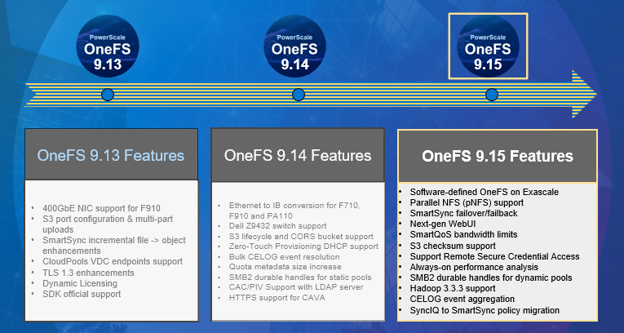
Dell PowerScale is kicking off the summer with the release of OneFS 9.15, introduced on August 11, 2026, marking a significant evolution of its scale-out NAS platform. This release brings broad innovation across platform capabilities, performance, security, serviceability, and ease of use, delivering meaningful value for a wide range of enterprise workloads.

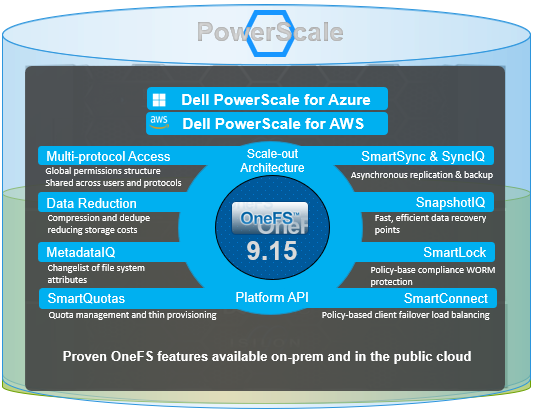
As the latest version of PowerScale’s unified software platform for both on-premises and cloud deployments, OneFS 9.15 is well suited for traditional file services, vertical industry use cases such as media and entertainment, healthcare, life sciences, and financial services, as well as modern workloads including generative AI, machine learning, deep learning, and analytics.

PowerScale continues to provide flexible deployment options across core, edge, and cloud environments, whether on-site, in colocation facilities, or through customer-managed deployments in AWS and Microsoft Azure. Its scale-out architecture ensures the performance and agility required to support increasingly complex unstructured data workflows. In today’s environment, where data security, threat detection, and operational visibility are more critical than ever, OneFS 9.15 introduces a slew of new capabilities and enhancements designed to strengthen performance, resiliency, and security while simplifying operations.

Performance enhancements are a central highlight of OneFS 9.15, including the general availability of pNFS, which enables parallel client data access and significantly improves throughput for AI and high-performance computing workloads.

With 9.15 also comes the introduction of software-defined OneFS on Dell Exascale, decoupling the PowerScale file system software from proprietary hardware, enabling flexible deployment on industry-standard servers and cloud infrastructure. This approach delivers the same enterprise-grade data services, scalability, and performance as traditional PowerScale appliances while providing greater deployment flexibility and cost efficiency for large scale AI environments.

Exascale, Dell’s rack-scale AI and data platform, uses AMD EPYC–based nodes and NVMe-rich storage behind 400Gb-class fabrics for massive AI training bandwidth. In addition to PowerScale, the Exascale platform can also be configured to natively run ObjectScale, Lightning file system, or PowerStore block.

OneFS 9.15 also delivers predictable, linear scaling across clusters ranging from 3 to 32 nodes, allowing organizations to grow efficiently without overprovisioning. SmartQoS has been enhanced with support for both bandwidth- and IOPS-based limits, separation of read and write workload classes, improved latency observability, and the ability to define system pools that isolate performance-sensitive nodes, providing administrators with granular control over resource allocation.

Security and compliance have also been strengthened through validation of cryptographic entropy sources for FIPS 140-3 compliance and updates to the secure development lifecycle, including removal of outdated software components and adoption of current packages to maintain a strong security posture. Reliability improvements are deeply embedded across the platform, with enhancements to the non-disruptive upgrade framework that improve stability, introduce retry mechanisms, and streamline upgrade operations. Additional resiliency gains include better service startup handling, continuous performance data collection through Always-On Performance Analysis, and optimizations for large file workflows and deduplication consistency.

Serviceability and observability see major gains with automated CELOG event aggregation, which correlates and enriches events to provide clearer insights and reduce troubleshooting time. Administrators also benefit from API-driven configuration management that eliminates the need for root access when adjusting advanced settings, along with automated diagnostic tools that generate actionable reports and proactive alerts for job failures or cancellations.

Finally, data mobility and user experience are further enhanced through the transition from SyncIQ to SmartSync, enabling more modern and flexible disaster recovery strategies while preserving existing investments. A new SmartSync web interface simplifies management, while improvements to SMB2 failover durability and expanded SmartQoS visibility enhance both resilience and operational clarity.

Theme Key Features
Unlock Platform Power for Gen AI ·         Exascale – Performance, reliability, compression

·         NVIDIA CX8 VPI network controller support

·         PowerScale switch DNOS 10.6.1.1 support

·         Enable SONiC on S5224 for TOR

File/Object Handling Enhancements ·         New checksum support for S3

·         Support for CRC64NVME default AWS checksum algorithm

·         Hadoop release 3.3.3 support

·         pNFS General Availability

·         Ability to force a dump of S3 server logs

Performance Improvements ·         Support for read, write and op classes as SmartQoS metrics

·         SmartQoS bandwidth limits

·         Linear Performance Scaling

·         Configurable system pool

Reliability ·         NDU hook framework stability, resilience, and performance enhancements

·         S3 service start up and non-disruptive config reload enhancements

·         Automated management for user configuration changes

·         Always On Performance Analysis

·         Cluster resiliency for large client workloads

·         Large file performance improvements

·         File metrics included in ‘isi statistics workload’ reporting

Serviceability ·         Aggregate CELOG event details for better customer experience

·         Remote Secure Credential (RSC) Access Enablement

·         Ability to alert when multiple jobs have cancelled/failed

·         Improved Performance diagnostics for Protocols

Data Mobility and Data Recovery ·         SmartSync DR – FO/FB – Moves across domains

·         Migration of SyncIQ policies to SmartSync

Useability ·         Enhanced WebUI Dashboard/Node Overview

·         Dynamic licensing subscription model for software-defined PowerScale on the Exascale platform

·         Directory Rename in PowerScale Cluster to reflect in ElasticSearch via Metadata IQ

·         SmartSync: WebUI for SmartSync

·         SMB 2 Durable handles for Dynamic Pools

·         Enhance latency metric for SmartQoS

·         Job engine reports.db size under control

Security ·         Cluster join rule enforcement update

·         OpenSSL support for FIPS 140-3

Overall, OneFS 9.15 reinforces Dell PowerScale’s position as a leading platform for unstructured data, delivering powerful advancements in scalability, performance, security, and operational efficiency, and equipping organizations to meet the growing demands of modern data-driven environments.

We’ll be taking a deeper look at the new OneFS 9.14 features and functionality in blog articles over the course of the next few weeks. Meanwhile, the new OneFS 9.15 code is available on the Dell Support site, as both an upgrade and reimage file, allowing both installation and upgrade of this new release.

For existing clusters running a prior OneFS release, the recommendation is to open a Service Request with to schedule an upgrade. To provide a consistent and positive upgrade experience, Dell Technologies is offering assisted upgrades to OneFS 9.15 at no cost to customers with a valid support contract. Please refer to this Knowledge Base article for additional information on how to initiate the upgrade process.

OneFS Zero Touch Provisioning DHCP Support

Standing up a new PowerScale cluster has always required a human armed with a serial cable. Before a node can join a cluster and receive a routable IP address through the standard network management path, an administrator must physically connect to the node’s serial console and manually configure the front-end network interface. For environments deploying a handful of nodes occasionally, this is a minor inconvenience. For large-scale datacenter deployments — where dozens or hundreds of nodes may need to be provisioned at once — the serial console dependency becomes a meaningful operational bottleneck, requiring scheduled on-site time from qualified engineers for what is essentially a repetitive, low-complexity task.

In addition to time, serial provisioning is inherently sequential, potentially error-prone, and tricky to automate. Plus it typically involves coordination between the storage admin and whoever has physical access to the racks. In a hyperscale or rapidly growing environment, the time spent cabling and typing IP addresses into consoles is time that scales linearly with node count.

OneFS 9.14 takes another decisive step in the journey to PowerScale Zero Touch Provisioning (ZTP) via native DHCP support for a cluster’s front-end network interfaces. This enables nodes to obtain their network configuration automatically from a remote DHCP server, rather than requiring manual IP assignment at the serial console.

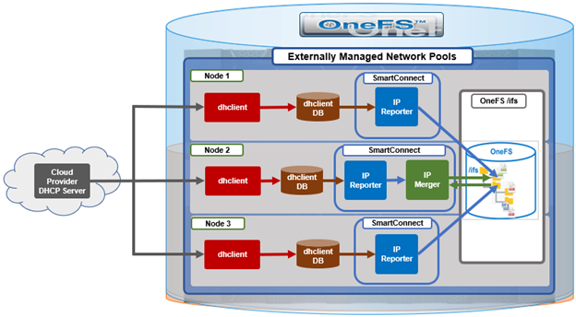
To appreciate ZTP’s benefits in OneFS 9.14, it helps to understand how OneFS already handles dynamic IP assignment in certain contexts. For several release now, OneFS has used an externally managed allocation method for network pools, backed by two SmartConnect components: The IP Reporter and the IP Merger.

The IP Reporter parses external IP sources — such as DHCP lease files — and generates IP report files on the cluster filesystem (for example, /ifs/.ifsvar/modules/flexnet/ip_reports/DHCP/node.1). The IP Merger, which runs as a single instance per cluster, reads these reports and merges the discovered IP information into the Flexnet network configuration. Flexnet is the OneFS subsystem responsible for maintaining the authoritative view of which IPs are assigned to which interfaces on which nodes. Both components run on a fixed interval — roughly a one-minute cycle — so newly obtained leases are picked up automatically within a short window.

This SmartConnect-based path already exists and works in cloud deployments of OneFS, where DHCP is always enabled and the cloud provider’s DHCP server assigns IPs automatically. What was missing for on-premises deployments was the DHCP client management layer — the component responsible for actually running dhclient on the appropriate interfaces and producing the lease files that the existing IP Reporter can then parse. ZTP closes that gap with a new purpose-built daemon and a new cluster-level configuration surface, while deliberately reusing the proven IP Reporter/Merger pipeline rather than reinventing it.

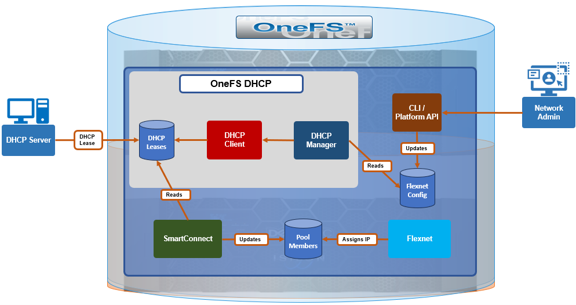
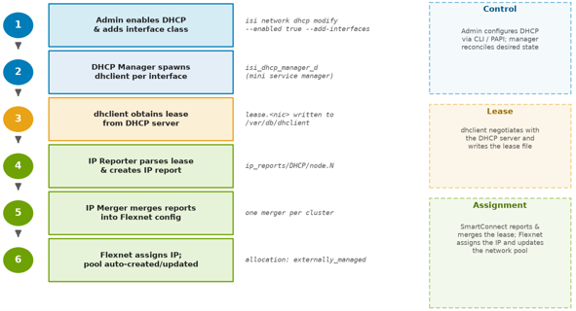
The new component introduced in OneFS 9.14 is ‘isi_dhcp_manager_d’, a daemon that runs on every node in the cluster.

Under the purview of MCP, the DHCP manager acts as a mini service controller, spawning and supervising one dhclient process per configured front-end interface. It monitors these processes for health, and continuously compares which interfaces should have DHCP and which nodes are excluded against the actual state (i.e. which dhclient processes are currently running) and corrects any drift. If an interface is added to the included list, the manager starts a client for it, and if one is removed or a node is excluded, the manager stops the corresponding client. This declarative model is what allows the same configuration to be safely re-applied across reboots, upgrades, and transient interface flaps without the need for manual intervention.

The end-to-end flow works as follows. The network administrator uses the CLI or PAPI to configure DHCP for the cluster. The DHCP Manager reads that configuration from Flexnet and starts a dhclient process on each included interface — for example, interface class ext-2 mapped to the physical NIC on a given node. Each dhclient negotiates with the DHCP server and writes a lease file to /var/db/dhclient/lease.<nic>. The DHCP Manager log consolidates the output from every dhclient it spawns into a single file, which makes debugging the DHCP protocol exchange considerably easier. The existing IP Reporter detects the lease, parses the assigned address, and writes an IP report; the IP Merger then merges it into the Flexnet configuration, and the Flexnet daemon performs the actual IP assignment to the interface.

Importantly, IPs remain assigned and tracked by Flexnet throughout, with ‘dhclient’ creating only the lease file. DHCP-obtained addresses show an allocation method of ‘externally_managed’, distinguishing them from statically assigned IPs. The DHCP Manager does not start or terminate dhclient for interfaces that are not link-up, and it automatically terminates any orphaned dhclient processes it finds running at startup.

One of the more useful behaviors demonstrated in ZTP is automatic network pool management. When a DHCP-assigned IP arrives, OneFS checks for an existing network pool covering that IP range. If one exists, the new IP is added to it, otherwise a pool is created automatically, along with the DHCP-obtained IP range is associated with it. The naming convention is of the general ‘groupnet0.subnet0.pool_dhcp’ format. As additional nodes obtain leases, their addresses are merged into the same pool’s IP ranges.

Critically, DHCP coexists with existing allocation methods on the same interface. An interface class such as ext-1 that already carries a statically assigned IP can also be enrolled in DHCP and receive an additional DHCP-assigned address. The result is an interface that holds both a static IP and a DHCP IP simultaneously, associated with multiple pools. This flexibility means DHCP can be layered onto an existing statically configured cluster without displacing any current addressing. This is an important property for brownfield environments, where removing a working static configuration to adopt DHCP would likely be a non-starter.

Zero Touch Provisioning in OneFS 9.14 introduces three configurable dimensions for DHCP management:

Capability Description
Enable or disable DHCP cluster-wide A single toggle governs whether DHCP is active across the cluster.
Specify which interface classes participate Admins define an ‘included’ list of interface classes that should be managed via DHCP.
Exclude specific nodes Individual nodes can be added to an ‘excluded’ list by Logical Node Number (LNN). assigned IPs remain untouched. This is useful when specific nodes have static requirements or when rolling DHCP out incrementally.

A single toggle governs whether DHCP is active across the cluster. DHCP is disabled by default on both fresh installs and upgrades from earlier OneFS versions, so existing deployments are never affected unless an administrator explicitly opts in. When disabled, the ‘isi_dhcp_manager_d’ service is present but not running.

Administrators define an ‘included’ list of interface classes (ie. ext-1, ext-2, mgmt-1) that should be managed via DHCP. Interfaces not in the list keep their existing allocation method.

Individual nodes can be added to an ‘excluded’ list by Logical Node Number (LNN). An excluded node will not run dhclient for any interface class regardless of the included list, and any DHCP-obtained IPs on that node are removed — while its statically assigned IPs remain untouched. This is useful when specific nodes have static requirements or when rolling DHCP out incrementally.

All DHCP configuration lives under the ‘isi network dhcp’ CLI command family, which supports both ‘view’ and modify ‘options’. The general configuration flow is as follows:

The following CLI commands can be used to configure and manage DHCP. For example, to view current state:

# isi network dhcp view

To enable DHCP cluster-wide:

# isi network dhcp modify --enabled true

To enroll interface classes, for example external and management interfaces:

# isi network dhcp modify --add-interfaces ext-1,ext-2

To remove an interface class:

# isi network dhcp modify --remove-interfaces ext-2

To exclude a node (for example LNN 4):

# isi network dhcp modify --add-excluded-nodes 4

To disable DHCP entirely:

# isi network dhcp modify --enabled false

Any modification triggers an interactive confirmation prompt — a safeguard against accidentally severing front-end connectivity if DHCP is the only IP source:

# isi network dhcp modify --enabled false
You are modifying DHCP settings. Please ensure you have front-end
connectivity via other statically/dynamically assigned IPs as you
may lose connectivity. Would you like to proceed? (yes/[no]):

The ‘–force’ flag can be added to suppress this prompt for scripted workflows. The same functionality is exposed through the PAPI at /platform/25/network/dhcp for orchestration tooling, and the DHCP configuration is captured hourly as telemetry via that endpoint.

When DHCP is disabled, the DHCP Manager terminates every dhclient process, removes the DHCP-obtained leases, and gracefully shuts down the daemon itself. Two pieces of state intentionally persist, however. First, the included-interfaces and excluded-nodes configuration is not cleared — so re-enabling DHCP later reapplies the previous configuration without re-entry. Second, any auto-created pool is not deleted; it remains (with no IP ranges) and is reused under the same name when DHCP IPs return within the same subnet. This persistence is a deliberate convenience: it means disabling DHCP is a reversible, low-friction operation rather than a destructive one.

Aspect Cloud On-Premises
Default state Always enabled, not configurable Disabled by default, admin-configurable
DHCP management MCP manages dhclient directly isi_dhcp_manager_d daemon manages dhclient
DHCP server Cloud provider managed Customer network managed
Node exclusion Not applicable Supported via LNN excluded list

Note that while cloud deployments already rely on DHCP, they do not yet take advantage of this new configuration surface or daemon — bringing the two models together is planned for a follow-up release.

When DHCP-assigned IPs are not appearing as expected, the following systematic diagnostic sequence will usually cover the most common failure points:

Step CLI Command Expected Result
DHCP enabled? isi network dhcp view Enabled: True
Node not excluded? isi network dhcp view Node LNN absent from Excluded Nodes list
Service running? isi services -a isi_dhcp_manager_d Service reported as enabled
dhclient active? ps aux | grep dhclient One dhclient: <nic> per configured interface
Lease file present? ls /var/db/dhclient/ lease.<nic> present per interface
IP bound to interface? ifconfig <nic> | grep inet inet <ip-address> present

A good approach is generally to work through the above checklist from top to bottom, with each step gating the next. If DHCP shows disabled or the node appears in the excluded list, nothing downstream will happen by design. If the service is enabled but no dhclient is running, the interface’s link may not be up, or the interface class may not be in the included list. If dhclient is running but no lease file appears, the issue is almost certainly between the node and the DHCP server (reachability, scope exhaustion, or relay configuration). And if a lease exists but no IP is bound, the bottleneck is typically the IP Reporter/Merger cycle or a pool conflict during the merge.

The principal log file locations include:

Log file Detail
/var/log/isi_dhcp_manager_d.log Primary daemon log, including consolidated dhclient output.
/var/log/isi_smartconnect IP Reporter and IP Merger logs covering lease parsing and pool merging.
/var/db/dhclient/lease.<nic> Raw lease files, confirming what the DHCP server offered.
/ifs/.ifsvar/modules/flexnet/flx_config.xml Stored DHCP configuration as seen by Flexnet


There are also three new DHCP-related CELOG events flags introduced in OneFS 9.14 in support of ZTP:

Event Severity Meaning / Action
SW_SC_DHCP_CLIENT_RESTART Warning dhclient restarted 5+ times in 15 min — check network stability and DHCP server availability
SW_SC_IPMERGE_FAILED Warning DHCP IP could not be merged into Flexnet (e.g., address already in a static pool) — check for IP pool conflicts or invalid pool configuration
SW_SC_DHCP_LEASE_REBIND Critical Lease renewal failed, IP at risk of expiring — verify DHCP server is reachable

With OneFS 9.14’s ZTP capability, on-prem PowerScale nodes can now receive their front-end network addresses from a DHCP server automatically, without serial console access during provisioning. Built on the existing SmartConnect IP Reporter and Merger infrastructure, the new isi_dhcp_manager_d daemon slots cleanly into the Flexnet pipeline, auto-creating network pools, allowing static and DHCP addresses to coexist on the same interface, and preserving configuration across enable/disable cycles — all without displacing any existing IP allocation mechanism. Removing the requirement for serial console access from the provisioning path helps set the stage for broader zero-touch deployment automation in future releases.