Modern web applications routinely load resources — images, videos, fonts, scripts — from origins other than the server hosting the page. Browsers enforce the ‘same-origin policy’ by default, which blocks these cross-origin requests unless the target server explicitly permits them. Cross-Origin Resource Sharing (CORS) is the W3C mechanism that provides those permissions, and as of OneFS 9.14, PowerScale S3 supports it natively on a per-bucket basis.
This capability matters for any organization running a web application that reads from or writes to a PowerScale S3 bucket directly from a browser. Without CORS configuration on the bucket, the browser silently blocks the request at the network layer — no error in the server logs, just a failed request on the client side. A CORS policy tells the browser which origins, HTTP methods, and headers are acceptable, enabling seamless integration between frontend applications and PowerScale object storage while preserving the bucket’s underlying access controls.
Web browsers enforce a same-origin policy that, by default, prevents a web application served from one origin (a combination of scheme, host, and port) from reading resources served from a different origin. CORS relaxes this policy in a controlled manner. By using a defined set of HTTP response headers, a resource declares which other origins, HTTP methods, and request headers are permitted to access it.
Before sending a cross-origin request that could have side effects — such as a PUT or DELETE — the browser sends an HTTP OPTIONS preflight request to the target server. The preflight carries:
- Origin — the domain making the request
- Access-Control-Request-Method — the HTTP method the browser intends to use
- Access-Control-Request-Headers — any non-standard request headers
The S3 service evaluates these headers against the bucket’s CORS configuration and returns the appropriate Access-Control-* response headers. If all three are permitted by a matching rule, the browser proceeds with the actual request. If any one is rejected, the browser aborts. For simple read-only requests (GET, HEAD) the browser skips the preflight and reads the CORS response headers from the actual response directly.
CORS support extends OneFS S3 to browser-based workloads that would otherwise be blocked by the same-origin policy. Consider, for example, a website which needs to load images and other assets from a PowerScale S3 bucket. Without a CORS configuration the browser blocks these requests. Once CORS is configured to allow the application’s origin, the assets are retrieved and displayed successfully. Similarly, workflows where users upload files directly to a PowerScale S3 bucket from a front-end application, with no back-end proxy server in the request path. Once the bucket permits the application’s origin, uploads succeed and the browser receives a valid response with no CORS errors.
OneFS 9.14 introduces three new S3 API operations for managing per-bucket CORS configuration, and extends all existing bucket and object APIs with CORS response headers.
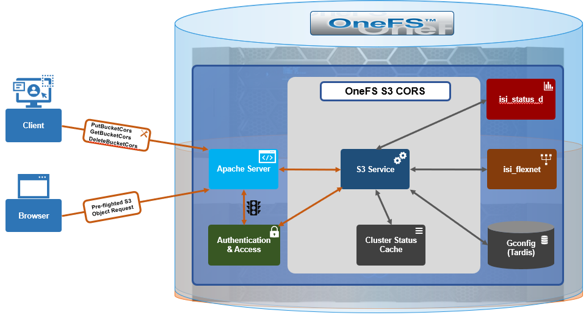
The CORS configuration is attached to an individual bucket and defines one or more rules. Each rule declares the allowed origins, HTTP methods, request headers, response headers to expose, and how long a browser may cache a preflight result.
1. PutBucketCors
PutBucketCors sets a CORS configuration on a bucket. If a configuration already exists it is replaced in full — there is no partial update. The request body is an XML document:
<?xml version="1.0" encoding="UTF-8"?>
<CORSConfiguration xmlns="http://s3.amazonaws.com/doc/2006-03-01/">
  <CORSRule>
    <ID>allow-webapp</ID>
    <AllowedOrigin>https://app.example.com</AllowedOrigin>
    <AllowedMethod>GET</AllowedMethod>
    <AllowedMethod>PUT</AllowedMethod>
    <AllowedHeader>*</AllowedHeader>
    <ExposeHeader>ETag</ExposeHeader>
    <MaxAgeSeconds>3600</MaxAgeSeconds>
  </CORSRule>
</CORSConfiguration>
A bucket can have multiple CORSRule blocks, each scoped to a different origin or method set. MaxAgeSeconds controls how long the browser may cache the preflight response, reducing round trips for repeat requests. Table 1 describes the CORS rule elements.
| Element | Description |
| AllowedOrigin | One or more origins from which cross-origin requests are allowed. A single wildcard (*) is permitted. |
| AllowedMethod | An HTTP method the origin is allowed to use. Valid values:GET,PUT,HEAD,POST,DELETE. |
| AllowedHeader | A request header allowed in a preflight request viaAccess-Control-Request-Headers. A trailing wildcard (*) is permitted. |
| ExposeHeader | A response header that the browser is allowed to expose to the client application. |
| ID | An optional unique identifier for the rule. |
| MaxAgeSeconds | The time in seconds that the browser may cache the preflight response for the requested resource. |
Required permission: Bucket owner or FULL_CONTROL ACL on the
bucket. Using the AWS CLI against a PowerScale endpoint:
aws s3api put-bucket-cors \
  --bucket mybucket \
  --cors-configuration file://cors.json \
  --endpoint-url https://powerscale.example.com:9020
2. GetBucketCors
GetBucketCors returns the current CORS configuration for a bucket:
GET /<bucket>?cors
The response returns the same XML structure set by PutBucketCors. If no CORS configuration exists, the API returns 404 NoSuchCorsConfiguration.
Required permission: Bucket owner or READ ACL.
aws s3api get-bucket-cors \
  --bucket mybucket \
  --endpoint-url https://powerscale.example.com:9020
3. DeleteBucketCors
DeleteBucketCors removes the CORS configuration from a bucket entirely:
DELETE /<bucket>?cors
After deletion the bucket returns no CORS headers and browser cross-origin requests will fail. There is no versioning, so the configuration is gone immediately.
Required permission: Bucket owner or FULL_CONTROL ACL.
The other new S3 operation introduced in OneFS 9.14 is the HTTP OPTIONS method, which browsers send as a preflight check before a cross-origin request that could have side effects. OneFS evaluates the preflight entirely outside the normal S3 authentication path, with no credentials required:
OPTIONS /<bucket>/<object> HTTP/1.1
Origin: https://app.example.com                  # origin url, including scheme and port
Access-Control-Request-Method: PUT               # intended http method
Access-Control-Request-Headers: Content-Type     # non-standard request headers
OneFS compares the origin, method, and headers against the bucket’s CORS rules and responds with the appropriate ‘Access-Control-*’ headers. Authentication is bypassed for ‘OPTIONS’ by design, consistent with the S3 specification, since the browser sends the preflight before it has any context for signing the subsequent request.
In addition to the three new CORS operations, all existing bucket-level and object-level S3 APIs now return CORS response headers on 200 OK responses where the request matches a configured rule. Three bucket-level APIs (HeadBucket, PutBucket/CreateBucket, and DeleteBucket) are intentionally excluded, consistent with Amazon S3 behavior.
| Response Header | Description |
| Access-Control-Allow-Origin | The origin permitted to access the resource, echoed from the matched rule, or a wildcard (*). |
| Access-Control-Allow-Methods | The HTTP methods permitted for the matched origin. |
| Access-Control-Allow-Headers | The request headers permitted in the actual cross-origin request. |
| Access-Control-Expose-Headers | The response headers the browser is allowed to expose to the client application (e.g.ETag). |
| Access-Control-Max-Age | How long in seconds the browser may cache the preflight response. |
| Access-Control-Allow-Credentials | Whether the response may be exposed when the request’s credentials mode is set. |
CORS support requires no additional cluster-level configuration. The feature becomes active once the S3 service is enabled on the cluster:
# isi s3 settings global modify --service enabled
A CORS rule applies to a bucket only after a client sets a configuration with PutBucketCors. Until then, the bucket enforces the browser’s default same-origin behavior. On upgrade, the feature is applied after the upgrade is committed. After uninstallation the feature no longer functions.
When investigating and troubleshooting S3 CORS, the most common issues typically fall into three categories:
- CORS configuration management errors
- OPTIONS preflight errors
- Rule matching failures.
1. CORS Configuration Management Errors
These occur when calling PutBucketCors, GetBucketCors, or DeleteBucketCors directly, typically because the supplied XML is malformed, the caller lacks the required ACL, or no configuration has been set yet:
| Status | Error | Cause | Resolution |
| 400 | Bad Request | Incorrect CORS configuration XML | Check the error message and fix the configuration issue |
| 403 | Forbidden | Caller lacks required bucket ACL | FULL_CONTROL for Put/Delete, READ for Get; must be bucket owner |
| 404 | NoSuchCorsConfiguration | No CORS config set on the bucket | CallPutBucketCorsfirst |
2. OPTIONS Preflight Errors
These are returned when the browser’s preflight request is missing one of the two required headers that OneFS needs to evaluate the request against the bucket’s CORS rules:
| Status | Error | Cause | Resolution |
| 400 | InvalidRequest | OPTIONS preflight missingOriginorAccess-Control-Request-Method | Both headers are required in every preflight request |
3. Rule Matching Failures
These are the most frequent issues in practice. The bucket has a CORS configuration but the incoming request does not satisfy any rule, either because no configuration exists at all, or because the origin, method, or headers are not listed as permitted. CorsNotAllowed is the most common: AllowedOrigin values are matched exactly, so https://app.example.com and https://app.example.com:443 are treated as different origins. Wildcards (*) are supported in AllowedOrigin and AllowedHeader but not in AllowedMethod:
| Status | Error | Cause | Resolution |
| 403 | CorsNotEnabled | No CORS configuration on the bucket | CallPutBucketCorsto define at least one rule |
| 403 | CorsNotAllowed | Origin, method, or headers not matched by any configured rule | Review the CORS rules; confirmAllowedOriginmatches exactly (scheme + host + port) |
In summary, PowerScale S3 CORS support in OneFS 9.14 adds three new S3 APIs, PutBucketCors, GetBucketCors, and DeleteBucketCors, plus the OPTIONS preflight handler. CORS response headers are also returned upon the successful responses of all existing bucket and object operations where a matching rule exists.
Configuration is per-bucket, requires no additional licensing, and takes effect immediately after PutBucketCors is called. The implementation is compatible with standard AWS S3 SDK clients using the ‘–endpoint-url’ override, making it straightforward to integrate into existing web application stacks that already target Amazon S3.