It’s been a sprightly spring for Dell PowerScale. Hot on the heels of the OneFS 9.14 launch comes the introduction of the innovative new PowerScale InsightIQ 6.3 release.
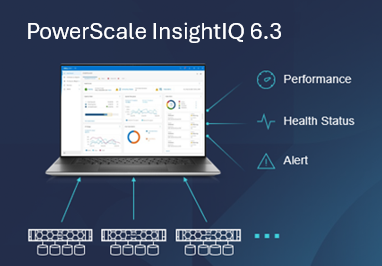
InsightIQ provides powerful performance and health monitoring and reporting functionality, helping to maximize PowerScale cluster efficiency. This includes advanced analytics to optimize applications, correlate cluster events, and the ability to accurately forecast future storage needs.
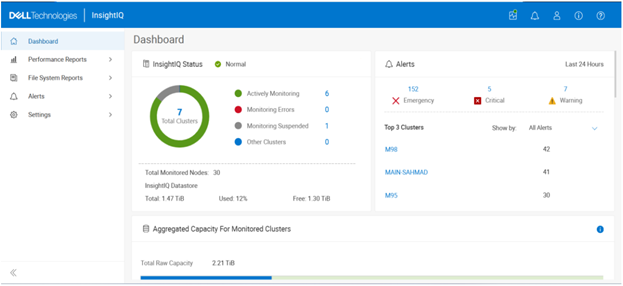
So what new functionality does this InsightIQ 6.3 release add to the PowerScale metrics and monitoring mix?
Additional functionality includes:
| Feature | IIQ 6.3 Functionality |
| Expanded Ecosystem | · Ecosystem support extended to include RHEL 10.0 and PowerScale OneFS 9.14. |
| Virtual Cluster Support | · Monitoring of virtual clusters on AWS or Azure to also use InsightIQ no matter where InsightIQ is located. |
| Support Granular Protocol Operations | · Break down performance metrics by S3 operations, helping analyze and troubleshoot S3 protocol issues. |
| Multiple values per category filtering | · Filter on multiple IP, host, node and protocol, enabling administrators comparing performance by variety of individuals against the same period. |
| SSO support | · IIQ users can enable SSO via Azure AD or ADFS. SAML only |
| Upgrade | · In-place, direct upgrade from 6.1 and 6.2 to 6.3 |
The new PowerScale InsightIQ 6.3 release introduces several significant enhancements aimed at improving flexibility, security, and usability. IIQ 6.3 expands platform compatibility by extending ecosystem support to Red Hat Enterprise Linux (RHEL) 10.0 and PowerScale OneFS 9.14.
InsightIQ 6.3 also adds support for monitoring virtual clusters deployed on AWS or Azure, allowing InsightIQ to monitor environments regardless of where the application itself is hosted. Performance visibility for file and object workloads has been enhanced through support for granular protocol operations, enabling metrics to be analyzed and broken down by individual file and/or object actions to streamline troubleshooting of protocol-related issues. Filtering capabilities have been improved to allow multiple values per category—such as IP addresses, hosts, nodes, and protocols—making it easier to compare performance across multiple entities within the same time range.
Security and operational integration are further strengthened with Single Sign-On support using SAML-based authentication through Microsoft ADFS or Azure Entra ID. InsightIQ 6.3 also supports direct, in-place upgrades from versions 6.1 and 6.2, simplifying the upgrade process for existing Scale and Simple deployments.
InsightIQ 6.3 introduces a new AI‑based assistant, too. This AI assistant is an intelligent, document‑aware companion designed to help users quickly find answers, understand product capabilities, and troubleshoot issues related to InsightIQ and PowerScale. The assistant draws its responses from supported documentation, including InsightIQ and PowerScale documentation, release notes, and knowledge base (KB) articles.
InsightIQ 6.3 continues to offer the same two deployment models as its predecessors:
| Deployment Model | Description |
| InsightIQ Scale | Resides on bare-metal Linux hardware or virtual machine. |
| InsightIQ Simple | Deploys on a VMware hypervisor (OVA). |
The InsightIQ Scale version resides on bare-metal Linux hardware or virtual machine, whereas InsightIQ Simple deploys via OVA on a VMware hypervisor.
InsightIQ v6.x Scale enjoys a substantial breadth-of-monitoring scope, with the ability to encompass 504 nodes across up to 20 clusters.
Additionally, InsightIQ v6.x Scale can be deployed on a single Linux host. This is in stark contrast to InsightIQ 5’s requirements for a three Linux node minimum installation platform.
Deployment:
The specific deployment options and hardware requirements for installing and running InsightIQ 6.x are as follows:
| Attribute | InsightIQ 6.3 Simple | InsightIQ 6.3 Scale |
| Scalability | Up to 10 clusters or 252 nodes | Up to 20 clusters or 504 nodes |
| Deployment | On VMware, using OVA template | RHEL, SLES, or Ubuntu with deployment script |
| Hardware requirements | VMware v15 or higher:
· CPU: 8 vCPU · Memory: 16GB · Storage: 1.5TB (thin provisioned); Or 500GB on NFS server datastore |
Up to 10 clusters and 252 nodes:
· CPU: 8 vCPU or Cores · Memory: 16GB · Storage: 500GB Up to 20 clusters and 504 nodes: · CPU: 12 vCPU or Cores · Memory: 32GB · Storage: 1TB |
| Networking requirements | 1 static IP on the PowerScale cluster’s subnet | 1 static IP on the PowerScale cluster’s subnet |
Ecosystem support:
The InsightIQ ecosystem includes VMware ESXi v9.0.1 in addition to VMware v8 OU3, Ubuntu 24.04 Online deployment and OpenStack RHOSP 21 with RHEL 9.6, SLES 15 SP4, and Red Hat Enterprise Linux (RHEL) versions 9.6 and 8.10. This allows customers who have standardized upon VMware to run an InsightIQ 6.3 Scale deployment image on an ESXi 9.0.1 hypervisor to monitor the latest OneFS versions.
| Qualified on | InsightIQ 6.2 | InsightIQ 6.3 |
| OS (IIQ Scale) | RHEL 8.10, RHEL 9.6, and SLES 15 SP4 | RHEL 8.10, RHEL 9.6, RHEL 10.0, SLES 15 SP4 |
| PowerScale | OneFS 9.5 to 9.13 | OneFS 9.7 to 9.14 |
| VMware ESXi | ESXi v8.0U3, and ESXi v9.0.1 | ESXi v8.0U3, and ESXi v9.0.1 |
| VMware Workstation | Workstation 17 Free Version | Workstation 17 Free Version |
| Ubuntu | Ubuntu 24.04 Online deployment | Ubuntu 24.04 Online deployment |
| OpenStack | RHOSP 21 with RHEL 9.6 | RHOSP 21 with RHEL 9.6 |
Similarly, in addition to deployment on VMware ESXi 8 and 9, the InsightIQ Simple version can also be installed for free on VMware Workstation 17, providing the ability to stand up InsightIQ in a non-production or lab environment for trial or demo purposes, without incurring a VMware licensing charge.
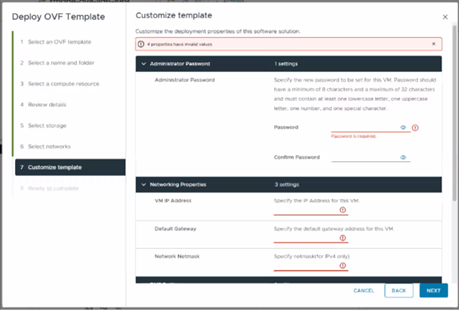
Additionally, the InsightIQ OVA template is under 5GB in size, and with an installation time of generally less than 12 minutes.
In the next article in this series, we’ll dig into the details of the additional functionality that debuts in this new InsightIQ 6.3 release.