The OneFS cluster inventory request API enables automated workflows to query detailed hardware and infrastructure inventory information from a PowerScale cluster. This capability, which was introduced in OneFS 9.12, is particularly useful for orchestration and discovery use cases, functioning in a manner similar to how LLDP is used within networking environments to collect device and topology data.
The new REST API provides comprehensive inventory details at both the node and backend fabric levels. Node‑level inventory includes general system information, baseboard management controller (BMC) data, network interface details, and attached storage drives. In addition, the response includes backend switch inventory information for supported Ethernet switches running firmware versions later than 10.5.2. InfiniBand switches are not currently supported by this feature. The API also returns the last known inventory state for any component that is offline at the time of the request, such as during upgrades or maintenance, allowing visibility into previously collected data even when a component is temporarily unavailable.
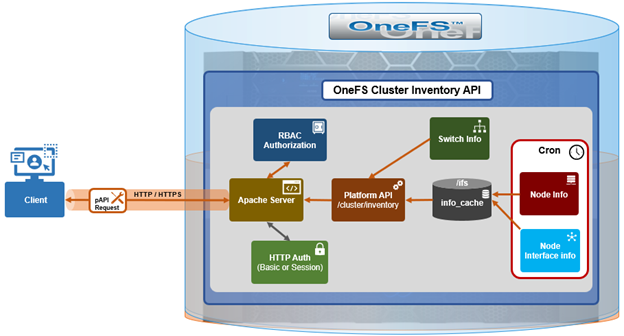
The inventory collection mechanism uses a producer‑consumer design model. On the producer side, cron jobs periodically query cached node and switch information and store the results as inventory cache files within the /ifs filesystem. For node‑level inventory, OneFS collects system and hardware details and saves them to the node information cache. For backend switches, inventory data is retrieved from the switch information cache. The cluster inventory request API also leverages the existing OneFS FlexNet service and its data store to collect network interface details such as IP addressing and interface configuration.
On the consumer side, a new platform API handler reads these cached inventory files from /ifs and assembles them into a consolidated inventory report, which is then returned to the requesting client. This design avoids real‑time polling of hardware during API requests, improving both performance and reliability.
Here are some details regarding the new cron jobs and event triggers:
| Inventory Update | Method | Storage | Location | Frequency |
| Node cache inventory update | Cron scheduled | Node info cache | /ifs/.ifsvar/db/node_info_cache/* | Every 12 hours |
| Backend switch inventory update | Cron scheduled | Switch info cache | /ifs/.ifsvar/db/switch_info_cache/* | Every 15 minutes |
| Event-driven node-level update | Event triggered | Node info cache | /ifs/.ifsvar/db/node_info_cache/* | Update on /ifs mount events |
| Node networking update | Event triggered | Flexnet DB | /ifs/.ifsvar/module/flexnet/* | IP network change events |
Several periodic and event‑driven mechanisms are used to keep the inventory data current. A scheduled cron job updates the node‑level inventory cache every twelve hours, while a separate cron job refreshes the backend switch inventory cache every fifteen minutes. For example:
# cat /etc/crontab | grep inventory

# run the gather inventory switches info every 15 minutes

*/15    *       *       *       *       root    isi_ropc /usr/bin/isi_gather_inventory -t switches

# run the gather inventory node cache info every 12 hours

0       */12    *       *       *       root    /usr/bin/isi_gather_inventory -t node
In addition to these scheduled updates, OneFS uses event‑driven triggers to refresh inventory data when relevant system changes occur. For example, when the /ifs filesystem is mounted, OneFS automatically triggers a node‑level inventory update to ensure the latest data is captured. Network‑related inventory data is updated in response to IP configuration changes via the FlexNet database.
The inventory cache data is stored in three locations within /ifs, consisting of the node inventory cache, the switch inventory cache, and the FlexNet database for network interface information. Customers access the inventory data through a single REST API endpoint provided by the OneFS platform API at /platform/<version>/cluster/inventory:
http://<x.x.x.x>:8080/platform/26/cluster/inventory
Or with python:
# python -c 'import isi.papi.basepapi as papi; resp = papi.get("/cluster/inventory");print(resp.body)'
Note that access to this inventory endpoint requires the requesting user to possess both the ‘ISI_PRIV_DEVICES’ and ‘ISI_PRIV_NETWORK’ RBAC privileges.
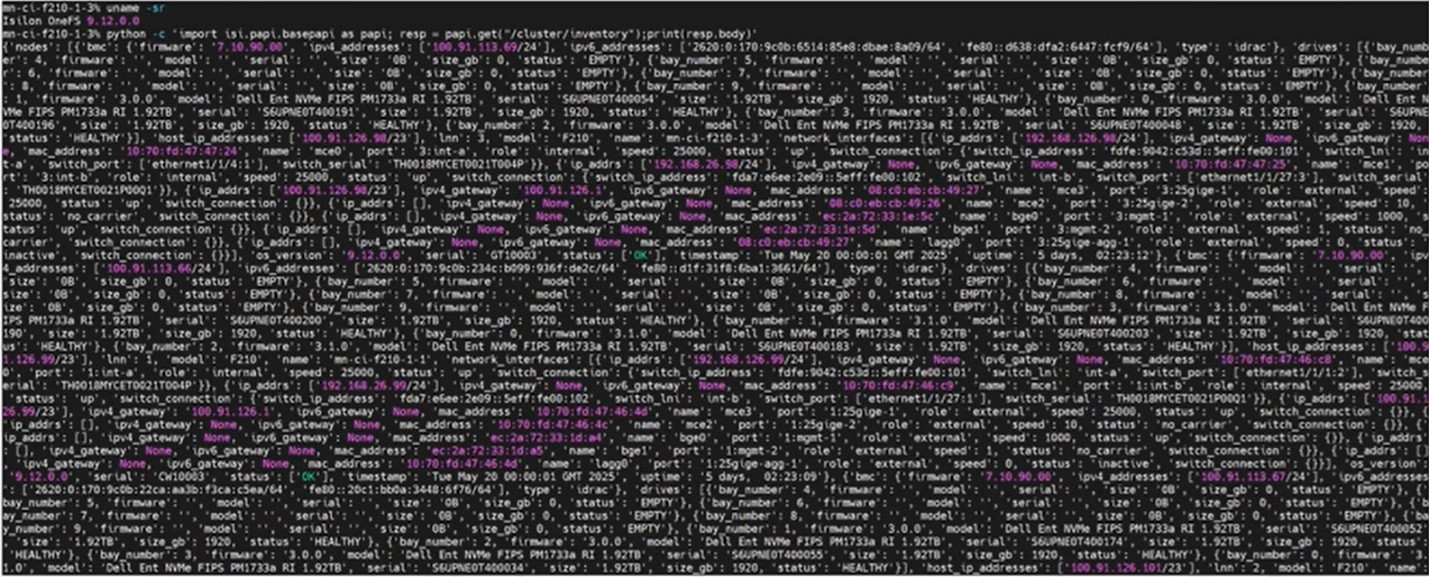
Here’s an example of this substantial inventory report from an F210 cluster:
When queried, the API returns a structured inventory report comprising two primary sections: a
- Nodes array
- Switches array
For example:
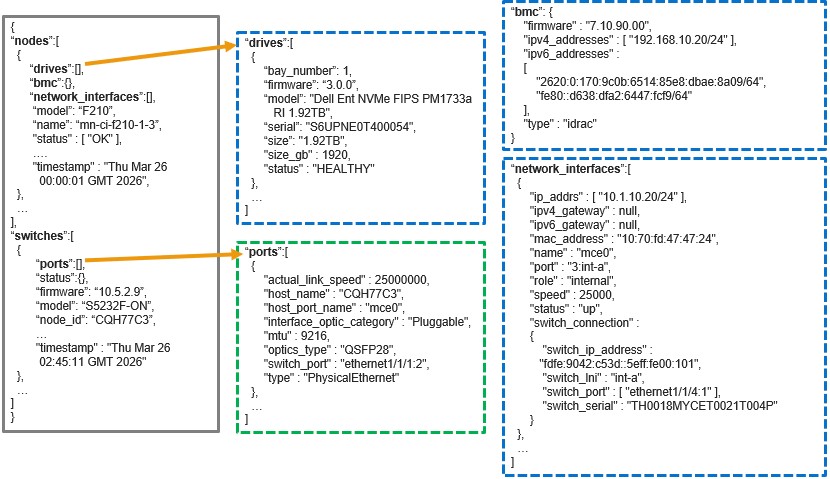
Specifically, each ‘nodes’ object represents an individual node in the cluster and includes nested objects for its drives, BMC details, and network interfaces. The ‘switches’ array represents the entire backend fabric, and may include multiple backend switches, with each switch object containing its corresponding port‑level information.
If a backend switch query fails, the behavior depends on whether valid inventory data was previously collected. If historical data exists, the API returns the last known switch inventory state. If the backend switch has never been successfully queried, the switches section of the response will be empty. This behavior ensures that the inventory report remains consistent and informative even when transient connectivity issues occur.
The PowerScale OneFS cluster inventory request API (`isi.papi.basepapi`) allows native Python integration for cluster inventory operations, offering more robust error handling and authentication management compared to direct HTTP requests. This native API approach is particularly well-suited for DevOps automation workflows, enabling seamless integration with configuration management tools, CI/CD pipelines, and infrastructure-as-code frameworks.
The fundamental approach to accessing cluster inventory through the OneFS cluster inventory request API involves importing the `isi.papi.basepapi` module and using the `get()` method to retrieve inventory data. This method provides automatic session management, authentication handling, and response parsing, simplifying the development of automation scripts. For example, here’s a basic python script to perform a node and drive inventory on a cluster:
#!/usr/bin/env python3

import isi.papi.basepapi as papi

try:

    resp = papi.get("/cluster/inventory")

    if resp.status == 200:

        inventory = resp.body

        nodes = inventory.get("nodes", [])

        drive_count = sum(len(node.get("drives", [])) for node in nodes)

        print(f"Cluster contains {len(nodes)} nodes")

        print(f"Total drives: {drive_count}")

    else:

        print(f"Error: {resp.status} - {resp.body}")

except Exception as e:

    print(f"API Error: {e}")
The script’s output is along the following lines:
# python3 inventory.py

Cluster contains 228 nodes

Total drives: 4342
From a troubleshooting perspective, OneFS also includes an internal ‘isi_gather_inventory’ command line (CLI) utility that can be used to manually initiate inventory collection.
| Component | Details |
| Node information | isi_gather_inventory -t node |
| Switch information | isi_gather_inventory -t switches |
| Log file | /var/log/messages |
Note that the ‘isi_gather_inventory’ CLI tool can only be run by root.
Separate commands are available to gather node inventory data or backend switch information, and related messages are written to the system log. The utility does not generate standalone log files, but inventory cache contents can be collected using standard OneFS support log packages, which include archived copies of the node and switch inventory cache data.
PowerScale inventory monitoring can be readily integrated into modern DevOps and infrastructure automation workflows. Within CI/CD pipelines—such as those implemented in Jenkins—the OneFS cluster inventory API enables automated pre-deployment validation, ensuring cluster health and configuration integrity before changes are applied. This approach supports continuous change detection and compliance verification as part of the delivery lifecycle.
Configuration management tools such as Ansible can leverage the cluster inventory API for dynamic inventory generation and real-time state validation. By querying current cluster conditions during playbook execution, automation workflows can enforce guardrails that ensure configuration changes occur only when predefined operational criteria are met. Similarly, Terraform can consume inventory data via external data sources, enabling adaptive infrastructure-as-code patterns that align deployments with the actual cluster state and reduce configuration drift.
GitOps workflows further benefit from PowerScale inventory integration by embedding automated validation checks into controllers and operators. Infrastructure changes are applied only when cluster conditions are healthy and compliant, providing a reliable mechanism for policy-driven storage management at scale.
Beyond deployment orchestration, the cluster inventory API supports a wide range of operational use cases. Capacity planning automation can be achieved through periodic collection of node and drive inventory data, combined with trend analysis to forecast growth and trigger proactive alerts as utilization thresholds are approached. Performance monitoring systems, such as Prometheus, can ingest inventory and performance metrics to provide end-to-end observability, enabling threshold-based alerting and long-term performance optimization.
Maintenance workflows can also be automated using the API’s health and hardware inventory data to detect failing components and initiate remediation processes. Integration with IT service management and procurement systems enables automated ticket creation and replacement part ordering, while detailed hardware metadata ensures compatibility and accuracy. Finally, regular synchronization with configuration management databases (CMDBs) ensures inventory accuracy, supporting change management, auditability, and compliance reporting across the storage environment.