PowerScale OneFS inline compression is a native data reduction feature that operates in the write path to improve storage efficiency by compressing data before it is written to disk. This helps OneFS drive data reduction efficiencies to support PowerScale’s contract-backed 2:1 data reduction ratio (DRR) guarantee. Plus, many workloads and deployments achieving substantially higher ratios in practice, including EDA up to 6.5:1 compression and life sciences up to 4:1 compression.

As part of a multi-stage pipeline that includes zero-block elimination and inline deduplication, OneFS evaluates data in 128 KB regions and selectively compresses those that achieve useful space savings, storing them as compact encoded containers while leaving incompressible data unmodified.

Because this process occurs inline, it not only influences capacity utilization, but also CPU consumption, write latency, and on-disk data layout. When used with suitably compressible workloads, inline compression can significantly reduce physical I/O and increase effective cluster capacity. However, its impact on performance and data placement calls for understanding and careful consideration, particularly for workloads with low compressibility or frequent small updates.
Inline compression is often a beneficial optimization, with modest additional CPU overhead reducing physical I/O demands while increasing effective storage capacity. For many workloads, this expectation holds true. However, for incompressible data sets, enabling OneFS inline compression can negatively impact performance as compared to running with no compression at all, and the penalty doesn’t abate instantly upon disabling the feature.
So for data such as encrypted backups, already-compressed media, highly random content, or when randomly overwriting data that was previously written in a compressed layout, performance can degrade in ways that are predictable once the underlying on-disk activities are understood. The crux is that inline compression is not just a logical efficiency feature. It changes how data is laid out and how writes are handled. That means the impact is not limited to capacity savings, since it can also influence write throughput, overwrite behavior, and the cost of small updates into existing files.
Without inline compression, OneFS stores data in 8 KB blocks, grouped into protection groups (e.g. 4+2 on a six node cluster/pool with a +2n FEC protection policy).
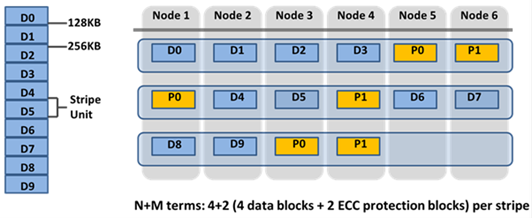
A 128 KB logical range (stripe unit) comprises 16 × 8 KB blocks laid out as plain data or parity blocks. Conversely, with inline data reduction enabled, every incoming write flows through a multi-stage pipeline before it ever touches disk:

| Order | Stage | Description |
| 1 | Zero block removal | Fully-zero 8 KB blocks are detected and stored as sparse references rather than real blocks. |
| 2 | Inline dedupe | 8 KB blocks are fingerprinted and matched against an in-memory hash table; duplicates are collapsed to shared references. |
| 3 | Inline compression | Surviving 128 KB regions are handed to the compression engine (zlib or lz4 depending on platform), which decides per-region whether the result is small enough to keep. |
| 4 | Protection and layout | Whatever comes out the other side (compressed container, deduped reference, or plain blocks) is then protected with FEC and laid out across the cluster. |
Note that every stage in this pipeline consumes cluster resources (CPU, etc) and adds write-path latency on every write – before OneFS knows whether it will deliver a benefit. Two things change on disk as a result:
- Data is chunked into 128 KB compression regions. Each region maps to 16 logical 8 KB blocks, and this is what the compression engine actually works on.
- Compressible regions are stored as compressed containers. When a 128 KB region compresses well enough, OneFS encodes it into a smaller bytestream using a node-specific algorithm (zlib, lz4, etc., fixed per platform and OneFS release). That region is no longer stored as 16 individual blocks, instead becoming a single compressed container.
Compressed regions are reported via the ‘isi get -DDO’ CLI command, as follows:
lbn 160: 10+2/2

...

5,5,1403920384:8192[DIRTY,COMPRESSED]#2

(sparse)[DIRTY,COMPRESSED]#3

...

{ebns={160,161},lbns={160,161,162,163,164},

encoded_size=10762,encoded_offset=0,

decoded_blocks=5,format=zlib}
The ‘encoded_size’ parameter returns the compressed byte count while ‘decoded_blocks’ reports how many logical 8 KB blocks live inside. The file looks identical from the outside, but, physically, the layout is where things get interesting since OneFS doesn’t know data is incompressible until it attempts to compress it. So even for data that will never compress, the engine still:
- Takes the 128 KB chunk.
- Runs it through the compression algorithm.
- Checks if compressing the chunk does save at least one full 8 KB block.
- Falls back to writing it as a chunk of normal, uncompressed 8 KB blocks.
On disk, those blocks show up tagged as ‘INCOMPRESSIBLE’. For example:
lbn 0: 10+2/2

...

6,2,1176543232:8192[DIRTY,INCOMPRESSIBLE]#16

...

1,5,1075085312:8192[DIRTY,INCOMPRESSIBLE]#12
No {encoded_size=…, decoded_blocks=…, format=…} stanza — just plain blocks. But the cluster still expended CPU and latency as a cost of trying. That overhead is real, and on CPU-constrained A-series archive nodes, it can show up directly in throughput.
That said, OneFS inline compression can be easily disabled entirely via the following CLI syntax:
# isi compression settings modify --enabled=False
With the ‘–enabled’ parameter set to ‘False’, new writes automatically skip the compression stage completely. Each 128 KB region goes straight to disk as plain 8 KB blocks — no attempt, no fallback, no overhead. The on-disk layout looks identical to the incompressible case above (without the INCOMPRESSIBLE tag), but the ‘attempted compression’ overhead never affected the write path.
However, note that disabling compression is not retroactive. Disabling compression afterwards doesn’t decompress or rewrite (re-lay-out) those regions in the background. That’s why you can disable compression cluster-wide and still see what looks like ‘compressed behavior’ on overwrites to older data. These regions can be identified by their ‘[COMPRESSED]’ tags and the compression metadata block in output from the ‘isi get -DDO’ CLI command.
With compression enabled, every write still flows through the full pipeline (zero-block removal > dedupe > compression) regardless of whether the data ends up compressed or uncompressed on disk. Hence, the latter case incurs CPU overhead and write-path latency for no additional space savings.
On platforms like the PowerScale A310, this translates to a measurable throughput drop for workloads dominated by encrypted backups, already-compressed files, or just very random data. Disabling compression and re-running against fresh data will often result in write throughput increasing noticeably.
Note that the penalty for incompressible data is often more significant than for genuinely compressible or dedupe-able data. When data compresses or deduplicates well, inline data reduction actually reduces the amount of physical I/O hitting the drives, due to fewer blocks to write, less parity to compute, less backend traffic. The CPU overhead is more than offset by the I/O savings, resulting in better throughput and lower latency than without data reduction at all. In contrast, uncompressible data yields none of that I/O relief, but only the overhead.
When over-writing existing compressed data, a compressed region is a 128 KB atomic unit. This means that even a 4 KB update in the middle of a region will force OneFS to:
- Read the full 128 KB compressed container.
- Decompress it in memory.
- Merge the changed bytes.
- Re-encode and rewrite the full 128 KB region.
This read–decompress–modify–rewrite (R-DM-W) penalty applies even with inline compression disabled compression. If the region on disk was written compressed, the overwrite path still must treat it that way until the full file is physically rewritten with an uncompressed layout.
Even over-writing regions that are ‘incompressible’ incur an overhead. Because a file written with compression enabled may contain a mix of compressed and uncompressed (incompressible) regions, OneFS has to route partial-chunk overwrites through the compression stage to stay consistent across the 128 KB boundary. It can’t know ahead of time whether a given 128 KB range is fully uncompressed, so it has to treat the whole chunk conservatively.
This means that even ‘incompressible regions (i.e. data that never compressed in the first place) still carry a partial-overwrite penalty if compression was enabled when the file was initially written. Only a full 128 KB chunk replacement can safely bypass the compression engine entirely for that region, which is usually achieved by overwriting the file completely. This often manifests itself as:
- New writes returning to full speed immediately upon disabling compression.
- Overwrites remaining sluggish until the underlying data is physically rewritten as uncompressed — regardless of whether the on-disk blocks are tagged ‘[COMPRESSED]’ or ‘[INCOMPRESSIBLE]’.
Investigating and troubleshooting unexpected performance with inline compression typically involves:
- First, confirming whether the data is actually compressible by verifying data reduction statistics at the cluster or path level:
# isi statistics data-reduction view

# isi compression stats view

# isi_storage_efficiency /ifs/path/to/file
If compression is ‘enabled’ but little to no space savings are evident, the data almost certainly isn’t compressible.
- Next, check the actual on-disk layout:
# isi get -DDO /ifs/path/to/file
Specifically, the ratio of ‘[COMPRESSED]’ to ‘[INCOMPRESSIBLE]’ tags in the ‘PROTECTION GROUPS’ section, and the ‘Metatree logical blocks:’ summary at the end.
- Separate new writes from overwrites when testing:
This is the most important thing to get right when benchmarking. Use fresh test files written after any compression settings reconfiguration, and run tests in two distinct phases:
- Phase 1 — Initial write (e.g. –overwrite=0 in fio)
- Phase 2 — Overwrite / update (e.g. –overwrite=1 with random updates into the same files)
The following is a simple example ‘fio’ test overwriting an existing file at random offsets:
fio --name=random-update \

--filename=data.bin \

--rw=randwrite \

--bs=1M \

--size=10G \

--direct=1 \

--overwrite=1 \

--ioengine=libaio \

--iodepth=64
Then compare:
| Test | What it reveals |
| Initial writes: compression on vs. off | The cost of the “try to compress” overhead |
| Overwrites into files written with compression on | The R-DM-W penalty on legacy compressed regions |
| Overwrites into files written with compression off | Your true baseline uncompressed overwrite performance |
- Rule out unrelated bottlenecks.
Before assuming a compression issue, validate that the cluster is not hitting CPU, disk, or network limits for other reasons:
# isi statistics system list --nodes=all --format=top

# isi statistics drive list --format=top --sort=Queued

# isi statistics client list --format=top

# isi statistics protocol list --format=top
The goal is to distinguish between hitting the limits of the compression design from saturating the hardware. Having confirmed that legacy compressed layout is hurting performance, disabling compression, then physically rewriting the data is generally the cleanest approach. The following options can be used to ‘rehydrate’ the data back to a regular uncompressed layout.
1. Disable compression globally (or via file pool policy)
# isi compression settings modify --enabled=False
2. Or rewrite via intra-cluster copy using the ‘cp’ CLI command:
# cp -a /ifs/source/path /ifs/target/path
3. Use SyncIQ or SmartSync to replicate/copy to another /ifs location within the cluster.
Once rewritten, the ‘isi get -DDO’ CLI will show only uncompressed blocks, and overwrites follow the efficient block-level path rather than a read-decompress-modify-write (R-DM-W) operation.
4. If rewriting from the application is impractical, the SmartPoolsTree job can be used instead. Note that this method requires SmartPools to be licensed across the cluster, and the job settings configured as follows:
a) Set the SmartPoolsTree job to a ‘retune’ restriping strategy via gconfig:
# isi_gconfig -t job-config jobs.types.smartpoolstree.find_goal=retune

# isi_gconfig -t job-config jobs.types.smartpoolstree.restripe_goal=retune
b) Then run against the target path
# isi job start SmartPoolsTree --paths=/ifs/path/to/data
Or, for a more direct, non-job-engine approach, use isi set (no SmartPools license required):
# isi set -r -g retune /ifs/path/to/data
5. Alternatively, if SmartPools is unlicensed or using the job engine is undesirable, for a more direct, the ‘isi set’ CLI command can be used as follows:
# isi set -r -g retune /ifs/path/to/data
Note the case sensitivity of the ‘isi set’ ‘-r’ and ‘-R’ flags: The lowercase ‘-r’ flag forces an immediate restripe of the file using the specified goal (-g retune), effectively decompressing and re-laying-out the data without going through the job engine. The uppercase ‘-R’ flag applies the goal recursively to an entire directory tree, which can be an extremely time-consuming operation with little visibility or control over speed and duration. Scripting ‘isi set -r -g retune’ to iterate over a list of hot files or a specific subdirectory is typically preferred, providing improved control. Because this operation trades background I/O and capacity (by giving back compression savings), it’s best targeted at specific uncompressible or otherwise hot datasets rather than an entire archive tier.
Inline data reduction in OneFS can be highly beneficial for the appropriate workloads, but its underlying on-disk behavior can lead to unexpected outcomes if unfamiliar with its operation. Key takeaways include:
- Incompressible data still incurs a compression cost when compression is enabled: CPU resources are consumed and write-path latency increases even when no actual space savings occur. In some cases, this overhead can be more impactful than with compressible data. When data compresses or deduplicates effectively, reduced I/O often offsets CPU usage and can even improve performance. With incompressible data, however, there are no such benefits—only added overhead.
- Both compressed and incompressible regions are subject to read–decompress–modify–write (R-DM-W) overhead on every overwrite, regardless of the current compression setting.
- Turning off compression benefits new writes right away, but it does not change the layout of data that was already written in a compressed format.
- Data originally written as incompressible continues to experience 128 KB partial-chunk overhead during partial overwrites until those areas are either fully overwritten or the entire file is replaced.
- A solid understanding of how OneFS implements data reduction—and a clear view of your workload characteristics before enabling it—helps avoid these pitfalls entirely.
As with many things in life, compression usage is a cost-benefit conundrum. Once the underlying mechanics are understood, their behavior is consistent and predictable. The key is to evaluate, measure, and quantify, and apply the knowledge and findings proactively, rather than reacting after performance issues arise in production.