Standing up a new PowerScale cluster has always required a human armed with a serial cable. Before a node can join a cluster and receive a routable IP address through the standard network management path, an administrator must physically connect to the node’s serial console and manually configure the front-end network interface. For environments deploying a handful of nodes occasionally, this is a minor inconvenience. For large-scale datacenter deployments — where dozens or hundreds of nodes may need to be provisioned at once — the serial console dependency becomes a meaningful operational bottleneck, requiring scheduled on-site time from qualified engineers for what is essentially a repetitive, low-complexity task.
In addition to time, serial provisioning is inherently sequential, potentially error-prone, and tricky to automate. Plus it typically involves coordination between the storage admin and whoever has physical access to the racks. In a hyperscale or rapidly growing environment, the time spent cabling and typing IP addresses into consoles is time that scales linearly with node count.
OneFS 9.14 takes another decisive step in the journey to PowerScale Zero Touch Provisioning (ZTP) via native DHCP support for a cluster’s front-end network interfaces. This enables nodes to obtain their network configuration automatically from a remote DHCP server, rather than requiring manual IP assignment at the serial console.
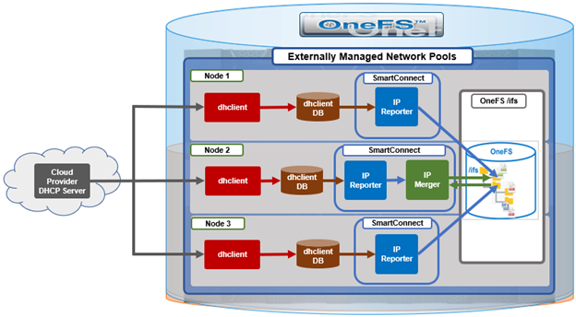
To appreciate ZTP’s benefits in OneFS 9.14, it helps to understand how OneFS already handles dynamic IP assignment in certain contexts. For several release now, OneFS has used an externally managed allocation method for network pools, backed by two SmartConnect components: The IP Reporter and the IP Merger.

The IP Reporter parses external IP sources — such as DHCP lease files — and generates IP report files on the cluster filesystem (for example, /ifs/.ifsvar/modules/flexnet/ip_reports/DHCP/node.1). The IP Merger, which runs as a single instance per cluster, reads these reports and merges the discovered IP information into the Flexnet network configuration. Flexnet is the OneFS subsystem responsible for maintaining the authoritative view of which IPs are assigned to which interfaces on which nodes. Both components run on a fixed interval — roughly a one-minute cycle — so newly obtained leases are picked up automatically within a short window.
This SmartConnect-based path already exists and works in cloud deployments of OneFS, where DHCP is always enabled and the cloud provider’s DHCP server assigns IPs automatically. What was missing for on-premises deployments was the DHCP client management layer — the component responsible for actually running dhclient on the appropriate interfaces and producing the lease files that the existing IP Reporter can then parse. ZTP closes that gap with a new purpose-built daemon and a new cluster-level configuration surface, while deliberately reusing the proven IP Reporter/Merger pipeline rather than reinventing it.
The new component introduced in OneFS 9.14 is ‘isi_dhcp_manager_d’, a daemon that runs on every node in the cluster.
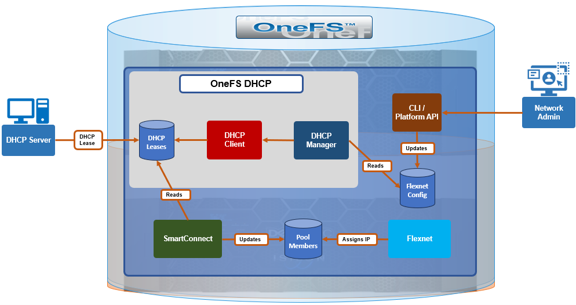
Under the purview of MCP, the DHCP manager acts as a mini service controller, spawning and supervising one dhclient process per configured front-end interface. It monitors these processes for health, and continuously compares which interfaces should have DHCP and which nodes are excluded against the actual state (i.e. which dhclient processes are currently running) and corrects any drift. If an interface is added to the included list, the manager starts a client for it, and if one is removed or a node is excluded, the manager stops the corresponding client. This declarative model is what allows the same configuration to be safely re-applied across reboots, upgrades, and transient interface flaps without the need for manual intervention.
The end-to-end flow works as follows. The network administrator uses the CLI or PAPI to configure DHCP for the cluster. The DHCP Manager reads that configuration from Flexnet and starts a dhclient process on each included interface — for example, interface class ext-2 mapped to the physical NIC on a given node. Each dhclient negotiates with the DHCP server and writes a lease file to /var/db/dhclient/lease.<nic>. The DHCP Manager log consolidates the output from every dhclient it spawns into a single file, which makes debugging the DHCP protocol exchange considerably easier. The existing IP Reporter detects the lease, parses the assigned address, and writes an IP report; the IP Merger then merges it into the Flexnet configuration, and the Flexnet daemon performs the actual IP assignment to the interface.
Importantly, IPs remain assigned and tracked by Flexnet throughout, with ‘dhclient’ creating only the lease file. DHCP-obtained addresses show an allocation method of ‘externally_managed’, distinguishing them from statically assigned IPs. The DHCP Manager does not start or terminate dhclient for interfaces that are not link-up, and it automatically terminates any orphaned dhclient processes it finds running at startup.
One of the more useful behaviors demonstrated in ZTP is automatic network pool management. When a DHCP-assigned IP arrives, OneFS checks for an existing network pool covering that IP range. If one exists, the new IP is added to it, otherwise a pool is created automatically, along with the DHCP-obtained IP range is associated with it. The naming convention is of the general ‘groupnet0.subnet0.pool_dhcp’ format. As additional nodes obtain leases, their addresses are merged into the same pool’s IP ranges.
Critically, DHCP coexists with existing allocation methods on the same interface. An interface class such as ext-1 that already carries a statically assigned IP can also be enrolled in DHCP and receive an additional DHCP-assigned address. The result is an interface that holds both a static IP and a DHCP IP simultaneously, associated with multiple pools. This flexibility means DHCP can be layered onto an existing statically configured cluster without displacing any current addressing. This is an important property for brownfield environments, where removing a working static configuration to adopt DHCP would likely be a non-starter.
Zero Touch Provisioning in OneFS 9.14 introduces three configurable dimensions for DHCP management:
| Capability | Description |
| Enable or disable DHCP cluster-wide | A single toggle governs whether DHCP is active across the cluster. |
| Specify which interface classes participate | Admins define an ‘included’ list of interface classes that should be managed via DHCP. |
| Exclude specific nodes | Individual nodes can be added to an ‘excluded’ list by Logical Node Number (LNN). assigned IPs remain untouched. This is useful when specific nodes have static requirements or when rolling DHCP out incrementally. |
A single toggle governs whether DHCP is active across the cluster. DHCP is disabled by default on both fresh installs and upgrades from earlier OneFS versions, so existing deployments are never affected unless an administrator explicitly opts in. When disabled, the ‘isi_dhcp_manager_d’ service is present but not running.
Administrators define an ‘included’ list of interface classes (ie. ext-1, ext-2, mgmt-1) that should be managed via DHCP. Interfaces not in the list keep their existing allocation method.
Individual nodes can be added to an ‘excluded’ list by Logical Node Number (LNN). An excluded node will not run dhclient for any interface class regardless of the included list, and any DHCP-obtained IPs on that node are removed — while its statically assigned IPs remain untouched. This is useful when specific nodes have static requirements or when rolling DHCP out incrementally.
All DHCP configuration lives under the ‘isi network dhcp’ CLI command family, which supports both ‘view’ and modify ‘options’. The general configuration flow is as follows:
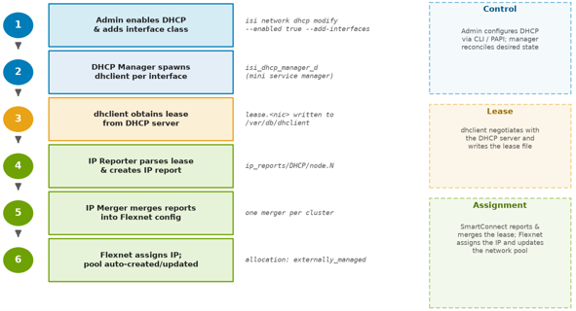
The following CLI commands can be used to configure and manage DHCP. For example, to view current state:
# isi network dhcp view
To enable DHCP cluster-wide:
# isi network dhcp modify --enabled true
To enroll interface classes, for example external and management interfaces:
# isi network dhcp modify --add-interfaces ext-1,ext-2
To remove an interface class:
# isi network dhcp modify --remove-interfaces ext-2
To exclude a node (for example LNN 4):
# isi network dhcp modify --add-excluded-nodes 4
To disable DHCP entirely:
# isi network dhcp modify --enabled false
Any modification triggers an interactive confirmation prompt — a safeguard against accidentally severing front-end connectivity if DHCP is the only IP source:
# isi network dhcp modify --enabled false
You are modifying DHCP settings. Please ensure you have front-end
connectivity via other statically/dynamically assigned IPs as you
may lose connectivity. Would you like to proceed? (yes/[no]):
The ‘–force’ flag can be added to suppress this prompt for scripted workflows. The same functionality is exposed through the PAPI at /platform/25/network/dhcp for orchestration tooling, and the DHCP configuration is captured hourly as telemetry via that endpoint.
When DHCP is disabled, the DHCP Manager terminates every dhclient process, removes the DHCP-obtained leases, and gracefully shuts down the daemon itself. Two pieces of state intentionally persist, however. First, the included-interfaces and excluded-nodes configuration is not cleared — so re-enabling DHCP later reapplies the previous configuration without re-entry. Second, any auto-created pool is not deleted; it remains (with no IP ranges) and is reused under the same name when DHCP IPs return within the same subnet. This persistence is a deliberate convenience: it means disabling DHCP is a reversible, low-friction operation rather than a destructive one.
| Aspect | Cloud | On-Premises |
| Default state | Always enabled, not configurable | Disabled by default, admin-configurable |
| DHCP management | MCP manages dhclient directly | isi_dhcp_manager_d daemon manages dhclient |
| DHCP server | Cloud provider managed | Customer network managed |
| Node exclusion | Not applicable | Supported via LNN excluded list |
Note that while cloud deployments already rely on DHCP, they do not yet take advantage of this new configuration surface or daemon — bringing the two models together is planned for a follow-up release.
When DHCP-assigned IPs are not appearing as expected, the following systematic diagnostic sequence will usually cover the most common failure points:
| Step | CLI Command | Expected Result |
| DHCP enabled? | isi network dhcp view | Enabled: True |
| Node not excluded? | isi network dhcp view | Node LNN absent from Excluded Nodes list |
| Service running? | isi services -a isi_dhcp_manager_d | Service reported as enabled |
| dhclient active? | ps aux | grep dhclient | One dhclient: <nic> per configured interface |
| Lease file present? | ls /var/db/dhclient/ | lease.<nic> present per interface |
| IP bound to interface? | ifconfig <nic> | grep inet | inet <ip-address> present |
A good approach is generally to work through the above checklist from top to bottom, with each step gating the next. If DHCP shows disabled or the node appears in the excluded list, nothing downstream will happen by design. If the service is enabled but no dhclient is running, the interface’s link may not be up, or the interface class may not be in the included list. If dhclient is running but no lease file appears, the issue is almost certainly between the node and the DHCP server (reachability, scope exhaustion, or relay configuration). And if a lease exists but no IP is bound, the bottleneck is typically the IP Reporter/Merger cycle or a pool conflict during the merge.
The principal log file locations include:
| Log file | Detail |
| /var/log/isi_dhcp_manager_d.log | Primary daemon log, including consolidated dhclient output. |
| /var/log/isi_smartconnect | IP Reporter and IP Merger logs covering lease parsing and pool merging. |
| /var/db/dhclient/lease.<nic> | Raw lease files, confirming what the DHCP server offered. |
| /ifs/.ifsvar/modules/flexnet/flx_config.xml | Stored DHCP configuration as seen by Flexnet |
There are also three new DHCP-related CELOG events flags introduced in OneFS 9.14 in support of ZTP:
| Event | Severity | Meaning / Action |
| SW_SC_DHCP_CLIENT_RESTART | Warning | dhclient restarted 5+ times in 15 min — check network stability and DHCP server availability |
| SW_SC_IPMERGE_FAILED | Warning | DHCP IP could not be merged into Flexnet (e.g., address already in a static pool) — check for IP pool conflicts or invalid pool configuration |
| SW_SC_DHCP_LEASE_REBIND | Critical | Lease renewal failed, IP at risk of expiring — verify DHCP server is reachable |
With OneFS 9.14’s ZTP capability, on-prem PowerScale nodes can now receive their front-end network addresses from a DHCP server automatically, without serial console access during provisioning. Built on the existing SmartConnect IP Reporter and Merger infrastructure, the new isi_dhcp_manager_d daemon slots cleanly into the Flexnet pipeline, auto-creating network pools, allowing static and DHCP addresses to coexist on the same interface, and preserving configuration across enable/disable cycles — all without displacing any existing IP allocation mechanism. Removing the requirement for serial console access from the provisioning path helps set the stage for broader zero-touch deployment automation in future releases.