Introduced in OneFS 9.14, the PowerScale S3 Lifecycle Management feature enables policy‑driven object management within PowerScale S3 buckets by supporting the automated deletion of objects based on administrator‑defined criteria such as object age, size, or key prefix. These lifecycle policies are applied consistently to both existing and newly created objects within a bucket. Backend processing is managed by the OneFS Job Engine, which performs daily evaluations of configured lifecycle rules and creates per‑bucket tasks to traverse bucket directories and remove objects that meet the specified conditions.
Newly introduced S3 API support in OneFS 9.14 and later includes the following endpoints:
| API Endpoint | Description |
| PutBucketLifecycleConfiguration | Sets the lifecycle configuration for the bucket and replaces any existing one. User must be the bucket owner to create the lifecycle configuration. |
| GetBucketLifecycleConfiguration | Returns the current lifecycle configuration for the bucket. User must be the bucket owner to get the lifecycle configuration. Will return a ‘NoSuchLifecycleConfiguration’ error if a configuration is not found. |
| DeleteBucketLifecycle | Deletes the lifecycle configuration for the bucket. User must be the bucket owner to delete the lifecycle configuration. |
Additionally, the following S3 endpoints are also updated in the OneFS 9.14 release and require the following read and write permissions:
| S3 Endpoint | Read Permission | Write Permission |
| CompleteMultiPartUpload | x | x |
| CopyObject | x | x |
| GetObject | x | |
| HeadObject | x | |
| PutObject | x | x |
Note that all the above operations have an updated ‘x-amz-expiration’ response header if ‘objectexpiration’ has been configured. For example:
HTTP/1.1 200 OK … x-amz-expiration: expiry-date="Wed, 30 Apr 2027 00:00:00 GMT",rule-id=“3024" Content-Length: 434234 Content-Type: text/plain
S3 bucket lifecycle behavior In OneFS 9.14 enables the bucket owner to define lifecycle management policies that are enforced using root‑level credentials. Lifecycle processing respects object lock protections, ensuring that immutable objects are preserved and not subject to deletion. Lifecycle rules may define expiration based on either a relative time period measured in days since the object’s last modification or an absolute date and timestamp, and can incorporate filtering criteria based on object size and key prefix, including support for backdated expiration rules. Each bucket supports a maximum of 1,000 lifecycle rules.
Note that the OneFS CLI, WebUI, or platform API do not currently support bucket lifecycle configuration, which can only be performed though the S3 API. Additionally, object tag–based filtering is not supported in OneFS 9.14, nor are object transition policies, ‘ExpiredObjectDeleteMarker’ configurations, noncurrent version expiration or transition rules, or versioned objects.
Under the hood, the core S3 bucket lifecycle management architecture is as follows:
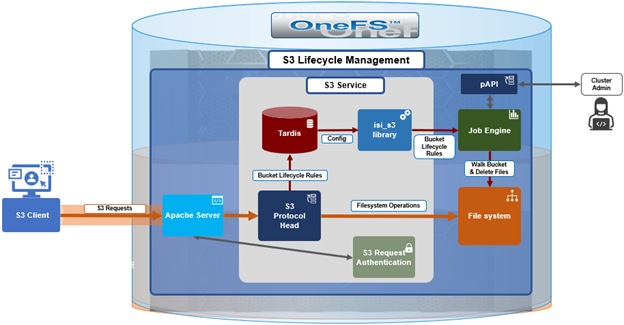
At a high level, an S3 client sends a request containing the desired lifecycle rule(s), and the cluster’s S3 protocol head saves that into OneFS’ Tardis configuration database. The OneFS Job Engine retrieves the lifecycle configuration and then proceeds to walk the bucket and file structure, deleting files based upon the expressed rules.
The lifecycle processing is handled by the ‘S3Lifecycle’ job, which, by default, runs daily at 1:00 AM. Scheduling and priority for this job are optionally configurable through the OneFS CLI by a privileged local user:
# isi job types view S3Lifecycle

         ID: S3Lifecycl

Description: Manage S3 object lifecycle per bucket lifecycle policy.

    Enabled: Yes

     Policy: LOW

   Schedule: every day at 1:00am

   Priority: 6
During execution, the job logs all deleted objects and generates an S3Lifecycle job report, which can be viewed with the following OneFS CLI command:
# isi job reports view <job id>
Job report output is along the lines of the following:
S3Lifecycle[22] phase 1 (2026-04-30T11:18:06) --------------------------------------------- Files 3 Directories 1 Apparent size 5300 Physical size 52224 Objects Deleted 2 Objects Evaluated 3 Objects No Action 1 JE/Error Count 0 JE/Time elapsed 3 seconds JE/Time working 3 seconds S3Lifecycle[22] Job Summary --------------------------- Final Job State Succeeded Phase Executed
As above, this report summarizes the number of objects deleted and skipped, and logs detailed information about all deleted objects to /var/log/isi_job_d_s3_lifecycle.log.
The following table outlines the parameters that are supported for use within the lifecycle XML configuration body.
| Configuration | Description |
| ID | Unique identifier for the rule. |
| Status | If ‘Enabled’, the rule is currently being applied. If ‘Disabled’, the rule is not currently being applied. This is a mandatory field. |
| Expiration | |
|
Specifies expiration of the object in the form of date timestamp. |
|
Specifies expiration of the object in the form of days. |
| Filter | |
|
Minimum object size to which the rule applies. |
|
Maximum object size to which the rule applies. |
|
Prefix identifying one or more objects to which the rule applies. |
|
Apply a logical ‘AND’ to two or more rules inside the operator. |
The ‘PutBucketLifecycleConfiguration’ request takes the following form:
PUT /?lifecycle HTTP/1.1 Host: Bucket.s3.amazonaws.com x-amz-expected-bucket-owner: ExpectedBucketOwner <?xml version="1.0" encoding="UTF-8"?> <LifecycleConfiguration xmlns="http://s3.amazonaws.com/doc/2006-03-01/"> <Status>Enabled</Status> <Rule> … </Rule> <Rule> … </Rule> </LifecycleConfiguration>
As for the rules themselves, these can be temporal in nature. For example, expressing expiration as a date and/or time box:
<Rule> <Expiration> <Date>2029-03-02T12:30:00</Date> <Days>365</Days> </Expiration> </Rule>
The ‘date’ tag can be used to specify a time stamp, so objects in the bucket that exist during that date expression (for instance, 12:30 on March 2nd, 2029 in the example above) will be deleted. The ‘date’ tag can include a date in the past. In addition to an explicit date, a rule can also include a ‘days’ tag, which, in the example above, targets objects that haven’t been modified in 365 days, marking them for deletion.
Rules can also specify maximum and/or minimum object size in bytes. For example, greater than 1KB (1024) bytes but less than 50KB (51200 bytes):
<Rule> <Filter> <ObjectSizeGreaterThan>1024</ObjectSizeGreaterThan> </Filter> <Rule> </Rule> <Filter> <ObjectSizeLessThan>51200</ObjectSizeLessThan> </Filter> </Rule> Rules filters can also specify data locality. For example: <Rule> <Filter> <And> <ObjectSizeGreaterThan>18124</ObjectSizeGreaterThan> <ObjectSizeLessThan>92686</ObjectSizeLessThan> <Prefix>/data/path/</Prefix> </And> </Filter> </Rule>
Note that, when specifying more than one filter, they must be wrapped in the <And> element, as above.
A bucket’s lifecycle configuration can be queried with the ‘GetBucketLifecycleConfiguration’ request. For example:
GET /?lifecycle HTTP/1.1 Host: Bucket.s3.amazonaws.com x-amz-expected-bucket-owner: ExpectedBucketOwner In contrast, a lifecycle can also be removed with the ‘DeleteBucketLifecycle’ request. For example: DELETE /?lifecycle HTTP/1.1 Host: Bucket.s3.amazonaws.com x-amz-expected-bucket-owner: ExpectedBucketOwner
In addition to bucket lifecycles, OneFS 9.14 also provides lifecycle management for incomplete S3 MPU operations. Specifically, this is the ability to craft lifecycle rules which clean up incomplete multipart uploads, helping reclaim space from abandoned large object transfers.
| Configuration | Description |
| AbortIncompleteMultipartUpload | |
|
Number of days after the system aborts an incomplete MPU. |
Rule parameters include the number of days after MPU initiation and the data path prefix. For example:
<Rule> <AbortIncompleteMultipartUpload> <DaysAfterInitiation>7</DaysAfterInitiation> </AbortIncompleteMultipartUpload> <Filter> <Prefix>/path/to/data/</Prefix> </Filter> </Rule>
Note that the ‘DaysAfterInitiation’ parameter is limited in scope to incomplete multipart uploads (MPUs) and does not apply to standard objects or completed MPU uploads, while the lifecycle expiration rules similarly exclude incomplete MPUs.
In the next article in this series, we’ll look at some practical examples of how to configure, use, and validate S3 bucket lifecycle management in OneFS 9.14 and later releases.