The previous article in this series provided an overview of the S3 multipart upload (MPU) functionality in PowerScale OneFS. Now, we’ll turn our attention to extended MPU functionality introduced in OneFS 9.13, which allows PowerScale S3 users to track the status and completion progress of their MPU completion in real time.
MPU Completion is an existing standard S3 API that has been extended to return three additional response headers, Completion‑Id, Fast‑Path, and Completion‑State‑Info, when MPU completion progress tracking is enabled. MPU Completion Progress is a newly added extended S3 API that reports real‑time progress information in the response, including whether the fast path is used, the total number of parts and recovery parts, and the counts of completed and recovered parts.
Disabled by default, MPU completion progress activation on a PowerScale cluster is controlled by the boolean ‘MPUCompletionProgressEnable’ gconfig parameter, which must be set to value ‘1’, followed by a restart of the S3 service, for it to take effect. The CLI syntax for this procedure is as follows:
# isi_gconfig registry.Services.lwio.Parameters.Drivers.s3.MPUCompletionProgressEnable=1

# isi services s3 disable

# isi services s3 enable
Starting with OneFS 9.13, multipart upload (MPU) completion can follow either a fast or slow path based on part integrity and ordering, with fast‑path completion occurring when all parts are the same size except possibly the last, parts are retransmitted only in the event of failure while preserving their original sizes, every uploaded part is included in the final object, and part numbers are contiguous beginning at 1 with no gaps. When these conditions are satisfied, OneFS performs a highly optimized assembly process. If any condition is violated, OneFS falls back to the slow path, which requires more processing time.
OneFS 9.13 and later also include the following completion progress API endpoint:
GET /{bucket}/{object-key}?completionId=<completionId>&uploadId=<uploadId>
When progress tracking is enabled, the ‘CompleteMultipartUpload’ response includes a ‘completionID’, which is especially valuable for very large uploads where completion can take a noticeable amount of time, as it allows clients to determine whether the operation is using the fast or slow path, view the total number of parts involved, and retrieve real‑time completion metrics through the ‘Completion‑State‑Info’ data.
The components marked in green in the following diagram are introduced in OneFS 9.13, with ‘CompleteMultipartUpload’ used to assemble all the uploaded parts, and ‘GetMPUCompletionProgress’ to check the progress.

| Component | Action |
| S3 Protocol Head | S3 Protocol Head processes requests from S3 clients. |
| Likewise Iomgr | Likewise Iomgr provides IO APIs. Both MPU requests need to call the Iomgr in order to read and write progress status file(s). |
| FS Layer | File system layer performs IO requests from upper layers. |
| Gconfig | Gconfig is in charge of storing user configuration to enable or disable this feature. |
| Other | The other components are mainly responsible for processing the two requests from S3 clients. |
The following table details the various completion states:
| Scenario | Message | Progress |
| Super fast path | Super fast path with parts 1..N sequential, will finish quickly and completionID will be useless. | No need to check |
| Fast path | Fast path with parts 1..N sequential, but x parts need to be recovered. May fallback to slow path in case of errors. | To check recovery progress |
| Slow path: only one part | Not a fast path due to only one part in total and this part needs to be recovered. | To check slow path progress |
| Slow path: part number not contiguous | Not a fast path due to non-contiguous part numbers. Please verify intent, or abort and restart the session. | To check slow path progress |
| Slow path: part number not from 1 | Not a fast path due to part numbers not starting from 1. Please verify intent, or abort and restart the session. | To check slow path progress |
| Slow path: different part size | Not a fast path due to the size of non-last parts differs from the 1st part size. Please verify intent, or abort and restart the session. | To check slow path progress |
For example, the following shows the HTTP 200 response headers from a fast path MPU operation on a large file:
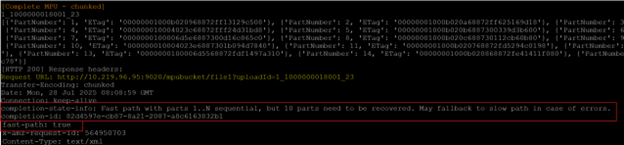
Pertinent information returned includes:
| Attribute | Example Output |
| completion-state-info: | Fast path with parts 1..N sequential, but 10 parts need to be recovered. May fallback to slow path in case of errors. |
| completion-id: | 82d4597e-cb87-8a21-2087-a8c6163632b1 |
| fast-path: | true |
For non‑MPU objects, OneFS can compute MD5-based ETags when configured (use Md5 for Etag and Validate Content Md5).
Note that objects created via multipart upload do not use a simple MD5 hash as the ETag.
As with AWS S3, MPU ETags may be composite values, and applications requiring MD5 semantics must account for this.
When it comes to investigating and troubleshooting S3 MPU issues, the following error response codes can be helpful:
| Status | Description | Troubleshooting |
| 400 Bad Request | Unexpected upload Id
Unexpected completion Id format |
Check if upload ID is correct.
Check if completion id is correct (it can be got from CompleteMPU response header), cannot be blank. |
| 403 Forbidden | No correct permission. | Only bucket owner, MPU completion initiator, or users who have been granted READ/FULL_Control permissions on the bucket can do this operation. |
| 404 NoSuchCompletionId | Failed to find MPU complete progress. | Check if the completion has already done.
Check if completion ID is correct (ID can be found in the CompleteMPU response header) |
It’s also worth nothing that Multipart upload is distinct from SigV4 streaming (chunked upload, available in OneFS 9.3 and later), which controls how payloads are signed and transmitted rather than how objects are partitioned. SigV4 chunked transfer encoding can be used with or without MPU.
Comparison:
| Characteristic | Multipart Upload | SigV4 Chunked Upload |
| Purpose | Breaks object into logical parts | Breaks HTTP payload into signed chunks |
| Identifiers | uploadId, part numbers | SigV4 per‑chunk signatures |
| Relationship | Independent mechanisms | Can be used together |
So, in summary, OneFS S3 MPU follows the same client-facing operation and semantics as AWS S3:
CreateMultipartUpload → UploadPart / UploadPartCopy → CompleteMultipartUpload / AbortMultipartUpload, plus listing operations.
Internally, OneFS stores multipart upload segments in ‘.s3_parts_<uploadId>’, assembles those parts into the final object upon completion, and removes the part files after either completion or abort, while OneFS 9.13 and later add MPU enhancements such as fast‑ or slow‑path determination for completion and real‑time progress monitoring via ‘GetMPUCompletionProgress’, including response headers like ‘Completion-Id’ and ‘Fast-Path’.