Hot on the heels of the OneFS 9.13 launch comes the unveiling of the innovative new PowerScale InsightIQ 6.2 release.
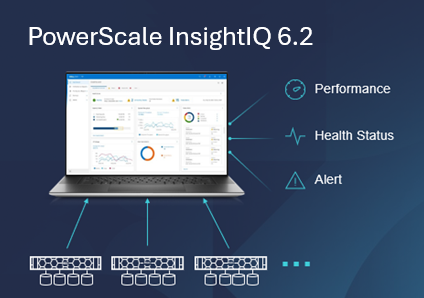
InsightIQ provides powerful performance and health monitoring and reporting functionality, helping to maximize PowerScale cluster efficiency. This includes advanced analytics to optimize applications, correlate cluster events, and the ability to accurately forecast future storage needs.
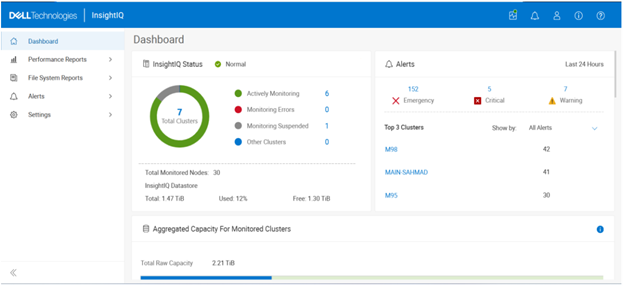
So what new goodness does this InsightIQ 6.2 release add to the PowerScale metrics and monitoring mix?
Additional functionality includes:
| Feature | IIQ 6.2 Functionality |
| Expanded Ecosystem | · Ecosystem support extended to include ESXi v9.0.1 and PowerScale OneFS 9.13. |
| Trusted Domain Support | · Enables seamless authentication and unified access across domains, while ensuring automatic trust management. |
| Customizable partitions and networking | · Enables the user to select datastore path of their choice.
· Resolves network conflicts. |
| Datastore Migration | · Admin can change the datastore path after installation. |
| Link & Launch | · Simplifies WebUI access directly from IIQ Dashboard and Reports. |
| Configurable Network Port | · Enables monitoring PowerScale with user defined TCP port. |
The PowerScale InsightIQ 6.2 release introduces several significant enhancements aimed at improving flexibility, security, and usability. One of the key features is Trusted Domain, which enables seamless authentication and unified access across multiple domains while ensuring automatic trust management for secure and efficient operations. Another important enhancement is Customizable Partition and Network Settings, allowing administrators to select a preferred data store path and configure network settings to resolve potential conflicts, thereby providing greater control over system configuration.
The release also includes Data Store Migration, which gives administrators the ability to change the data store path after installation. This feature offers improved flexibility and operational advantages, which will be demonstrated in the upcoming walkthrough and demo sessions. Additionally, the Link and Launch capability simplifies navigation by enabling direct access to the web UI from the InsightIQ dashboard and reports, reducing the complexity of switching between InsightIQ and PowerScale applications. Finally, the introduction of a Configurable IQ Listening TCP Port allows users to customize the listening port for InsightIQ, enabling tailored monitoring of PowerScale environments.
InsightIQ 6.2 continues to offer the same two deployment models as its predecessors:
| Deployment Model | Description |
| InsightIQ Scale | Resides on bare-metal Linux hardware or virtual machine. |
| InsightIQ Simple | Deploys on a VMware hypervisor (OVA). |
The InsightIQ Scale version resides on bare-metal Linux hardware or virtual machine, whereas InsightIQ Simple deploys via OVA on a VMware hypervisor.
InsightIQ v6.x Scale enjoys a substantial breadth-of-monitoring scope, with the ability to encompass 504 nodes across up to 20 clusters.
Additionally, InsightIQ v6.x Scale can be deployed on a single Linux host. This is in stark contrast to InsightIQ 5’s requirements for a three Linux node minimum installation platform.
The specific deployment options and hardware requirements for installing and running InsightIQ 6.x are as follows:
| Attribute | InsightIQ 6.2 Simple | InsightIQ 6.2 Scale |
| Scalability | Up to 10 clusters or 252 nodes | Up to 20 clusters or 504 nodes |
| Deployment | On VMware, using OVA template | RHEL, SLES, or Ubuntu with deployment script |
| Hardware requirements | VMware v15 or higher:
· CPU: 8 vCPU · Memory: 16GB · Storage: 1.5TB (thin provisioned); Or 500GB on NFS server datastore |
Up to 10 clusters and 504 nodes:
· CPU: 8 vCPU or Cores · Memory: 16GB · Storage: 500GB Up to 20 clusters and 504 nodes: · CPU: 12 vCPU or Cores · Memory: 32GB · Storage: 1TB |
| Networking requirements | 1 static IP on the PowerScale cluster’s subnet | 1 static IP on the PowerScale cluster’s subnet |
The InsightIQ ecosystem itself is also expanded in version 6.2 to also include VMware ESXi v9.0.1 in addition to VMware v8 OU3, Ubuntu 24.04 Online deployment and OpenStack RHOSP 21 with RHEL 9.6, SLES 15 SP4, and Red Hat Enterprise Linux (RHEL) versions 9.6 and 8.10. This allows customers who have standardized on VMware to now run an InsightIQ 6.2 Scale deployment image on an ESXi 9.0.1 hypervisor to monitor the latest OneFS versions.
| Qualified on | InsightIQ 6.1 | InsightIQ 6.2 |
| OS (IIQ Scale Deployment) | RHEL 8.10, RHEL 9.6, and SLES 15 SP4 | RHEL 8.10, RHEL 9.6, and SLES 15 SP4 |
| PowerScale | OneFS 9.5 to 9.12 | OneFS 9.5 to 9.13 |
| VMware ESXi | ESXi v8.0U3 | ESXi v8.0U3, and ESXi v9.0.1 |
| VMware Workstation | Workstation 17 Free Version | Workstation 17 Free Version |
| Ubuntu | Ubuntu 24.04 Online deployment | Ubuntu 24.04 Online deployment |
| OpenStack | RHOSP 21 with RHEL 9.6 | RHOSP 21 with RHEL 9.6 |
Similarly, in addition to deployment on VMware ESXi 8 and 9, the InsightIQ Simple version can also be installed for free on VMware Workstation 17, providing the ability to stand up InsightIQ in a non-production or lab environment for trial or demo purposes, without incurring a VMware licensing charge.
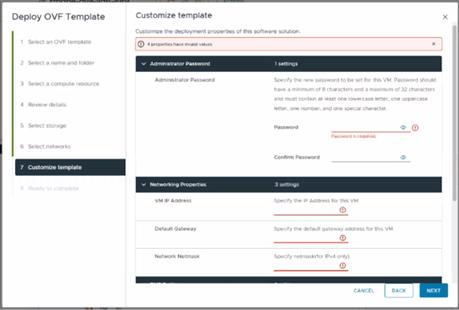
Additionally, the InsightIQ OVA template is now under 5GB in size, and with an installation time of generally less than 12 minutes.
In the next article in this series, we’ll dig into the details of the additional functionality that debuts in this new InsightIQ 6.2 release.