Cluster configuration management on PowerScale has historically required root access, directly via SSH, and without any of the privilege granularity or audit trail that modern operational environments expect. To address this, OneFS 9.15 introduces RBAC-controlled API endpoints for two of the most commonly used internal configuration tools: The gconfig global configuration database and cluster-wide sysctl management.
Prior to OneFS 9.15, three root-only tools handled cluster configuration state:
- ConfigMgr for configuration backup and restore,
- isi_gconfig for reading and writing the gconfig global configuration database
- isi_sysctl_cluster for managing cluster-wide kernel sysctl parameters.
All three require OS-level root access, carry no RBAC controls, and produce a limited audit trail. For secure and large enterprise clusters, this can cause some operational challenges.
When a field engineer needed to inspect or adjust a sysctl or gconfig value to diagnose a performance issue or validate a configuration drift, they currently required root shell access. This level of elevated access is something that many organizations restrict or prohibit for compliance reasons. Additionally, automation tooling would face the same hurdles when managing configuration state. Specifically, limited API endpoints and only direct SSH. And because changes to sysctl.conf logged only a free-text comment rather than a structured audit entry, tracing who changed what and when necessitated manually parsing log files.
OneFS 9.15 simplifies the debugging, tracing, and analysis of configuration changes by providing access to both tools through the same pAPI framework used everywhere else in OneFS, with full privilege checking, an allowlist control layer, and audit trail support.
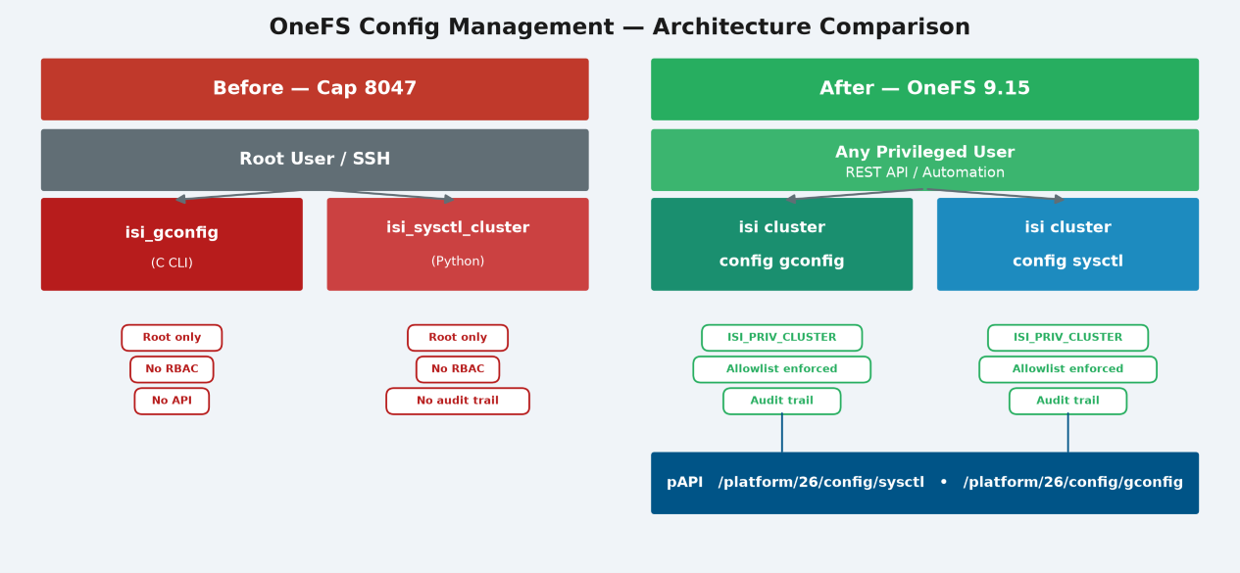
Two new CLI commands are introduced in OneFS 9.15, both backed by pAPI and enforcing the same privilege and allowlist controls:
| CLI Command | Description |
| isi cluster config sysctl | · Reads and writes cluster-wide kernel sysctl parameters, replacing isi_sysctl_cluster |
| isi cluster config gconfig | · Reads and writes the gconfig global configuration database, replacing isi_gconfig |
Both CLI commands are backed by pAPI endpoints, located under ‘/platform/26/config/sysctl’ and ‘/platform/26/config/gconfig’ respectively, and both require the ‘ISI_PRIV_CLUSTER’ RBAC privilege.
For example, using the sysctl endpoints via the ‘curl’ web tool:
# curl -i -u <uname:passwd> -k ‘https://x.x.x.x:8080/platform/26/config/syscls?describe’
Similarly, for gonfig:
# curl -i -u <uname:passwd> -k ‘https://x.x.x.x:8080/platform/26/config/gconfig?describe’
Query arguments include:
| Argument | Description |
| changed_only=<boolean> | When true, returns only keys whose current value differs from the factory defaults. |
| description=<boolean> | If true, includes the human-readbale description for each sysctl in the response. Applies to all GET modes. |
| keys=<string> | Comma-separated list of sysctl keys to retrieve. |
| lnn=<integer> | Logical node number of the node to query. Default is local node. |
| show_defaults=<boolean> | When true, includes the factory default values alongside the current value, for easy comparison. |
| trees=<boolean> | Only returns the list of available tree names without any key data when set to true. Only applies to the root gconfig endpoint. |
| verify=<boolean> | When true, includes a verification object for single-tree endpoints. |
To list all the sysctl keys:
# curl -i -u <uname:passwd> -k ‘https://x.x.x.x:8080/platform/26/config/syscls/keys?description=true’
And to list all the gconfig keys:
# curl -i -u <uname:passwd> -k ‘https://x.x.x.x:8080/platform/26/config/gconfig/keys?describe’
And for the main gconfig tree:
# curl -i -u <uname:passwd> -k –-location –-request GET ‘https://x.x.x.x:8080/platform/26/config/gconfig/trees/main?describe’
For a particular sysctl:
# curl -i -u <uname:passwd> -k ‘https://x.x.x.x:8080/platform/26/config/syscls/keys=efs.bam.acl_policies?description=true’
Or to configure a sysctl value:
# curl -s -u <uname:passwd> -k -X PUT ‘https://x.x.x.x:8080/platform/26/config/syscls?sync_wait=true&timeout=30’ -H ‘Content-Type: application/json’ -d ‘{

   “keys”: [

      {“efs.bam.acl_policies”: “1”, “explanation”: “Sync wait reconfig”}

   ]

}’
Or a gconfig value:
# curl -s -u <uname:passwd> -k -X PUT ‘https://x.x.x.x:8080/platform/26/config/gconfig/trees/main?keys=fsa.file_ext_char_cnt.fsa.max_mode_mem,celog.celog_settings.max_email_size’ \

  -H ‘Content-Type: application/json’ \

 -d ‘{

   “keys”:

[

{

“name” : “celog.celog)settings.max_email_size”,

“value” : “5242800”

},

{

“name” : “fsa.file_ext_char_cnt”,

“value” : “4”

},

{

“name” : “fsa.max_node_mem”,

“value” : “8600980”

},

{

“tree” : “main”,

},

]

}’
Since root access is no longer needed, automation scripts, orchestration tooling, and fleet management systems can interact with cluster configuration through standard REST endpoints, similar to the API interaction with SmartQuotas, network configuration, or any other pAPI-managed OneFS resource.
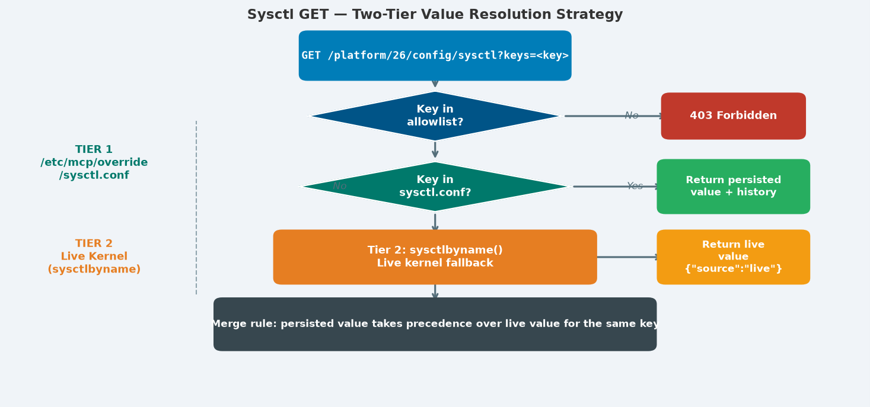
One of the more technically interesting aspects of the sysctl implementation is how ‘GET’ requests resolve values. The endpoint uses a two-tier lookup strategy that mirrors the way sysctl state actually works in OneFS.
- Tier 1 is the persisted override store: /etc/mcp/override/sysctl.conf. This file holds the sysctl values that have been explicitly set and need to survive reboots. A ‘GET’ request for a specific key first checks here. If the key is found, the response includes the persisted value along with the change history comment — who set it, when, under which OneFS version, and what the previous value was. This history alone makes the new API significantly more useful for diagnostics than the former root CLI.
- Tier 2 is the live kernel fallback. If a key isn’t in the persisted store, the handler falls back to sysctlbyname() and returns the current live kernel value, tagged with {“source”: “live”} to make the distinction explicit. For subtree queries, where the request specifies a prefix like ‘efs.bam’ rather than a specific leaf, the response merges persisted values from sysctl.conf with the live kernel enumeration. Persisted values take precedence for any key present in both.
The ‘PUT’ path for sysctls adds a useful set of control properties. The transient flag applies a change to the running kernel without writing to sysctl.conf, which can be useful for vetting-out a value before committing it permanently. The atomic flag causes all keys in a multi-key ‘PUT’ to succeed or fail together as a single transaction. The ‘sync_wait’ flag blocks the API response until MCP has propagated the change to all nodes, with a configurable timeout. This is essential for automation scripts that need to verify cluster-wide consistency before proceeding. Additionally, the ‘revert_to_default’ flag resets a key to its compiled-in default, something that previously required knowing the default value and issuing an explicit set.
The gconfig endpoint follows the same pAPI framework, adding structured access to the global configuration tree that was previously available only through ‘isi_gconfig’. A particularly useful addition is the description parameter on ‘GET’ requests which, when included, returns the compiled-in default value alongside the current value for each key. This helps with identifying any deviation from the baseline, and something that was previously difficult to do without inspecting code.
Both the sysctl and gconfig endpoints are governed by an allowlist file, located at ‘/etc/ifs/config_mgr/cluster_config_allowlist.json’. This provides a second control layer beneath RBAC. So even a user with ‘ISI_PRIV_CLUSTER’ cannot access a key that isn’t present in the allowlist, nor write to a key marked ‘read_only’. The allowlist also includes a blocklist section, and blocked entries take precedence over wildcard allow patterns. This prevents a specific entry blocking a security-sensitive key from being accidentally overridden by a broad allow rule.
Secret fields in gconfig such as passwords, credentials, and similar sensitive values (identified internally by ‘gci_is_secret_option’) are automatically masked as ‘{“***”}’ in all ‘GET’ responses. This masking is enforced at the API layer, rather than left to the caller to handle.
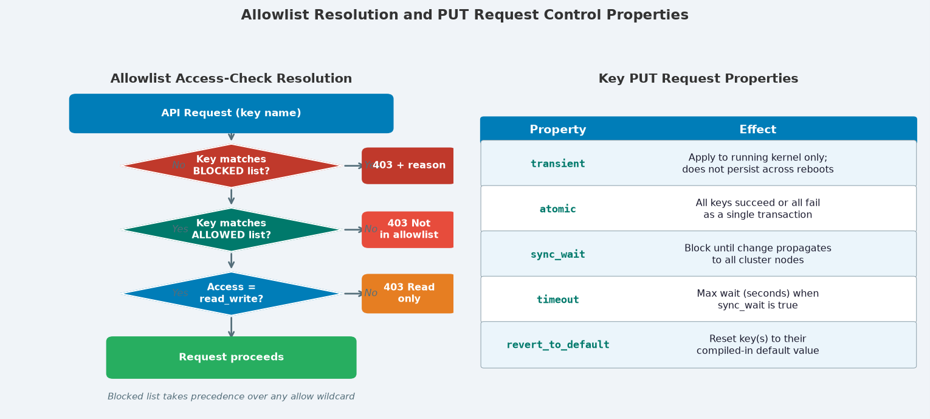
With the allowlist access-check resolution, blocked entries are evaluated first and take precedence over allow wildcards. The ‘PUT’ request properties control transaction scope, persistence, and cluster-wide propagation behavior.
A typical use case for the new gconfig endpoint can involve exporting a point-in-time snapshot of current configuration state to a JSON file, then comparing two snapshots taken prior and post-change or upgrade. This provides a structured way to compare configuration state across a time period, which has traditionally involved ad hoc scripting running as root via the CLI.
When OneFS protocol auditing is enabled, all changes made through the new API endpoints produce structured audit log entries recording the username, timestamp, and privilege used. This is a direct improvement over the previous state, where ‘isi_sysctl_cluster’ changes were recorded only as free-text comments in ‘sysctl.conf’ and ‘isi_gconfig’ writes went to a changelog file with no privilege attribution. This new default behavior can be a considerable benefit to organizations subject to change management requirements and/or security audits.
A common issue is a ‘403 Forbidden’ response when a key isn’t accessible through the new endpoints. The resolution path can be determined by checking the ‘/etc/ifs/config_mgr/cluster_config_allowlist.json’ file to confirm the key is present and has read_write access, verifying it isn’t overridden by a blocked entry, and using the keys list endpoint (‘GET /platform/26/config/gconfig/<TREE>/keys’) to enumerate which keys are currently accessible. The pAPI daemon log ‘/var/log/isi_papid’ records API requests and validation failures, /var/log/messages logs gconfig commit errors and daemon issues, and the ‘/etc/mcp/override/sysctl.conf’ file retains a history of persisted sysctl changes.
| Issue | Details |
| 403/500 errors, request failures | PAPI daemon logs – API request handling, authentication, handler errors Check logs at /var/log/isi_papi_d.log |
| 409 conflicts, system-level errors | General system logs – gconfig commit errors, daemon issues Check logs at /var/log/messages |
Before issuing a ‘PUT’ to an unfamiliar key, a good practice is to use the ‘description=true’ parameter on a ‘GET’ request to review the default value. Similarly, ‘transient=true’ can be used to test a sysctl change against the running kernel before committing it to sysctl.conf.
So with OneFS automated configuration, parameters that previously required root access and SSH are now accessible through a standard, privilege-checked REST API, with allowlist control, masked secret fields, atomic transactions, cluster-wide propagation confirmation, and a structured audit trail. The two new CLI commands (‘isi cluster config sysctl’ and ‘isi cluster config gconfig’) provide both administrators and automation tooling with a consistent, auditable interface to cluster configuration state that dovetails nicely with modern operational workflows.