Within the ubiquitous AWS S3 protocol spec, multipart upload (MPU) allows a large object to be more efficiently accessed by splitting it into smaller parts that are uploaded independently. It is used to improve reliability and performance by enabling parallel uploads and retrying only failed parts instead of restarting the entire operation. MPU is typically employed for objects larger than 5GB, and supports objects up to 5TB in size and 10,000 parts. The process involves initiating a multipart upload to obtain an upload ID, uploading individual parts (which can occur in any order), and completing the upload so the service assembles the parts into a single object, with the option to abort the upload to discard any uploaded parts.
The PowerScale S3 protocol implementation has supported Multipart Upload (MPU) since OneFS 9.0, leveraging the ‘HTTP 100-continue’ header during upload initiation. MPU enables OneFS to ingest or copy large objects in discrete sections, which improves performance, resilience, and workflow flexibility.
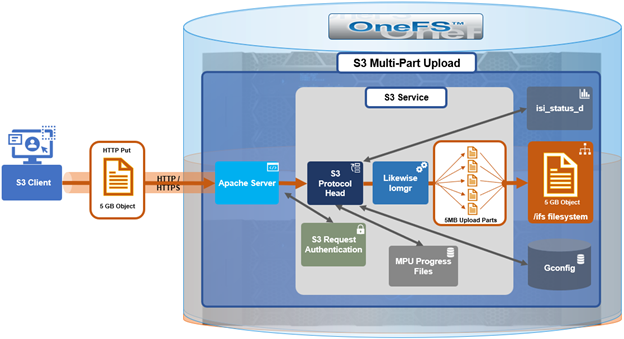
Using MPU provides several advantages, including increased throughput by allowing multiple parts to be uploaded in parallel, reduced recovery time because only failed parts must be retransmitted after a network interruption, and the ability to pause and resume uploads over extended periods. There is no automatic expiration for an MPU, so it must be explicitly completed or aborted by the client. MPU also enables upload workflows in which the final object size is not yet known, allowing applications to begin transmitting data as it is generated.
When operating over a stable, high‑bandwidth network, multipart upload maximizes bandwidth utilization by distributing parts across parallel upload threads. On less reliable networks, MPU improves resilience by isolating network failures to individual parts, avoiding the need to restart the entire upload operation. OneFS S3 Multipart Upload allows clients to transfer large objects as a series of independent parts that are later combined into a final object. To support this workflow, OneFS implements the full set of standard S3 MPU operations, including:
| Operation | Definition |
| CreateMultipartUpload | Initiates a new multipart upload and returns an ‘uploadId’ that uniquely identifies the MPU session. The client must reference this ‘uploadId’ for all subsequent part upload and completion operations. |
| UploadPart | Uploads a single part of the object. The client specifies a ‘part number’ (1–10,000) and the ‘uploadId’. Each part is stored independently until the MPU is completed or aborted. |
| UploadPartCopy | Creates a part by copying a range of bytes from an existing object instead of sending new data. The resulting copied part becomes part of the MPU associated with the specified ‘uploadId’ and ‘part number’. |
| ListParts | Returns metadata for the parts that have already been uploaded for a given MPU. Useful for resuming interrupted uploads or verifying which parts have been received. |
| CompleteMultipartUpload | Finalizes the MPU. The client submits an ordered list of ‘part numbers’ and associated ‘ETags’. The service assembles the parts into the final object and removes temporary part storage. |
| AbortMultipartUpload | Cancels an in‑progress MPU and discards all previously uploaded parts associated with the ‘uploadId’. After aborting, the MPU cannot be resumed. |
| ListMultipartUploads | Returns a list of all in‑progress multipart uploads within a bucket. Useful for monitoring active sessions or identifying abandoned uploads. |
OneFS S3 MPU also adheres to the standard S3 limits which include the following:
| Item | Limit |
| Maximum number of multipart uploads returned in a list multipart uploads request | 1000 |
| Maximum number of parts per upload | A maximum of 10,000 parts per object is permitted. |
| Maximum number of parts returned for a list parts request | 1000 |
| Maximum object size | 5 TiB |
| Part numbers | 1 to 10,000 (inclusive) |
| Part size | 5 MB to 5 GB. There is no minimum size limit on the last part of a multipart upload. |
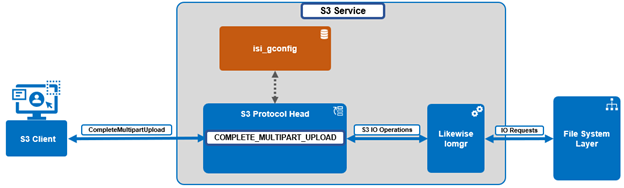
Under the hood, OneFS S3 MPU operates as follows:
| Component | Action |
| S3 Protocol Head | S3 Protocol Head processes requests from S3 clients. |
| Likewise Iomgr | Likewise Iomgr provides IO APIs. |
| FS Layer | File system layer performs IO requests from upper layers. |
| Gconfig | Gconfig is in charge of storing user configuration parameters. |
| Other | The other components are mainly responsible for processing the two requests from S3 clients. |
When an S3 multipart upload is initiated, OneFS creates a hidden ‘dot’ directory to store uploaded parts. The naming convention for this hidden directory is as follows:
.isi_s3_parts_<uploadId>
The hidden directory is placed under the bucket’s backing directory within the /ifs filesystem. For example:
# ls -lh .isi_s3_parts_1_1000000038001_1
total 276961
-rwx------ +   1 root  wheel   595M May 29 07:20 #31214989
-rwx------ +   1 root  wheel   1.0G May 29 07:27 #52428800
-rwx------ +   1 root  wheel     0B May 29 07:15 .1
-rwx------ +   1 root  wheel     0B May 29 07:27 .2
-rwx------ +   1 root  wheel     0B May 29 07:20 .3
-rwx------ +   1 root  wheel    50M May 29 07:37 1
Each uploaded part is saved as an individual ‘dot’ file within this directory and is keyed by its part number. During UploadPart or UploadPartCopy, the part is written to .isi_s3_parts_<uploadId>, associated with its part number (1–10,000), and the ‘uploadId’ returned by ‘CreateMultipartUpload’. Parts remain in this directory until the client completes the MPU, at which point they are assembled into the final object, or the MPU is aborted, which removes the part files and releases the associated space.
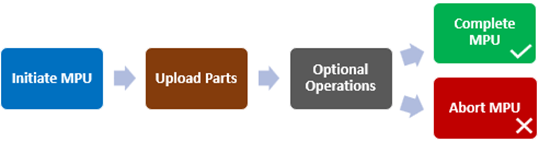
From the S3 client’s perspective, the MPU workflow operates as follows:
| Action | HTTP Request | Details |
| Initiate MPU | POST /bucket/object-key?uploads | OneFS returns an uploadID and creates .s3_parts_<uploadId> internally. |
| Upload Parts | PUT /bucket/object-key?partNumber=N&uploadId=<uploadId> | Each part is written as a file inside the corresponding parts directory. |
| Optional Operations | GET /bucket/object-key?uploadId=<uploadId>
GET /bucket?uploads |
List part and/or List multipart uploads |
| Complete MPU | POST /bucket/object-key?uploadId=<uploadId> | The client provides an XML list of part numbers and ETags. OneFS assembles the final object and removes the .s3_parts_<uploadId> directory and its contents. |
| Abort MPU | DELETE /bucket/object-key?uploadId=<uploadId> | OneFS deletes the stored parts and frees the associated space. |
In the next article in this series, we’ll take a look at the MPU status tracking and reporting functionality that was introduced in OneFS 9.13.