In the spirit of seamless cluster upgrade experience, OneFS 9.12 and later releases enable automatic migration of customized FTP settings during upgrade. This helps avoid potential customer impact caused by lost custom configurations when up-revving a PowerScale cluster.
Prior to OneFS 9.12, edits to the FTP daemon’s template file, vsftpd.conf, were not persistent across OneFS upgrades. As such, any custom configuration changes made by customers to PowerScale’s default supported FTP configuration would be overwritten during a cluster code upgrade operation. This necessitated the manual migration and replacement of the vstftpd.conf file post-cluster upgrade.
Such a situation could have potentially resulted in disruptions to SFTP workflows for a period while the old custom configuration file was retrieved and copied back into place.
This new durable configuration functionality in OneFS 9.12 and later is designed to enhance the customer upgrade experience by ensuring that customized FTP settings are automatically migrated during system upgrades. The primary objective is to prevent disruptions that could occur if custom configuration data is overwritten.
Currently, any changes made to temporary configuration files—such as those supporting customized SFTP settings—are lost during an upgrade. These settings are often essential for workflows that involve scaled content support.
Under the hood, a dedicated template file is introduced to store customized settings, ensuring they are not overwritten during upgrades. Additionally, new migration logic is implemented which transfers existing custom configurations into this new template during the upgrade process.
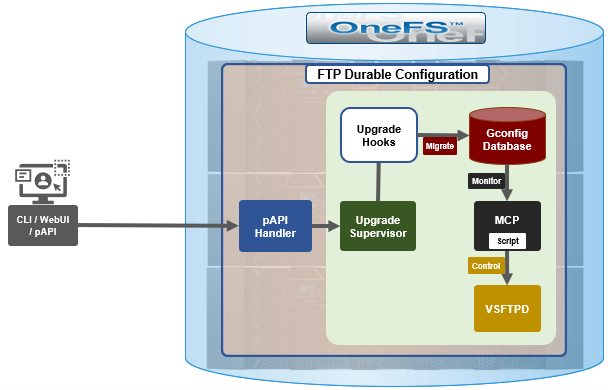
Architecturally, upgrade hooks detect any customized settings and migrate them into the new template file. Additionally, the configuration generation process is enhanced such that the final VSFTP configuration is an amalgam of the original template plus the new custom template.
The FTP upgrade workflow in OneFS 9.12 and later consists of the following components:
| Component | Description |
| Pre-Upgrade Phase | Identify customized settings. |
| Post-Upgrade Phase | Save these settings into the new template file and apply them. |
| Backup | A backup of all relevant files is created for safety purposes. |
| Pre-Check | Prevent customers from adding unsupported files to the preserved configuration set. |
| Health Check | Detect modifications to temporary files and issue warnings if changes could be lost during downgrade or upgrade. |
First, the pre-upgrade phase identifies any customized settings. Next, during the post-upgrade phase, these settings are saved into the new template file and applied. As a precaution, a backup of all relevant files is also created. The pre-check phase prevents customers from adding unsupported files to the preserved configuration set. Furthermore, a health check is introduced to detect modifications to temporary files and issue appropriate warnings if changes could potentially be lost during downgrade or upgrade. Details of this new FTP configuration healthcheck include:
| Healthcheck Component | Details |
| Checklist Name | check_vsftpd_template_changes |
| Healthcheck Description | The possible outputs of this item are: * OK: The /etc/mcp/templates/vsftpd.conf file is synchronized on all nodes in the cluster and no customized changes are found. * WARNING: File /etc/mcp/templates/vsftpd.conf is included in the /etc/mcp/override/user_preserve_files.xml unexpectedly, The upgrade process will fail if target version is 9.12.0.x or above. Please consider to remove it from the /etc/mcp/override/user_preserve_files.xml file. * CRITICAL: Please ensure /etc/mcp/templates/vsftpd.conf is synchronized and avoid modifying template files. File /etc/mcp/templates/vsftpd.conf should not be included in the /etc/mcp/override/user_preserve_files.xml if cluster version is 9.12.0.x or above. Please consider to remove it from the /etc/mcp/override/user_preserve_files.xml file. * UNSUPPORTED: Unsupported OneFS version to check template conf file: /etc/mcp/templates/vsftpd.conf. |
| Knowledge Base | For further help, please reach out to Dell Technologies Support as the relevant Knowledge Base article is currently unavailable. |
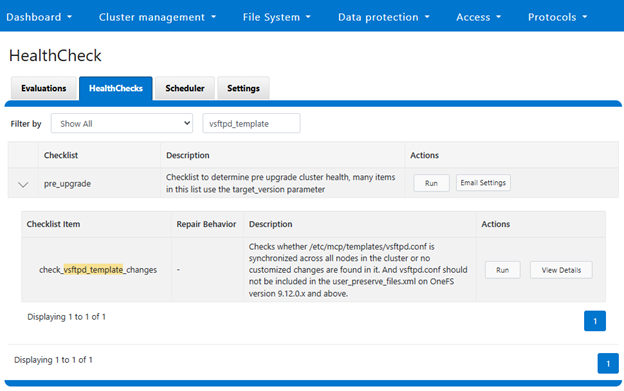
The above healthcheck can be viewed in the WebUI under Cluster management > HealthCheck > HealthChecks:
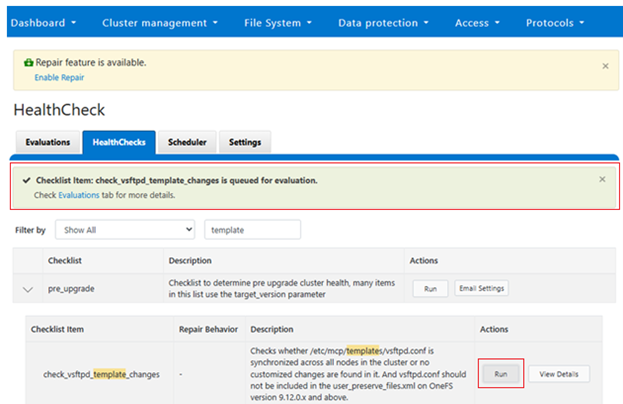
Or to run the healthcheck:
Similarly, from the CLI:
# isi healthcheck items view check_vsftpd_template_changes

              Name: check_vsftpd_template_changes

           Summary: Checks whether /etc/mcp/templates/vsftpd.conf is synchronized across all nodes in the cluster or no customized changes are found in it. And vsftpd.conf should not be

                    included in the user_preserve_files.xml on OneFS version 9.12.0.x and above.

             Scope: Per node

         Freshness: Now

        Parameters: -

       Description:   The possible outputs of this item are:

                    * OK: The /etc/mcp/templates/vsftpd.conf file is synchronized on all nodes in the cluster and no customized changes are found.

                    * WARNING: File /etc/mcp/templates/vsftpd.conf is included in the /etc/mcp/override/user_preserve_files.xml unexpectedly, The upgrade process will fail if target version is 9.12.0.x or above. Please consider to remove it from the /etc/mcp/override/user_preserve_files.xml file.

                    * CRITICAL: Please ensure /etc/mcp/templates/vsftpd.conf is synchronized and avoid modifying template files. File /etc/mcp/templates/vsftpd.conf should not be included in the /etc/mcp/override/user_preserve_files.xml if cluster version is 9.12.0.x or above. Please consider to remove it from the /etc/mcp/override/user_preserve_files.xml file.

                    * UNSUPPORTED: Unsupported OneFS version to check template conf file: /etc/mcp/templates/vsftpd.conf.

        Resolution:   Customized changes may be lost if the cluster are upgrading to 9.11.0.x or lower. Please consider preserve this file and re-apply the customized changes after upgrade. If upgrade target version is 9.12.0.x or above, consider saving customized changes in /etc/mcp/templates/vsftpd_custom.conf

Repair Description: -

    Repair enabled: No

   Repair behavior: -

       Repair risk: -

     Repair script: -

Repair script type: -
For issue investigation and troubleshooting, first review the upgrade logs, which include details of hook execution. Additionally, check the VSFTP logs for configuration generation and template comparison, as well as the project upgrade logs to identify any migration anomalies.
| Log file | Description |
| isi_upgrade_logs | For upgrade hooks logs |
| /var/log/vsftpd.log | For vsftpd log |
| /ifs/.ifsvar/upgrade/logs/: | For pre-upgrade hook log |