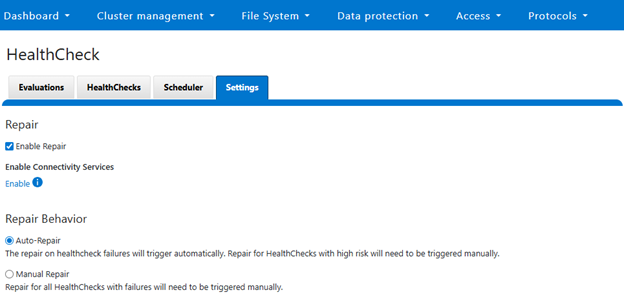
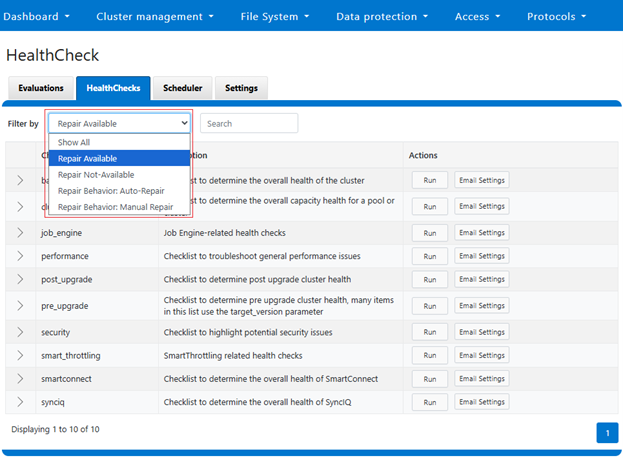
The new PowerScale Auto-Remediation feature introduced in OneFS 9.12 delivers an automated healing capability designed to improve cluster resilience and reduce operational overhead. This functionality leverages the HealthCheck framework to detect failures and initiate corrective actions without requiring manual intervention. When a known failure is identified, the system executes a predefined repair action to restore normal operation. By automating these processes, auto-remediation significantly reduces the number of incoming service requests and accelerates recovery times. Furthermore, repair actions can be delivered independently of the OneFS release cycle, enabling rapid deployment of critical fixes without waiting for a major upgrade.
Auto-remediation relies on the following key concepts:
| Component |
Description |
| Repair Action |
Repair script/executable that fixes an issue. |
| Repair Behavior |
Settings per repair action that determines if repair can run automatically or can only be invoked manually:
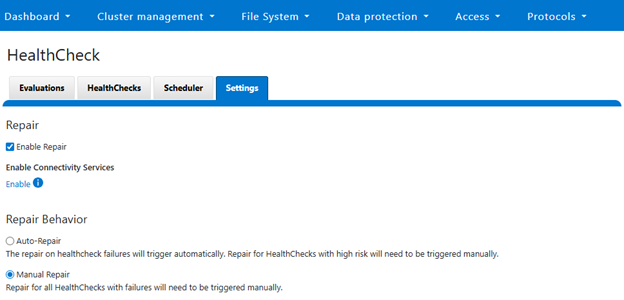
· Manual Repair: Type of repair that will always be manually initiated by user.
· Auto Repair: Type of repair that will be automatically triggered when required conditions are met and global auto repair setting is enabled. |
| Cluster Level Repair |
Repair that requires cluster level resolution and does not need node level execution. |
| Node Level Repair |
Repair that needs to run on each node that needs it. |
A ‘repair action’ refers to a script or executable that resolves a specific issue within the cluster. Each repair action is governed by ‘repair behavior’, which determines whether the action runs automatically or requires manual initiation. Repairs classified as ‘manual’ must always be triggered by the user, whereas ‘auto’ repairs execute automatically when the required conditions are met and the global auto repair setting is enabled. Repairs may also be scoped at different levels: ‘cluster-level repairs’ address issues affecting the entire cluster and do not require node-level execution, while ‘node-level repairs’ run individually on each affected node.
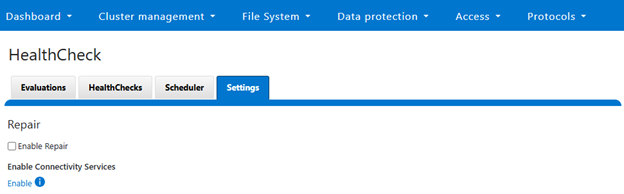
The OneFS auto-remediation feature provides administrators with flexible control over repair operations. Users can enable or disable the global auto repair setting at any time. When enabled, repairs can be triggered automatically in response to HealthCheck failures, ensuring timely resolution of issues. Administrators also retain the ability to manually initiate repairs for failed HealthChecks when necessary. The system supports both node-level and cluster-level repairs, offering comprehensive coverage for a wide range of failure scenarios. Additionally, repair actions can be updated outside the standard OneFS release cycle, allowing for rapid deployment of new fixes as they become available.
The auto-remediation architecture in OneFS 9.12 is designed to enhance system reliability by automating the detection and resolution of known failures. This architecture operates by leveraging the HealthCheck framework to identify issues within the cluster.
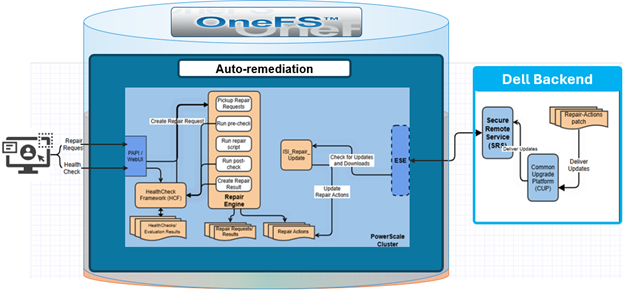
Once a failure is detected, the system executes a series of scripts and executables—referred to as repair actions—to restore normal functionality. By automating these processes, the architecture significantly reduces the number of incoming service requests, thereby improving operational efficiency and minimizing downtime.
OneFS 9.12 includes several repair actions to address common failure scenarios. The architecture is designed for continuous evolution, so additional repair actions will be incorporated both within and independent from future releases to expand coverage and improve resilience. As such, a key feature of this design is its ability to deliver repair actions outside the standard OneFS release cycle. This is achieved through updates to the HealthCheck package, allowing new repair actions to be added without waiting for a major software upgrade. As new repair actions become available, storage admins can update their cluster via Dell Connectivity Services (DTCS), ensuring timely access to the latest remediation capabilities.
The auto-remediation architecture in OneFS 9.12 consists of two primary components: the PowerScale cluster residing within the customer’s data center, and the Dell Secure Remote Services (SRS) backend. OneFS utilizes the HealthCheck framework to detect issues within the cluster. When a failure is identified, the HealthCheck framework invokes the Repair Engine, a newly introduced service responsible for applying the appropriate corrective action for the detected issue.
The repair process supports two operational modes: automatic and manual.
| Repair Mode |
Description |
| Auto |
Triggered automatically when required conditions are met and global auto repair setting is enabled. |
| Manual |
Repair will always be invoked manually by user. |
This dual-mode approach provides flexibility, allowing organizations to balance automation with administrative oversight based on their operational policies.
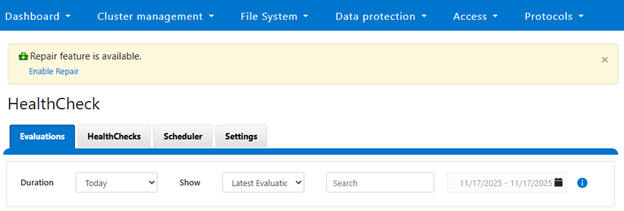
In an automatic scenario, the cluster admin initiates a HealthCheck, and if the check fails, the OneFS determines whether the conditions for auto repair are met. The Repair Engine is then called immediately to execute the corresponding repair action without user intervention. In contrast, the manual scenario requires explicit admin input. After a HealthCheck fails, OneFS waits for the administrator to either click the repair button in the WebUI or submit a repair request through the CLI. Once the request is received, the Repair Engine begins its workflow.
The Repair Engine follows a structured sequence to ensure accuracy and reliability. First, it retrieves the repair request and performs a ‘pre-check’ to validate the current state of the system. This step is particularly important for manual repairs, where the initial HealthCheck may have been executed several days earlier. If the pre-check confirms that the issue persists, the engine proceeds to execute the repair script associated with the failed HealthCheck. Each repair action is mapped one-to-one with a specific HealthCheck, ensuring precise remediation. The repair script is stored locally on the PowerScale cluster and is executed directly from that location.
After the repair script completes, the engine runs a ‘post-check’ to verify that the corrective action resolved the issue. If the post-check is successful, the system generates a repair result and stores it in the file system for future reference and reporting. This ensures transparency and provides administrators with a historical record of remediation activities.
In addition to the core repair workflow, the architecture includes an automated repair update mechanism. A scheduled ‘isi_repair_update’ process runs daily (by default) to check for new repair action packages available for the cluster. This process requires DTCS to be enabled on the cluster, and communicates with the SRS backend to retrieve updates. By decoupling repair action updates from the OneFS release cycle, the system ensures that customers can access the latest remediation capabilities without waiting for a major upgrade.
The Repair Engine’s workflow begins when a repair request is received. The trigger for this request can originate from two sources:
- Automated HealthCheck failure
- User-initiated repair action.
When the request is received, the engine first determines whether it was triggered by the HealthCheck framework (HCF) or by the user. An HCF-triggered request indicates an automatic repair scenario, while a user-triggered request corresponds to a manual repair.
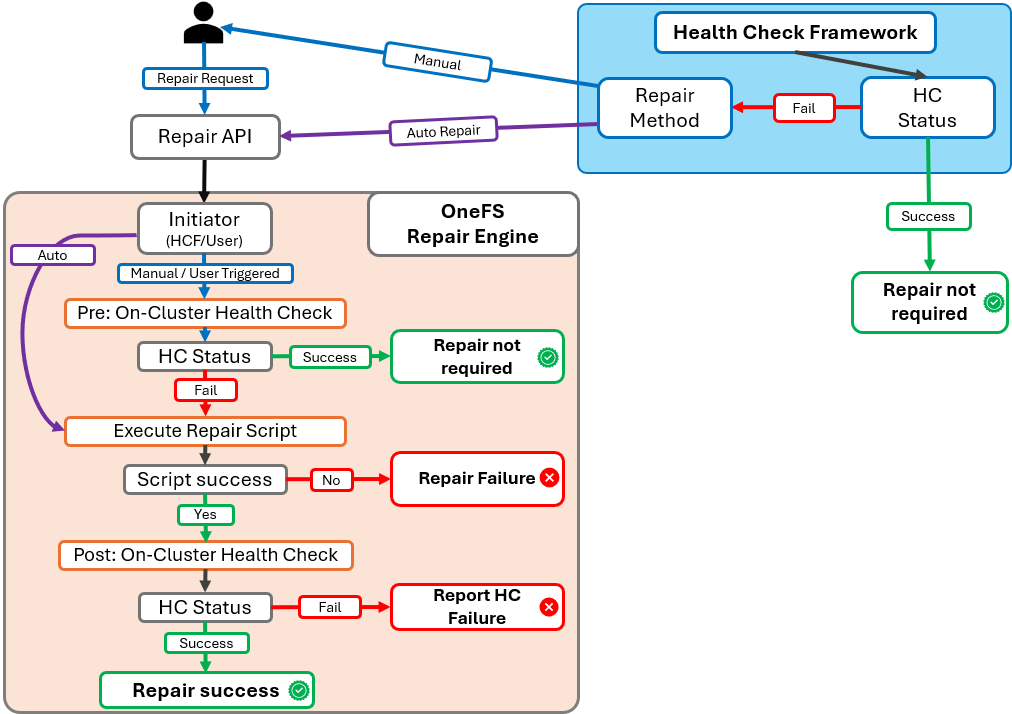
For automatic repairs, the engine bypasses the pre-check phase because the HealthCheck failure has just occurred, and the system state is already validated. In contrast, manual repairs require an additional verification step. The engine performs a pre-check to confirm that the issue detected by the original HealthCheck still exists. This step is critical because the initial HealthCheck may have been executed some time ago, and the system state could have changed.
If the pre-check confirms that the issue persists, the engine proceeds to execute the repair script associated with the failed HealthCheck. Each repair script is mapped one-to-one with a specific HealthCheck, ensuring precise remediation. Upon successful execution of the repair script, the engine performs a post-check to validate that the corrective action resolved the issue. If the post-check passes, the engine updates the repair status and records the outcome in the system, marking the repair as successful.
In the next article in this series, we’ll focus on the configuration and management of OneFS auto-remediation.