One of the object protocol enhancements introduced in OneFS 9.12 is the S3 Data Protection Mode (DPM). This feature integrates OneFS Multi-Party Authorization (MPA) with S3 data services to deliver stronger security controls, reducing risks associated with both accidental errors and malicious actions.
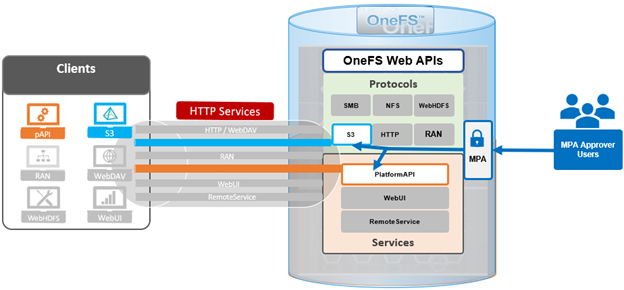
In the previous article in this series, we looked at the configuration and management of OneFS S3 Data Protection Mode from the WebUI. Now, we’ll turn our attention to the usage of DPM from the S3 API, plus some issue investigation and troubleshooting options.
In the following example, ‘dpmtest’ has been created and configured as an immutable S3 bucket, with its lock protection mode configured to ‘Bucket Lock and its retention period currently set to ‘10 days’:
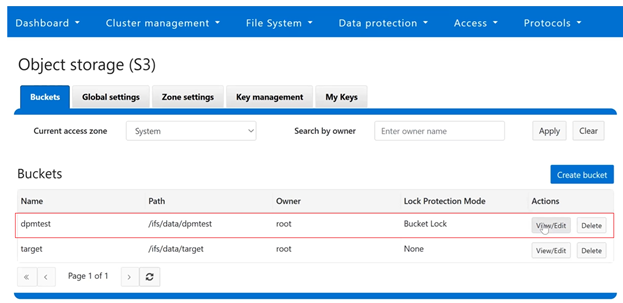
Or from the CLI:
# isi s3 buckets list

Bucket Name  Path                Owner  Object ACL Policy  Object Lock Enabled  Lock Protection Mode  Description

-------------------------------------------------------------------------------------------------

s3bucket     /ifs/data/dpmtest   root   replace            Yes                  Bucket Lock

s3buckettgt  /ifs/data/target    root   replace            No                   -

-------------------------------------------------------------------------------------------------
Using the S3 API endpoints, the following example shows the DPM auto-creation method, with a ‘PUT’ request to reconfigure the access logging for a bucket, creative named named ‘dpmtest’.
PUT  http:// {{S3_ENDPOINT}} /dpmtest/?logging

<BucketLoggingStatus>

      <LoggingEnabled>

            <TargetBucket>target2</TargetBucket>

            <TargetPrefix>newlog</TargetPrefix>

      </LoggingEnabled>

</BucketLoggingStatus>
The response includes an HTTP 403 error code notifying that the ‘modify_server_access_login_config’ action request is pending approval, plus the unique ID number of the associated MPA request:
403 Forbidden

<?xml version=”1.0” encoding=”UTF-8”?>

<Error>

      <Code>AccessDenied</Code>

      <Message>AccessDenied</Message>

      <Resource></Resource>

      <RequestId>675969624</RequestId>

      <MpaRequestId>paareqf2c58360e0ce84cd</MpaRequestId>

      <DpmMessage>Action  ‘modify_server_access_login_config’  pending approval  -  request [paareqf2c58360e0ce84cd]  submitted.</DpmMessage>
Similarly, an S3 auto-creation method to reduce retention for the ‘dpmtest’ immutable bucket from 10 days to 2 days:
PUT  http:// {{S3_ENDPOINT}} /dpmtest/?object_lock

<ObjectLockConfiguration>

      <ObjectLockEnabled>Enabled</ObjectLockEnabled>

      <Rule>

            <DefaultRetention>

                  <Mode>GOVERNANCE</Mode>

                  <days>2</Days>

            </DefaultRetention>

</Rule>

</ObjectLockConfiguration>
Followed by a similar MPA approval pending HTTP 403 error response:
403 Forbidden

<?xml version=”1.0” encoding=”UTF-8”?>

<Error>

      <Code>AccessDenied</Code>

      <Message>AccessDenied</Message>

      <Resource></Resource>

      <RequestId>675969625</RequestId>

      <MpaRequestId>paareqc00c7e920e0ce8413</MpaRequestId>

      <DpmMessage>Action  ‘reduce_immutable_bucket_retention’  pending approval  -  request [paareqc00c7e920e0ce8413]  submitted.</DpmMessage>
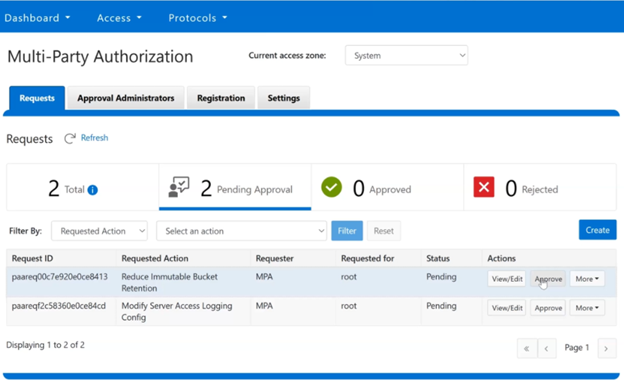
After logging in as an MPA approver, pending MPA requests can be viewed and approved via the WebUI under Access > Multi-Party Authorization > Requests, and clicking on the pertinent ‘Approve’ buttons. For example:
The approver(s) uses their preferred TOTP authenticator application to generate a security code:
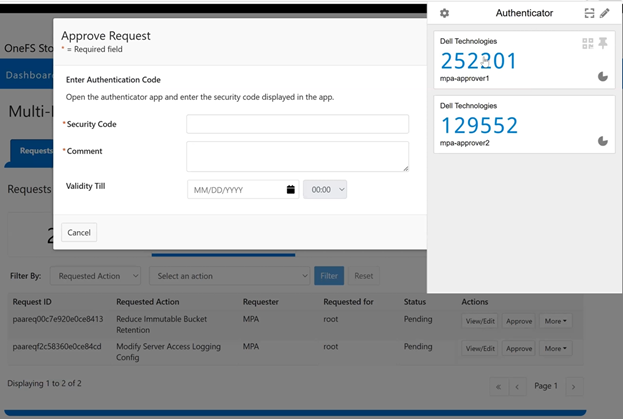
This security code is then added to the approval request, plus and additional comment and expiration time, if desired:

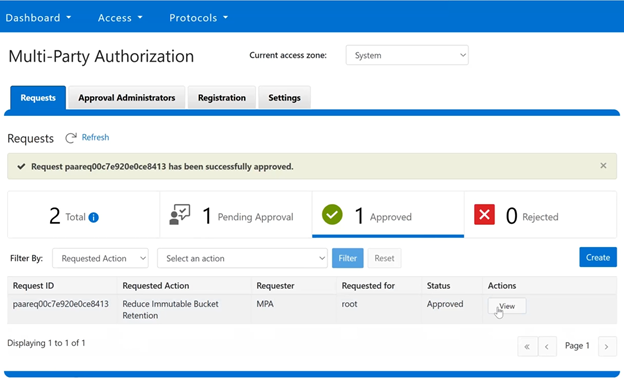
Once approved, the WebUI displays the success banner, and reports the current request status. In this case, one request approved and one still pending:
One caveat to be aware of is that MPA requests are service-sensitive. This means that, for, MPA treats the ‘S3’ and ‘platform’ services as separate requests, even if all their other fields are identical. For example:
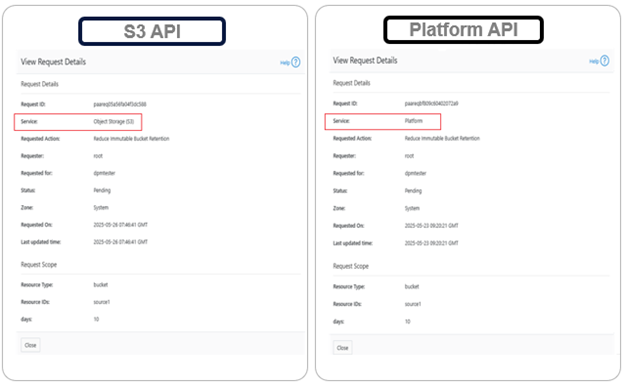
This distinction is important when users create MPA requests manually. For example, if a user creates a request and selects the ‘S3’ service, approval of that request will only allow privileged actions through the S3 API. The user will not be able to perform those actions via the platform API (or OneFS WebUI or CLI). The same applies in reverse, where requests created for platform services will only work through their respective APIs.
When investigating or troubleshooting S3 DPM issues, the preferred course of action is typically to enable and increase the verbosity of both the platform API log and S3 log. This can be done via the CLI with the following command syntax:
# isi_ilog -a papi --level debug+

# /usr/likewise/bin/lwsm set-log-level s3 - debug
Once done, check both isi_papi.log and s3.log for pertinent MPA and DPM debug messages.