Tucked among the object protocol enhancements that were introduced in OneFS 9.12 lies S3 data protection mode (DPM). DPM integrates OneFS Multi-Party Authorization (MPA) into the S3 data services to provide enhanced security control, mitigating risks caused either by mistakes or by malicious intent.
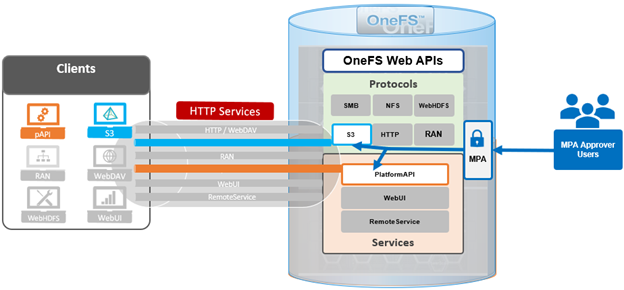
In OneFS 9.12 and later, the DPM functionality is not independently configurable. Rather, it is implicitly enabled when MPA is activated. As such, once MPA is enabled, all S3 privileged actions need to be approved before executed. The MPA activation and configuration process is covered in-depth within the following article: http://www.unstructureddatatips.com/onefs-multi-party-authorization-configuration
The two primary DPM capabilities that are introduced in OneFS 9.12 are:
| Function | Details |
| Reduction in bucket retention for an immutable bucket. | • Immutable Bucket is a bucket with lock-protection mode set to BucketLock.
• Reduction of the retention period is only supported in governance mode. |
| S3 Server Logs Support
|
• Disabling or reconfiguring the target bucket or target prefix is protected by DPM.
• All these reconfiguration operations are treated as the same MPA request and are not distinguished.
|
Reducing the retention period for an immutable bucket is only supported when the bucket is in governance mode. An immutable bucket is defined as a bucket with its lock-protection mode set to ‘BucketLock’.
For S3 server logs, disabling or reconfiguring the target bucket or target prefix is protected by DPM. All such reconfiguration operations are treated as a single MPA request and are not distinguished individually.
The MPA level should be set to the bucket protection level. This is because any modification to an object is governed by the immutable bucket’s retention period, so there is no need for separate MPA approval.
S3 DPM takes effect when both MPA and S3 service are enabled on a cluster running OneFS 9.12 or later, and the specific S3-related MPA privileged actions that are supported include:
| Service/
Component |
Action | Description |
| S3 | reduce_immutable_bucket_retention | Reduction in bucket retention for an immutable bucket. |
| S3 | modify_server_access_logging_config | Changing configuration of access logging for a bucket. |
| Platform | reduce_immutable_bucket_retention | Reduction in bucket retention for an immutable bucket. |
| Platform | modify_server_access_logging_config | Changing configuration of access logging for a bucket. |
Under the hood, the S3 DPM workflow can be represented as follows:
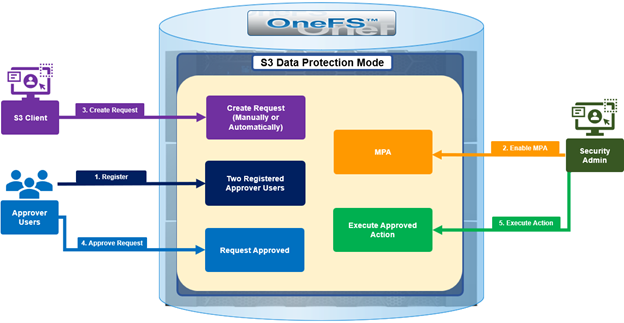
As such, the basic flow involves the following steps:
- First, the client initiates a protected action, either from posting an S3 API or platform API request, or a CLI or WebUI action.
- Next, OneFS checks whether MPA is enabled.
- If MPA is disabled, the privileged action executes directly without the protection of DPM.
- If MPA is activated, a request is auto-generated via ‘isi_mpa_common’.
- If the request is approved, the operation proceeds. If not approved or pending, the requesting user will receive a notification with an HTTP 403 response code.
DPM auto-creation privileged actions can be configured through WebUI under Protocols > Object Storage (S3) > Buckets.

When a privileged action is not approved for a s3 user. MPA requests can be created manually through editing the bucket configuration. The MPA requests will be created automatically if the internal system found there is not an approved request in system.
Users can also generate a privileged action request manually via the WebUI under Access > Multi-Party Authorization > Requests:
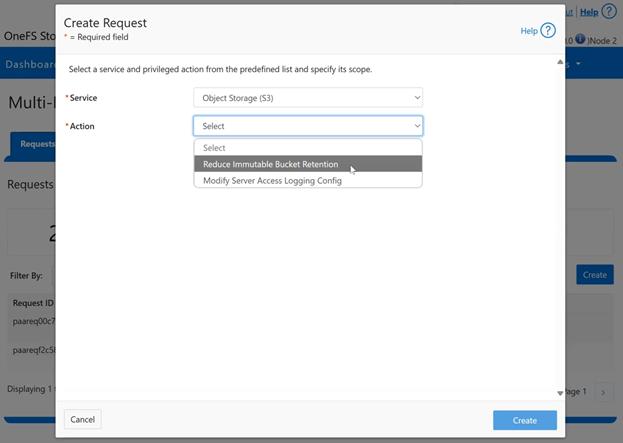
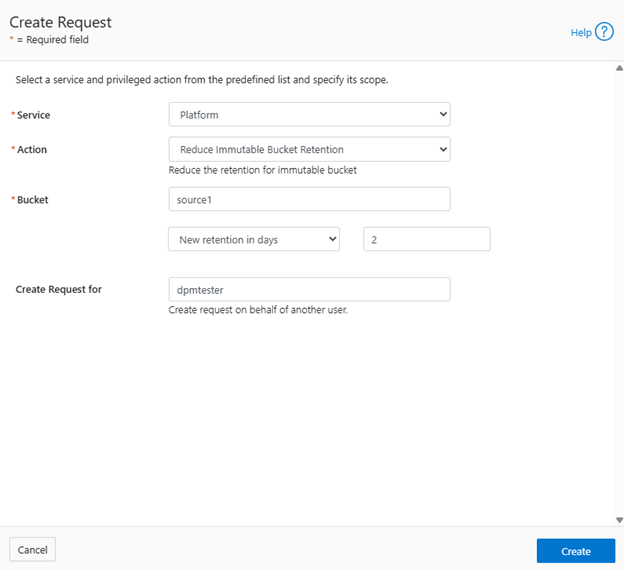
For example, to create a ‘Platform’ service request to reduce the retention for an immutable bucket to 2 days:
In the next article in this series, we’ll take a closer look at the configuration and management of S3 Data Protection Mode.