PowerScale InsightIQ provides powerful performance and health monitoring and reporting functionality, helping to maximize PowerScale cluster efficiency. This includes advanced analytics to optimize applications, correlate cluster events, and the ability to accurately forecast future storage needs.
On PowerScale, Partitioned Performance (PP) is the OneFS metrics gathering and reporting framework that provides deep insight into workload behavior and resource consumption across a cluster. By integrating comprehensive performance accounting and control directly into OneFS, PP enables cluster admins to more precise visibility into how workloads utilize system resources.
InsightIQ’s Partitioned Performance Reporting provides rich, long‑term visibility into activity at both the dataset and workload levels, unlike OneFS’ native PP telemetry, which only offers limited historical performance information, .
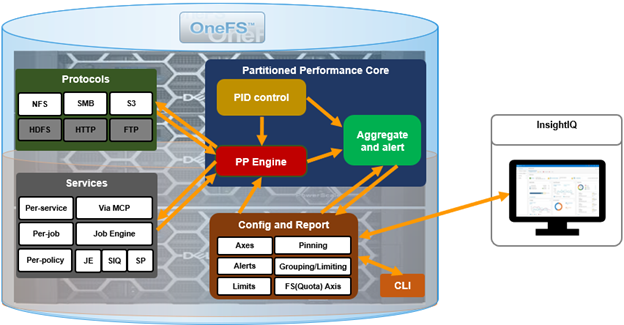
This enhanced visualization and historical context enables cluster admins to quickly identify which workloads consumed the most resources within a selected timeframe, whether measured by average utilization, peak consumption, or sustained high‑usage patterns from pinned workloads. These PP reports also serve as a powerful diagnostic tool, allowing Dell Support to more efficiently investigate, triage, and resolve customer performance issues.
As clusters scale and an increasing number of concurrent workloads place greater demand on shared resources, maintaining equitable resource distribution becomes more challenging. Partitioned Performance monitoring helps address this need by enabling administrators to define, observe, and respond to performance‑related conditions within the cluster. This enhanced visibility allows storage administrators to identify the primary consumers of system resources, making it easier to detect rogue workloads, noisy‑neighbor processes consuming excessive CPU, cache, or I/O bandwidth, or users whose activities significantly impact overall system performance.
A Partitioned Performance workload is defined by a set of identification attributes paired with its measured consumption metrics. Datasets, conversely, describe how workloads should be grouped for meaningful analysis.
| Category | Description | Example |
| Workload | A set of identification and consumption metrics representing activity from a specific user, multi-tenant access zone, protocol, or similar attribute grouping. | {username:nick, zone_name:System} consumed {cpu:1.2s, bytes_in:10K, bytes_out:20M, …} |
| Dataset | A specification describing how workloads should be aggregated based on shared identification metrics. | {username, zone_name} |
Administrators can precisely define workloads based on attributes such as:
- Directory paths
- User identities
- Client endpoints
- Access protocols
- Multi-tenant access zones
Workloads can then be analyzed through a variety of detailed performance metrics, including:
- Protocol operations
- Read and write throughput
- CPU execution time
- Latency
- L2/L3 cache hit rates
InsightIQ uses OneFS platform API endpoints to gather dataset metadata and workload statistics at defined intervals, leveraging its established time‑series ingestion and storage framework. For example:
- Retrieve workload statistics:
https://<node>:8080/platform/10/statistics/history?keys=cluster.performance.dataset.<dataset-id>
- Retrieve dataset list:
https://<node>:8080/platform/10/performance/datasets
- Full API description:
https://<node>:8080/platform/10/performance?describe&list
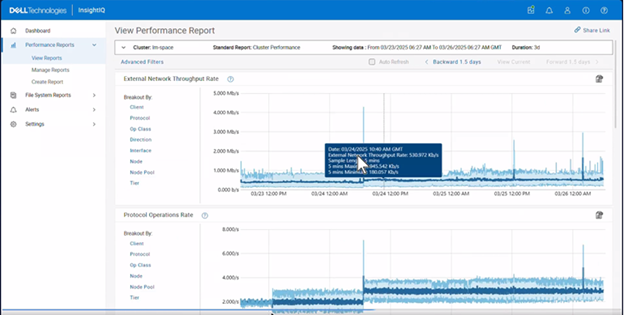
Using the ‘insightiq’ service account with a specific PP privilege configured on each monitored cluster, InsightIQ discovers the PP datasets from the monitored cluster(s), periodically polls their statistics via the PP APIs, stores the samples in the time‑series database, and then aggregates them into coarser time buckets (for example minutes, hours, or days). This allows IIQ to display per‑directory or per‑share throughput, per‑user or per‑client IOPS and bandwidth, and per‑zone resource consumption as the Partitioned Performance graphs and tables, with the report itself being a pre‑built view over these datasets that can be exported through the InsightIQ WebUI or REST API. Operationally, this means the PP‑backed views in InsightIQ are near‑real‑time (bounded by polling and aggregation), focused on isolating specific workloads within the cluster rather than just cluster‑wide aggregates, and cover the core protocols and services, plus other supported access patterns, with metrics per dataset.
InsightIQ’s TimescaleDB database permits the storage of long-term historical data via an enhanced retention strategy:

Unlike earlier InsightIQ releases, which used two data formats, with IIQ v6.0 and later telemetry, summary data is now stored in the following cascading levels, each with a different data retention period:
| Level | Sample Length | Data Retention Period |
| Raw table | Varies by metric type. Raw data sample lengths range from 30s to 5m. | 24 hours |
| 5m summary | 5 minutes | 7 days |
| 15m summary | 15 minutes | 4 weeks |
| 3h summary | 3 hours | Infinite |
Note that the actual raw sample length may vary by graph/data type – from 30 seconds for CPU % Usage data up to 5 minutes for cluster capacity metrics.
In the next article in this series, we’ll take a closer look InsightIQ Partitioned Performance Reporting configuration and use.