As part of Dell’s broader common architecture initiative, OneFS 9.13 introduces Dynamic Licensing for PowerScale, providing a unified and modernized licensing framework. Dynamic Licensing standardizes licensing mechanisms across Dell’s storage portfolio, streamlining customer interactions and reducing operational overhead through an automated, frictionless licensing experience. This approach is especially advantageous for customers operating multiple Dell Technologies products.
In OneFS 9.13, the legacy key‑based licensing model used in prior releases is replaced by Dynamic Licensing. The new system supports both direct‑connected and offline modes, allowing customers to manage license registration and entitlement reservations according to their connectivity capabilities while enabling real‑time entitlement updates and improved operational intelligence.
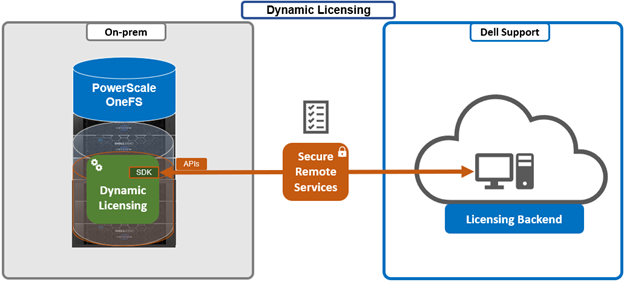
Key advantages of Dynamic Licensing include a shared licensing model across appliance, hybrid, and cloud deployments through a centralized reservation pool; near‑instant time‑to‑value with a cloud‑like experience; seamless mobility of licensed assets across clusters; reduced friction throughout the licensing lifecycle; and minimized serviceability requirements or support interventions through increased automation.
Dynamic Licensing supports two operational modes to accommodate varying customer environments:
| Licensing Mode | Requires DTCS/SRS | Details |
| Direct | Yes | PowerScale cluster running OneFS 9.13 or later is connected to the Dell Licensing backend via Dell Technologies Connectivity Service (DTCS).
· Automatic registration to the Dell backend · Real-time entitlement updates |
| Offline | No | There is no connectivity between the PowerScale cluster and the Dell Licensing Backend.
· Requires manual upload of registration file for entitlement, as with legacy OneFS versions. |
The direct, or connected, model serves customers who can establish connectivity to Dell Technologies through Dell Technologies Connectivity Services (DTCS), enabling automated entitlement updates and dynamic allocation of software assets. The Offline model supports environments without external connectivity by allowing customers to manually register PowerScale instances through registration files uploaded directly to the system.
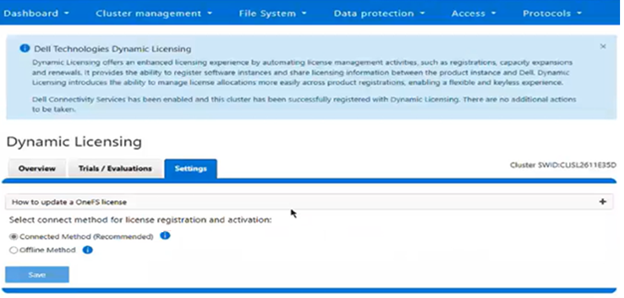
The current licensing method can be viewed from the WebUI under Cluster management > Dynamic licensing > Settings. For example, the following cluster which is still configured for ‘Offline’ licensing:
PowerScale’s integration with Dell Dynamic Licensing relies on several core operations exposed through backend API workflows. The Create Registration operation establishes a Common Software ID (cSWID) and associates the system with the appropriate reservation pool and entitlements. Update Registration adjusts licensing data in response to environmental changes such as cluster expansion, entitlement extensions, reductions, or try‑and‑buy scenarios. Get Registration performs periodic checks with the Dell Dynamic Licensing backend for entitlement updates. Send Consumption transmits usage telemetry to Dell and processes compliance notifications.
Deregistration removes a PowerScale instance from the reservation pool during cluster deprovisioning or uninstallation, ensuring proper lifecycle management of the associated components. As such, the focus of Dynamic Licensing is on delivering a frictionless licensing experience and reducing serviceability overhead and support requests through an automated, streamlined licensing workflow. Dynamic Licensing delivers the ability to activate licensing during connectivity provisioning for appliance-based deployments, and through License Activation Codes (LACs) for PowerScale for public cloud virtual instances. When a PowerScale cluster is upgraded to OneFS 9.13 or later, the system will automatically migrate to Dynamic Licensing if external connectivity is available. If the cluster becomes disconnected, XML‑based licensing continues to function as a fallback during the upgrade process.
The Dynamic Licensing framework supports entitlement expansion and reduction by registering or deregistering nodes as they are added to or removed from the cluster, and it also supports software capacity expansion through additional LACs. In the Direct model, the system automatically generates alerts whenever Dell Technologies Connectivity Services (ESE/DTCS) become unavailable. The cluster also generates alerts in cases of licensing compliance failures. Administrators have the ability to view complete license information—including expiration dates, licensed capacity, and associated entitlements—directly within the cluster interface.
The prerequisites for Dynamic Licensing require that the Direct model establishes connectivity through Dell Technologies Connectivity Services. Software‑only deployments require a License Authorization Code or valid order number for registration, while hardware‑based installations require node serial numbers to complete registration.
Architecturally, the OneFS Dynamic Licensing workflow is as follows:
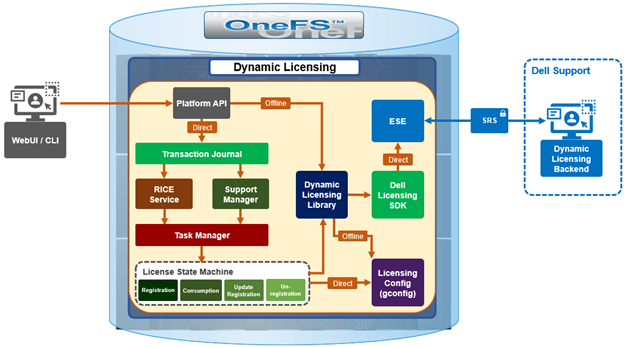
Whenever a PowerScale cluster receives a dynamic licensing request from the OneFS WebUI or CLI, it is quarterbacked by its corresponding platform API (pAPI) method. In this way, dynamic licensing tasks are added in the transaction journal. The OneFS isi_rice_d connectivity service, which is part of the secure remote services (SRS), is responsible for picking up the task and assigning it to a task manager. Internally, the licensing state machine performs the job of registration, consumption update, registration and deregistration. This licensing state machine talks to Dell’s backend dynamic licensing library which is implemented on top of the dynamic licensing SDK. If the cluster is already connected via the Dell Technologies Connectivity Services (DTCS), then all requests to the dynamic licensing backend are routed through SRS. Alternatively, if the cluster is offline then OneFS makes the pAPI call directly. Once the response is received back from the dynamic licensing back end, the data is stored in the licensing section of OneFS gconfig.
OneFS 9.13 and later support switching between Dynamic Licensing modes, allowing transitions from connected (Direct) to disconnected (Offline) operation in the initial phase. Once Direct mode is established, the administrator may switch to Offline mode, at which point OneFS relies on the licensing data stored in gconfig—populated by the Direct workflows—and begins executing the Offline Dynamic Licensing processes. In this state, the system bases alerting on the local configuration and stops transmitting consumption information to the Dynamic Licensing backend. Transitioning back from the disconnected Offline mode to the connected Direct mode is also supported; once connected, the system resumes sending consumption telemetry and generating alerts based on backend compliance responses.
When changing the licensing model, a PowerScale cluster that maintains DTCS connectivity automatically converts to Dynamic Licensing during the upgrade workflow, specifically within the post‑upgrade commit phase. Disconnected clusters continue using the legacy XML‑based licensing model and are not migrated until connectivity is enabled. If ESE connectivity is present, Dynamic Licensing is automatically activated and cannot be disabled; if ESE connectivity is absent, the system continues using XML‑based licensing. License violation reporting remains consistent with current behavior: Direct‑mode systems generate alerts based on backend compliance reports, while Offline systems rely on the most recently uploaded static license file. Dynamic Licensing becomes fully active only after all nodes in the cluster complete the upgrade commit process; until that point, key‑based licensing continues to function.
The transition path to Dynamic Licensing varies by deployment type. Greenfield environments activate Dynamic Licensing immediately upon enabling ESE connectivity, or, in the absence of connectivity, operate in Offline mode using a manually uploaded JSON license file. Brownfield clusters with existing entitlements convert them as part of the Dynamic Licensing transition. Connected systems convert automatically once ESE connectivity becomes available, while disconnected systems continue using XML‑based licensing until connectivity is established or the administrator manually selects the Offline Dynamic Licensing mode through the WebUI or CLI. If Dynamic Licensing activation fails, the system notifies the administrator while maintaining a consistent user experience. In‑product activation through LACs continues to operate as it does today, and trial activation remains local to the cluster. If registration or backend communication fails at any point, the user receives a notification.
When upgrading to the latest OneFS release, connected PowerScale clusters automatically transition to Dynamic Licensing. Newly deployed connected clusters running OneFS 9.13 or later enroll in Dynamic Licensing without additional steps. Administrators retain visibility into trial and licensing data consistent with earlier releases, including expiration details, licensed capacity, and pre‑upgrade entitlement information. However, because of Dynamic Licensing’s design, per‑feature expiration dates no longer appear in the WebUI; instead, features are labeled ‘Licensed’ or ‘Unlicensed.’ Direct‑mode compliance continues to rely on backend feature‑specific expiration data, even though the WebUI abstracts this into license state indicators. Offline systems also hide per‑feature expiration dates and base compliance solely on the static license file or the entitlement information stored locally.
Customers may still view detailed per‑feature expiration data through the Software Licensing Central (SLC) portal. For disconnected environments, the licensing workflow generally mirrors earlier OneFS versions, except for the removal of visible per‑feature expiration dates. Trial functionality continues to operate independently of Dynamic Licensing, and in‑product activation via LACs behaves the same from a user‑experience perspective, with the addition of backend telemetry when connectivity is available. When customers add nodes or capacity, Dynamic Licensing ensures that new nodes are licensed automatically, assuming the appropriate entitlements exist, maintaining the experience of current LAC‑based workflows.
Additionally, admins are notified if the cluster becomes disconnected, prompting them either to restore connectivity or manage entitlements manually through the ‘offline mode. For cloud deployments, customers must provide a LAC and related parameters to activate licensing through a two‑step sequence in which connectivity is first established without full registration, followed by registration of the cluster with the Dynamic Licensing backend using the LAC.
Alerting behavior differs between modes. In Direct mode, alerts are driven by backend compliance responses for both feature term and capacity. In Offline mode, alerts rely solely on the capacity and entitlements defined in the static registration file uploaded to the cluster.
At a high level, the new functionality in OneFS 9.13 that allows PowerScale to take advantage of Dell Dynamic Licensing includes:
| Dynamic Licensing Condition | Details |
| Offer onboarding | · Understand the License Policy & use it effectively within the product to control behaviors.
· Identify all features that are measured for consumption & configure them in the offers. |
| Product provisioning | · Perform a call to the Dynamic Licensing Product Registration APIs for Direct registration, or manually upload a file for offline registration to enroll the product with a unique cSWID. |
| Product use | · Meter the consumption of different features of the product.
· Send consumption home from each tenant. · Receive audit response & act on compliance results. |
The Dell Licensing backend provides a Common Licensing Platform (CLP) for integrating licensing into each product, enabling a standard licensing solution across the Dell portfolio. This SDK relies on third-party utilities and libraries such as cjson, curl, libxml, openssl, and xmlsec which, with the exception of cjson, are available by default in OneFS, located under /usr/local/lib/.
Product registration registers the installed product instance with Licensing to get a unique Software ID (cSWID) by passing the product’s ‘model-id’ plus additional information.
Introduced as part of Dynamic Licensing, the cSWID is a combination of the legacy iSWID and eSWID. As such, it draws benefits from both, with its ability to automatically register with Dell licensing like an iSWID as part of product registration, and also link to commerce entitlements like an eSWID.
The type of identifier used for product registration depends on the cluster type:
| Cluster Type | Identifier | Details |
| Hardware appliance | Service tag | For Hardware Clusters, the Service Tag is used as the identifier and is automatically detected, with a Model ID of POWERSCALE_HW. |
| Software defined (cloud) | LAC / Order Number | Software Clusters rely on the LAC (License Authorization Code) or Order Number as the identifier, which requires the customer to provide the LAC and have a Model ID of POWERSCALE_VE. |
The product registration process validates whether the customer has existing entitlements against the identifiers provided (i.e., Service Tag, Order Number, LAC) and then attempt to create a Reservation between the product’s Software ID and the entitlements related to the identifiers provided.
As mentioned previously, there are two product registration modes available: Direct and Offline. Each mode offers a distinct approach to registering products, catering to different customer needs and environments. Product registration is facilitated using the licensing library built on top of the Dynamic Licensing SDK.
With Direct mode, product registration occurs automatically through ESE as soon as the customer enables connectivity. In contrast, Offline Mode requires the customer to manually accesses the Dell Software Licensing Central (SLC) portal, select the product line, enter the LAC (TLA Agreement ID), and provide additional information (e.g., late-binding HW serial, node locking, etc.), then click ‘Register’ to obtain a file. The customer must upload the Dynamic Licensing file to activate the license on the PowerScale cluster, making this mode suitable for dark sites, and other environments with limited internet connectivity.
Upon completing the registration process, the registration response, including the entitled state, is stored in the gconfig under the licensing tree, along with the licensing topology and other pertinent info.
# isi_gconfig -t licensing
[root] {version:1}
(empty dir licensing.features)
licensing.swid (char*) = <null>
ignore_signature (bool) = true
last_upgrade_commit_epoch (int64) = -1
# Additional Attributes
license_topology = "direct"
license_technology = "dynamic"
The product registration process migrates existing key-based installations to dynamic licensing for customers who wish to upgrade to the latest version of PowerScale. By leveraging the registration process, customers can seamlessly transition from traditional key-based licensing to the more flexible and scalable dynamic licensing model.
A Transformational License Agreement (TLA) is an enterprise-level licensing model that allows customers to purchase large volumes of capacity for an extended term, typically five years. Under a TLA, customers receive software-only entitlements that are not associated with specific hardware at the time of purchase. Instead, hardware binding occurs later in the process during license registration and activation, when Service Tags are applied. A single registration request can support multiple TLA License Activation Codes (LACs).
TLA orders are characterized by their software-only nature, meaning entitlements are not tied to particular systems at the point of sale. Additionally, the late-binding model ensures that license entitlements are associated with hardware only during the registration and activation phase rather than at purchase time.
To register a TLA order, specific information is required, including the TLA License Activation Code, which uniquely identifies the license for activation purposes, and the relevant Service Tags, which are used to bind the entitlements to the appropriate hardware during the late-binding process.
The Dynamic Licensing system periodically conducts a License Assessment to compare a customer’s usage of Dell products with their allocated entitlements. If the assessment reveals any Compliance Failures, it will trigger an event/alert. Once registered with the Dell Dynamic Licensing backend, the PowerScale cluster transmits consumption data to the Dell backend at regular intervals. Specifically:
| Reporting type | Frequency |
| Collect | Once per hour |
| Hardware cluster | Once per day |
| Software-defined | Once per hour |
Consumption data is collected hourly and transmitted to the Dell Dynamic Licensing backend on a daily basis (for hardware clusters). For capacity-based features associated with a tier, the reported used capacity represents the aggregate of all nodes linked to that tier. In contrast, for features licensed on a base-only model, such as CloudPools, OneFS hardening, and HDFS, the quantity reported is the actual number of nodes. The license consumption call response provides the current state of the reservation pool, including existing entitlements. PowerScale processes compliance events based on consumption responses from Dynamic Licensing (DL), generating alerts for licensing violations and clearing them once violations are resolved. After processing compliance results, PowerScale acknowledges the audit back to the Dynamic Licensing APIs, completing the audit cycle.
Cluster that are running in Offline mode have their license assessment conducted against a customer-uploaded JSON license file. The License Assessment is evaluated based on capacity usage, not on a term basis.
So, as we’ve seen, Dynamic Licensing in OneFS 9.13 replaces the legacy, key‑based licensing model used in prior releases. In the next article in this series, we’ll turn our attention to its configuration and use.